At Frappe, you'll find teams and individual contributors accross different functions.
Most often the Sales team works closely with Delivery, Partners, Legal & Marketing teams and at times help from other teams like Product, DevOps & Frappe Cloud is also required.
This is how the sales process looks like from a bird's eye view
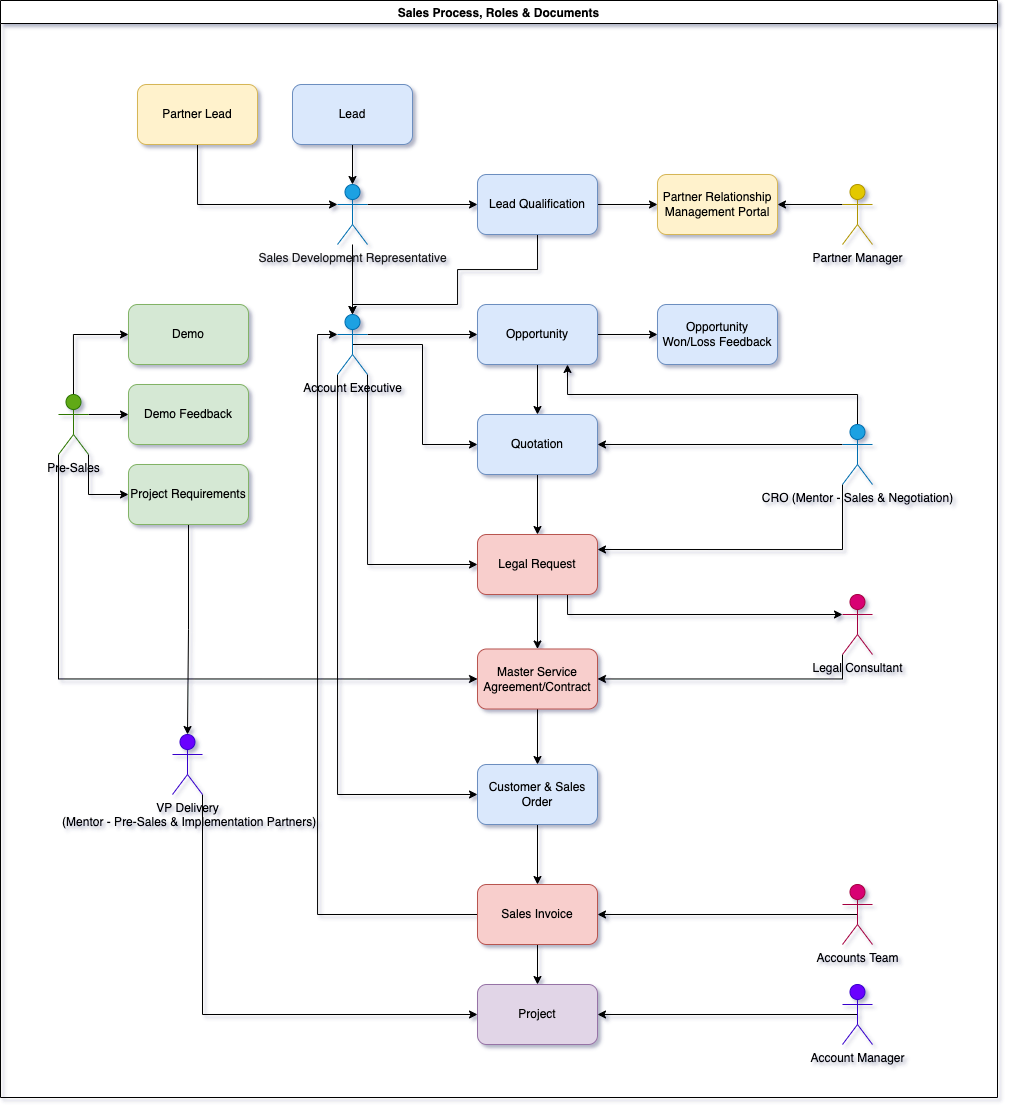 Note: This just for reference.
Lead Sources
- Contact us page
- Trial sign-up from erpnext.com
- Frappe Cloud site (With partner consent checked)
- Incoming calls via Exotel
- Reference/Outbound
Once the lead is created, it automatically gets assigned to a sales person based on the assignment rule. We follow a series of steps to ensure that the lead is properly qualified and the whole journey is tracked in our CRM.
1 Qualification call (QFC)
QFC ensures the leads are qualified before passing to AE.
- As soon as the lead is assigned, sales person schedules the qualification call with the prospect.
- All the activities (Phone Call, Email, QFC, DC, Telecon, WhatsApp) should be tracked in the Follow up table.
- During the QFC, sales person has to capture following details of lead and Lead’s company:
- Budget , Authority, Need and Timeline
- The current process and operations, key decision making factors, pain points & its impact, and decision process.
- Once the QFC is complete, sales person has to update the status as “Qualified”, “Inprocess” or “Unqualified”.
- If the lead is “Qualified”, DC is scheduled with the AE and calendar invite is shared for the same.
- If the lead is “Unqualified", lead is either closed or passed to a partner.
- “In process” lead qualification needs follow up from to ensure all open points are closed and eventually marked as qualified or unqualified.
2 Discovery Call(DC)
During the discovery call, AE dives deeper into their use-cases and captures below details:
- SDR has to ensure that a proper download is given to the AE before joining the DC to avoid repetition of the questions.
- AE has to validate the information filled by SDR in the QFC document.
- Based on the discussion during DC, AE will accept, reject or pass for re-qualification.
- If the DC is “Accepted”, AE will schedule a demo and share the calendar invite for the same.
- If the DC is “Rejected”, AE will close the lead with the reason for rejection.
If a sales person is handeling the account end-to-end, discovery call step can be skipped.
3 Demonstration
- AE/Technical Sales Counsultant will prepare a demo instance based on the priorities identified during the DC.
- Demo record has to be created for all the demos in Demo DocType. Also, demo activity should be added to the lead document in the Follow-up table.
- Post demonstration, webform link is shared with the prospect to get feedback on the demonstration which will be saved as a Post Demo feedback document.
- If the opportunity is marked as "Closed - Lost" demonstration account (if created) has to be deleted or the data should be earased.
4 Project Requirement/Pricing and Negotiation
- Sales person creates a Project Requirements sheet as per the modules required by the prospect.
- Since we are only doing vanilla onboarding, Project Requirements will mostly contain standard scope of work.
- Project requirement document will be used to get a ballpark figure on the hours required to do the onboarding and accordingly the Onboarding cost will be identified.
5 Opportunity
After the demonstration, sales person has to convert the lead into an Opportunity.
- Details like deal value, expected closing date, expected go-live date, stage has to be updated
- Once the opportunity moves to the Proposal stage, Quotation has to be created and shared with the prospect.
- Quotation has to be created against the Opportunity, following details has to be filled in the quotation:
- Once the prospect agrees on the pricing and payment terms, sales person needs to connect with the legal team to prepare the Master Service Agreement.
- Once the agreement is signed and payment is received, the stage of the opportunity should be changed to Converted and Closed-won.
- If the Opportunity is lost, the satus should be updated to Lost and Closed-lost with the reason.
6 Contract
Signed contract from both the parties (Frappe and Potential Prospect) will be shared with the legal team and captured under the Contract doctype.
7 Creation of Customer and Sales Order
- Once a Signed Contract is received, sales person has to create a Customer with all the required details.
- Sales Order will be created against that Customer with the details of the payment terms.
8 Handover to implementation team
- Once the signed Contract is received from the customer, sales person has to handover the project and update all the details in the Handover Checklist.
- After Project Requirement handover, Sales Person schedules a kickoff meeting between the customer and Frappe AM.
- AE introduces both the parties, gives a brief overview of the customer business and ensures all the customer information has been passed to the assigned AM.