1. Purpose
To ensure that Frappe Partners follow a structured, consistent, and measurable sales process that maximizes conversion, and improves customer experience. This document outlines the required tools, training, setup, and procedures to manage leads and opportunities effectively, create accurate quotations and contracts, and ensure smooth handovers to implementation/
2. Tools required
- Frappe CRM
- Price Estimator Tool
- Frappe Insights
3. Training
Sales team training
- The sales team member should be trained on the procedure, and systems within 2 months of their joining.
- The procedure training includes the end to end sales process from qualification to conversion to handover.
- Systems training includes CRM training (SLA, lead, opportunity, activity tracking, disussion notes, etc), important metrics and any other systems/software being used.
4. Setup requirements
SLA
- Configure SLA for lead response time in the CRM.
- All leads should be responded within 6-8 business hours.
Lead capturing
- Set-up a contact-us page on the website to capture the leads automatically in CRM. Leads from all the sources must be created in the CRM and should be assigned to a clear owner.
- Mandatory lead details to be captured include name, phone number, email address, company name, and lead source.
- SLA should be automatically applied to the lead upon creation to track response time and adherence.
Post demo feedback & post sales feedback
- Set-up feedback form in your CRM
- Post-demo feedback (taken during demo call).
- Rate this demo (Out of 5 stars)
- Tell us more
- Post-sale feedback (won or lost deals).
- Review and report on feedback monthly/quarterly
- Post-demo feedback (taken during demo call).
5. Sales procedure
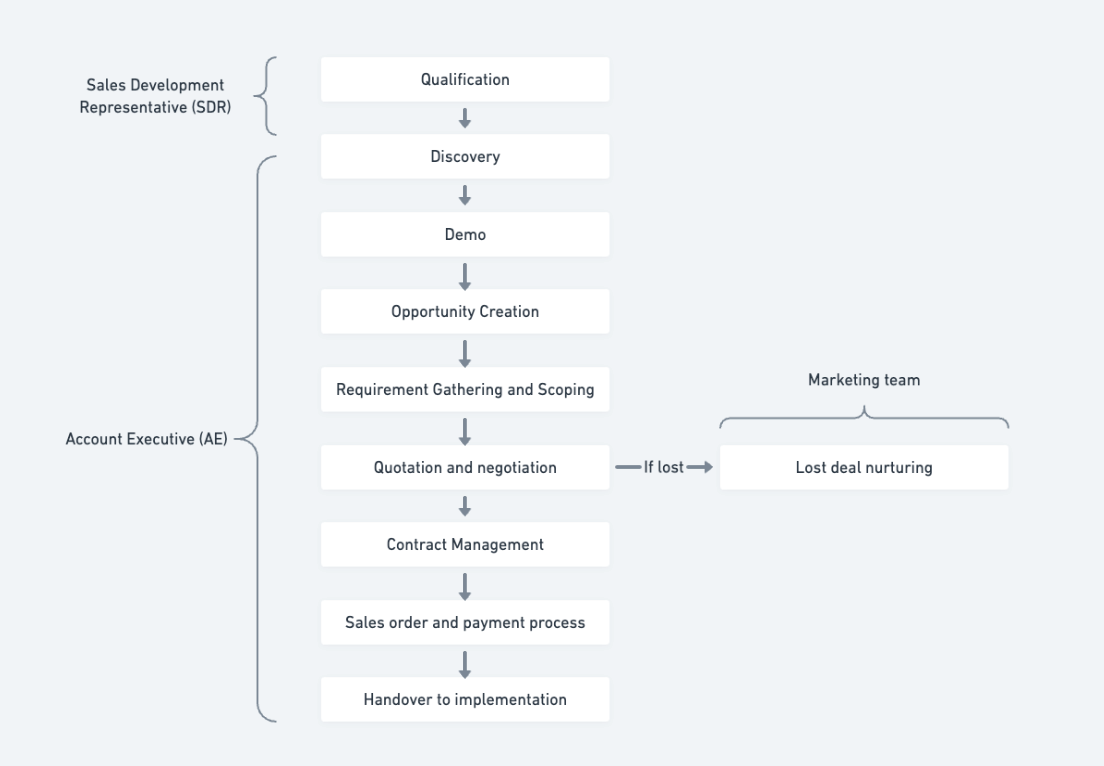
Lead qualification (Sales Development Representative)
- Lead qualification criteria
- Use BANT/MEDDIC qualification
- Define each criterion clearly:
- Budget: Confirm budget
- Authority: Identify the right decision-maker
- Need: Validate the pain points
- Timeline: Confirm urgency
- Lead qualification notes must be documented in the CRM.
Discovery call (Account Executive)
- Checklist of items to confirm: current process, decision-making, pain points.
- Qualification validation: set up the expectations for the demo.
Demo
- Demo process
- Structured demonstration plan based on the prospect’s use case and sample data.
- Feedback form to be shared post-demo (automated or manual).
Opportunity creation
- A Lead should be converted into an Opportunity/Deal once it is qualified and a 1st round of demo is done.
- Opportunity fields to track: expected closing, contract type, deal value.
Requirement gathering & scoping
- Detailed requirement gathering should be done before creating a quotation.
- Use the Price Estimator Tool during this stage to help with scoping and effort estimation.
- Capture all customization requirements clearly in the section defined for customization.
- For larger or complex projects, it is recommended to conduct a Proof of Concept (POC).
- The scope of work should be finalized and agreed upon before signing the contract.
- Any change in scope after the contract is signed should be handled through the Change Request procedure defined in the Implementation Procedure section.
Quotation & Negotiation
- Quotation
- Use the Price Estimator Tool as a reference for creating the quotation. Attach the scope document to the Quotation for internal reference.
- The quotation should include selected support plans, consulting/development hours, and contract terms.
- Link the quotation with the Project Requirements / BRD / Scope of Work sheet.
Contract management
- Standardized contract process with legal review.
- Capture renewal dates.
Sales order & Payment process
- Customer creation upon contract signing.
- Sales order should include payment terms and a linked quotation.
Handover to implementation
- Use a formal Handover Checklist with project details.
- Schedule a kickoff call along with the Project / Account Manager and a Project Champiom from the customer.
- Document the business context and requirements in the handover summary.
6. Lost deal nurturing
- Define a strategy for lost/unresponsive leads:
- Add them to monthly newsletters
- Share product update emails
- Add them to webinar invites
- Send them success stories
Last updated 5 months ago
Was this helpful?