Implementation Procedure
1. Purpose
To establish a consistent, scalable, and high-quality implementation process for ERPNext/Frappe projects delivered by Frappe partners. This also ensures smooth handover, predictable timelines, transparent communication, and a great customer experience.
2. Tools required
- ERPNext Projects module or Project Management Template (Spreadsheet shared by Frappe)
- Frappe Insights
3. Roles & responsibilities
Account Manager (AM) / Project Manager (PM)
- Owns the project from post-sales handover to go-live.
- Ensures implementation is executed as per customer goals.
- Schedules weekly stand-up calls and monthly/bi-weekly steering committee reviews.
- Tracks tasks, timelines, timesheets, delays, and escalations.
- Maintains all project documentation (sprint sheet, tasks, timesheets, feedback).
- Communicates delays or scope changes to all stakeholders.
- Facilitates UAT, manages go-live plan, and coordinates final handover to Support.
Project consultant
- Drives day-to-day implementation.
- Handles requirement gathering, process mapping, data migration, UAT support, and training.
- Works closely with customer’s project champion for reviews and sign-offs.
Project developer
- Works on customisations and integrations as per signed-off scope only.
- Hands over completed features to Consultant for internal testing and customer testing.
4. Implementation process
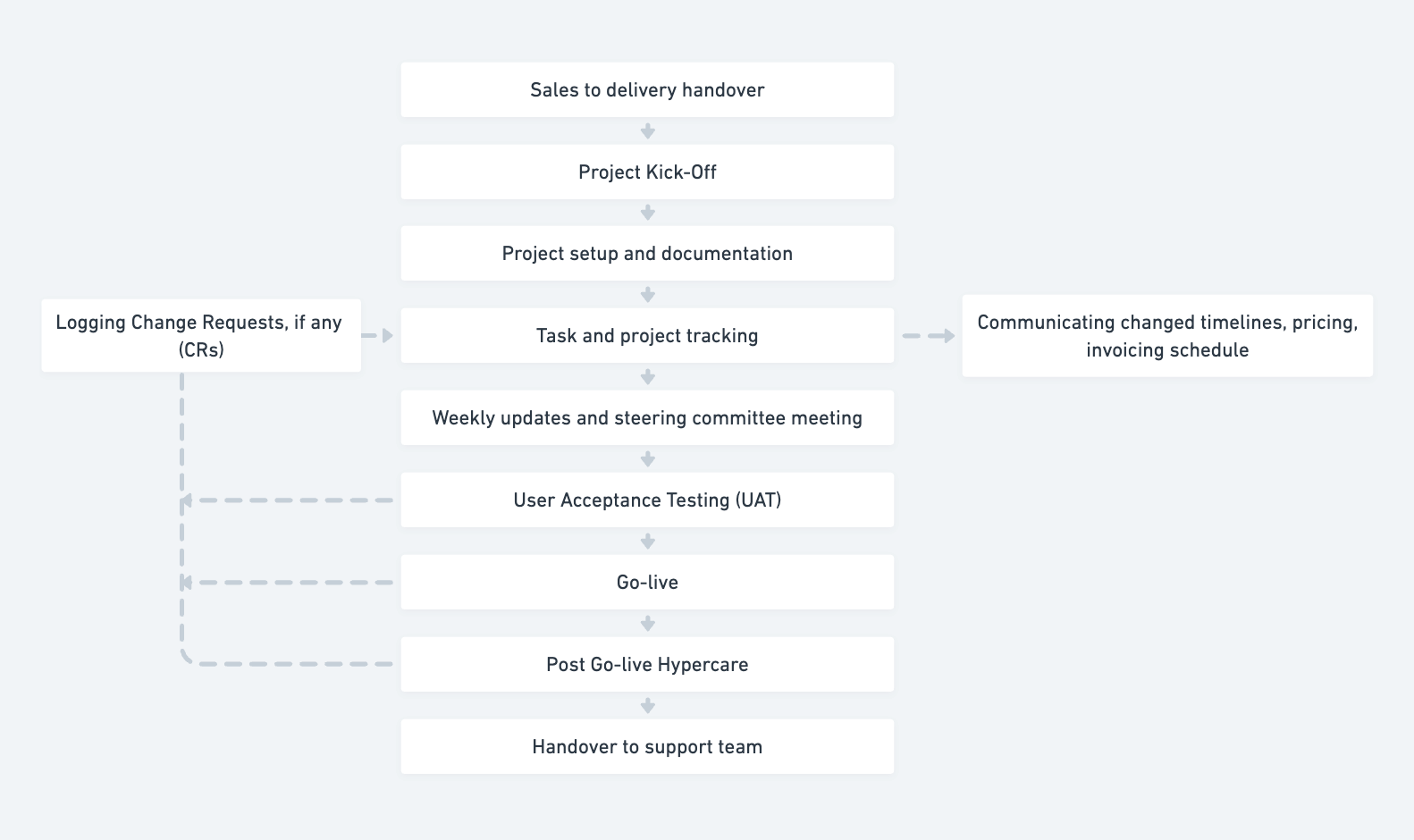
4.1 Project kick-Off
- Project Manager conducts a formal kick-off call with customer stakeholders.
- Roles, responsibilities, communication cadence, and escalation paths are clearly defined.
- Customer appoints a Project Champion (PC) as their single point of contact.
- Sprint sheet, task list, and project folder are shared within 1 week of kick-off.
4.2 Project setup & documentation
Project Manager (PM):
- Creates a Frappe Cloud staging instance and sets up required user accounts.
- Initializes the project with defined tasks, timelines, milestones, and sprint structure.
- Sets up a dedicated, well-organized folder for all project artifacts (documents, configurations, meeting notes, etc.).
- Ensures customer visibility into project progress through:
- Sprint sheets
- Project dashboards
- Weekly status update notifications
4.3 Task & project tracking
- Use the Project Planning Template for managing the project.
- Tasks are broken into smaller deliverables with owners and deadlines.
- Custom development tasks tracked separately through Delivery Requests (DRs).
- Timesheets/progress are logged weekly; consumption shared with customer for transparency.
- Delays are monitored, root causes logged, and mitigation planned.
4.4 Weekly cadence & steering committee reviews
PM shares a weekly update email covering:
- Completed tasks
- Pending tasks
- Risks and blockers
- Customer actions required
Weekly/Bi-weekly steering committee meetings
- For medium/large projects, a steering committee includes senior stakeholders from customer and Partner.
- Agenda includes:
- Progress against timeline
- Risks and escalations
- Scope alignment
- High-impact decisions and approvals
4.5 User acceptance testing (UAT)
- PM & PC agree on UAT scenarios.
- Customer validates staging environment and confirms sign-off before go-live.
- Any change requests go through approval and updated timelines.
(Add proof to the Project)
4.6 Go-live preparation & execution
- A detailed go-live plan is shared with timelines, responsibilities, and rollback plan.
- Customer switches from legacy system to ERPNext in a controlled manner.
- Once stable, customer provides go-live sign-off.
4.7 Post go-live (Hypercare)
- PM prepares a hypercare plan for the first month to handle increased support needs.
(Post go-live update is CR. Weekly updates should have open and completed CR.) - Customer feedback is actively captured throughout this phase.
- After hypercare, the project is formally handed over to Support.
5. Change requests
- All Change Requests (CRs) must be logged in the system.
- Customer sign-off is mandatory for any CR.
- Updated invoice schedule must be shared for approved CRs.
- Project timelines must be revised and communicated accordingly.
- All the above mentioned points must be auditable.
6. Handover to support team
- Internal handover call is scheduled between Implementation and Support team.
- A full overview of the project is shared with the Support team.
- Handover call is logged into the system with required details like date, notes, etc.
- Customer is informed via email/phone that the project is now under Support.
- Customers are guided to raise issues through the Support app.
- For critical projects, regular support review calls may be conducted.
Last updated 5 months ago
Was this helpful?