


May is usually the hottest month of the year in India, but this May at Frappe felt like hottest discussion month than usual.
As Frappe is stepping into the Agentic World, this was filled with brainstorming, experiments, and conversations about how we can adapt, ship faster, and make the most of new opportunities
While all of this was happening, our engineers continued shipping features and improvements across the products
Here are the updates from May…
Table of Contents

Background Task Queues
The Framework now includes a built-in way to give users real-time visibility into long-running background jobs. Instead of firing off tasks into the void, you can enqueue tasks that users can track, cancel, and retry directly from a live sidebar UI.
It also comes packed with developer-friendly configurations:
Custom Progress Tracking
- Disable the progress bar for black-box tasks (
show_progress_bar=False) - Rely entirely on custom stage text updates
- Disable the progress bar for black-box tasks (
Safe Cancellations & Retries
- Prevent mid-way cancellations for sensitive operations like salary processing using (
allow_user_cancellation=False) - Restrict retries using (
allow_user_retry=False)
- Prevent mid-way cancellations for sensitive operations like salary processing using (
Internal Auto-Retries
- Automatically retry tasks that fail due to known network hiccups or race conditions
- Configure retry behavior using (
retry_on,max_retries)
Site-Aware Callbacks
on_successandon_failurecallbacks run within the site context- Methods like
frappe.get_docwork seamlessly
Easy File Attachments
- Attach generated files such as CSVs or PDFs directly to the task document
- Alternatively, attach files to a linked reference document

Configure Doctype Global Search Fields from Settings (#39003)
Previously, the framework required opening each DocType (or Customize Form) and manually toggling “In Global Search” for every field. While this worked for one-off changes, it became tedious when you were already in Global Search Settings and simply wanted to choose which DocTypes should be searchable and which fields should be indexed.
Now, you can configure everything directly from Global Search Settings. For each DocType, click Configure, select the searchable fields through an intuitive dialog (including whether the document name should be searchable), and save.
The framework automatically applies the same flags used by Customize Form and rebuilds the search index in the background.
Improved Global Search (#39181)
Desk global search used to feel cramped: matches were hard to scan, and it was not easy to see which fields actually matched your query. Additionally, Cmd/Ctrl + G opened the Awesome Bar, meaning search and quick navigation shared the same space.
Global search now has its own dedicated dialog and improved layout. Results are displayed in a grid with searchable fields clearly visible, query highlighting, and filters to help narrow results by DocType.
You can now open Global Search with Cmd/Ctrl + G, while Cmd/Ctrl + K remains dedicated to the Awesome Bar (menus, actions, and recent items). Each dialog also includes a shortcut hint, making the distinction easy to discover.


Over Order Allowance Setting
A new Over Order Allowance (%) setting has been added to Buying Settings. It defines the maximum percentage by which the ordered quantity on a Purchase Order can exceed the quantity requested on the originating Material Request. For example, if the Material Request is for 100 units and the allowance is set to 10%, the Purchase Order can be placed for up to 110 units.
Previously, this was controlled by the Over Delivery/Receipt Allowance setting, which is intended for validating over-receipt or over-delivery against a Purchase or Sales Order. Since these are distinct business controls, the ordering tolerance now has its own dedicated setting.
Pending Quantity in Job Card
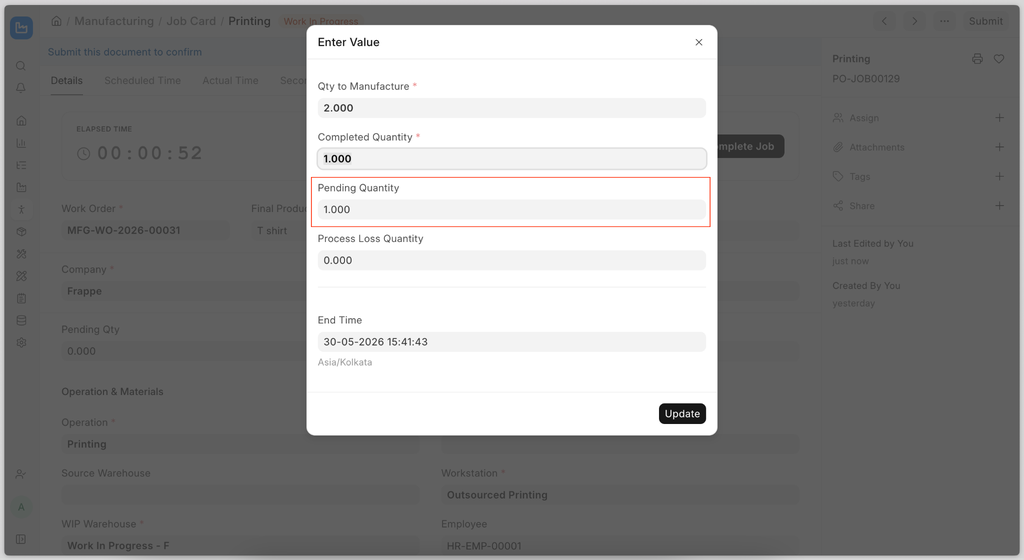
While completing a Job Card, the system always considered the remaining quantity as Process Loss quantity, due to which the user was unable to submit the Job Card.
To resolve this issue, a Pending Quantity field has been added to the Job Card. The system will now calculate the Process Loss quantity only when the Pending Quantity is zero. This feature available in version 16.
Better Placement of Timer and Action Buttons in Job Card
Improve the positioning of the timer and action buttons in the Job Card interface to enhance usability and workflow efficiency.
.png)

Refactor Stock Entry File
The stock_entry.py file has grown to more than 4,000 lines of code, making it difficult to read, understand, and maintain. To improve maintainability, the stock_entry.py file has been split into multiple files based on Stock Entry Types. This change has been merged into the develop branch and will be available in Version 17. The directory structure is as follows
stock/
├── stock_entry.py
└── stock_entry_handler/
    ├── __init__.py
    ├── base.py
    ├── disassemble.py
    ├── manufacturing.py
    ├── material_receipt_issue.py
    ├── material_transfer.py
    ├── serial_batch.py
    └── subcontracting.py

Stock Reservation for Product Bundle Items
Stock Reservation now supports reserving items from Product Bundles. The functionality works the same as standard Stock Reservation in Sales Order, except now items inside the Product Bundle table will also be reserved if the “Reserve Stock” button is checked in the Sales Order.
Deliver Partial Quantity in Drop Shipping
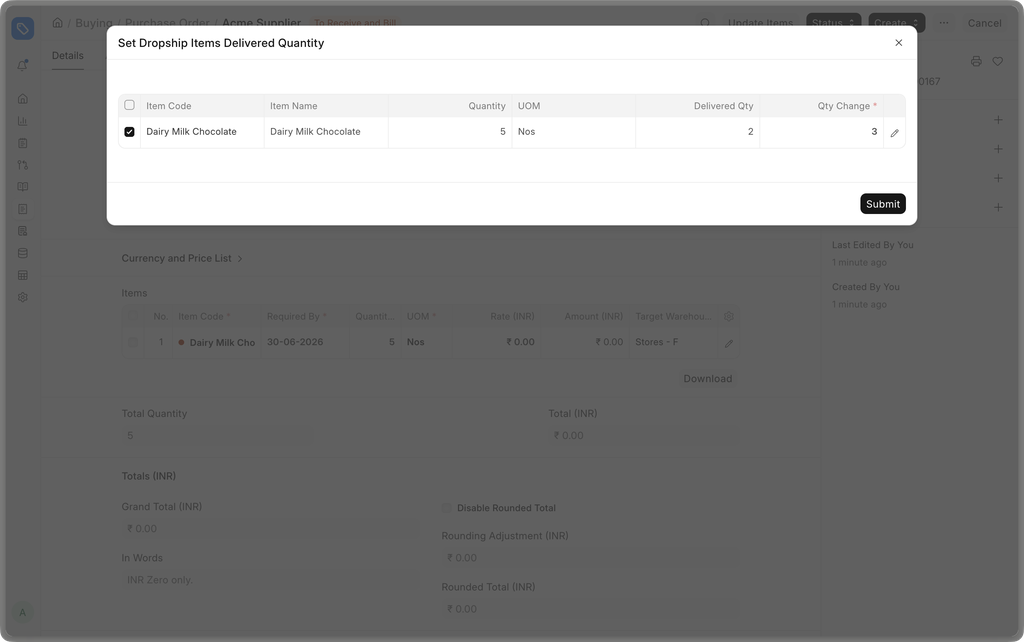
Previously, if you submitted a Purchase Order created from a dropshipped Sales Order, the entire quantity of the Sales Order would be marked as Delivered, causing users to track exactly how much did the supplier deliver to the customer manually and then mark the entire Sales Order as Delivered.
A new dialog is now added when marking delivery in the Purchase Order which will prompt the user for the actual quantity delivered by the Supplier to the Customer, eliminating the need to track deliveries outside of ERPNext.
Party Groups in Party Specific Item
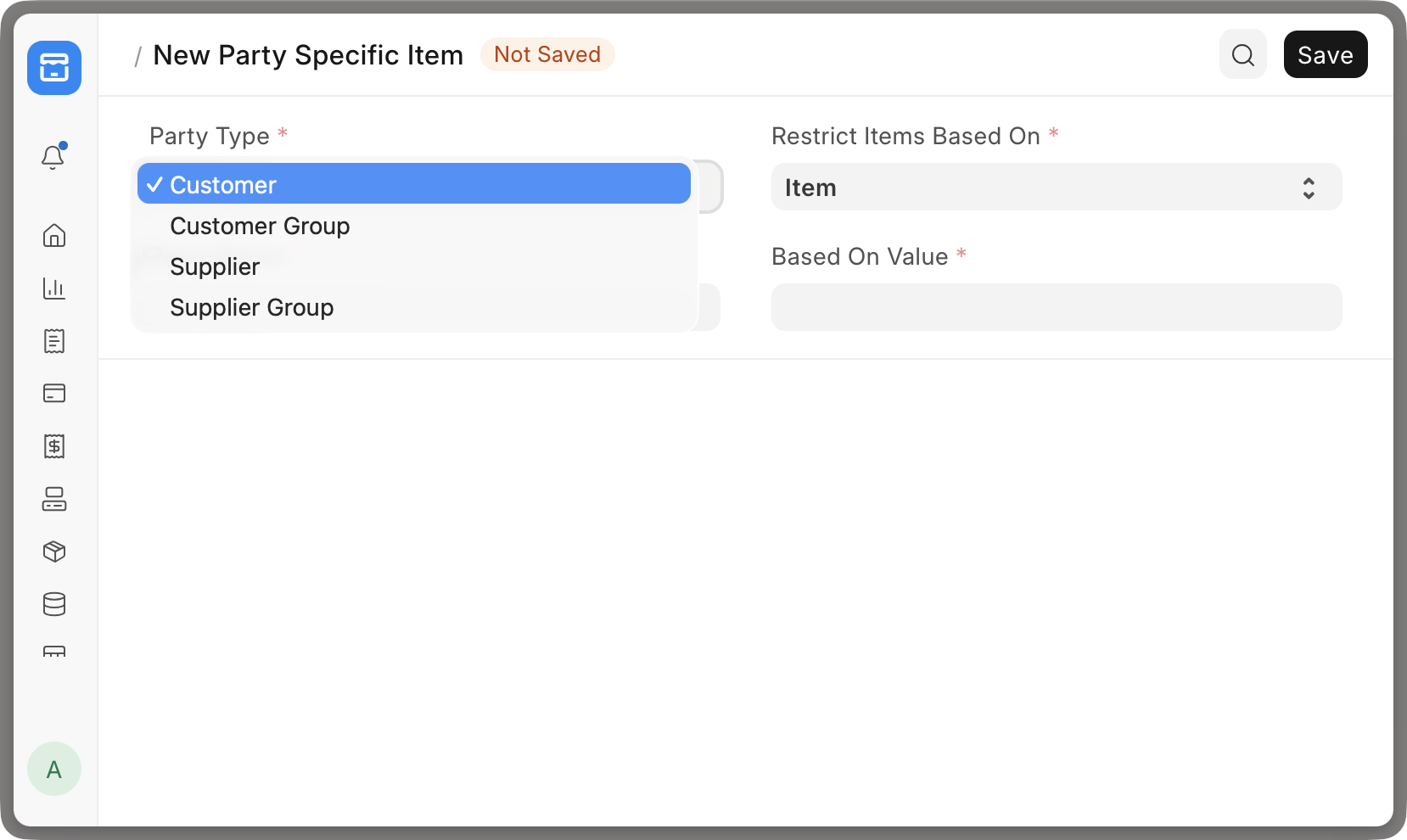
The Party Specific Item DocType now has support for Party Groups instead of just specific Customers or Suppliers, which eliminates the need for creating multiple Party Specific Items for each Party in a Party Group.
Stock Ageing Report Refactor
The Stock Ageing report did not honor batch-wise valuation for batched items, causing the bucket values to not match with values in the Stock Ledger or Stock Balance report. This has now been fixed alongside several bug fixes and performance improvements.


Employee CTC Break-up Report
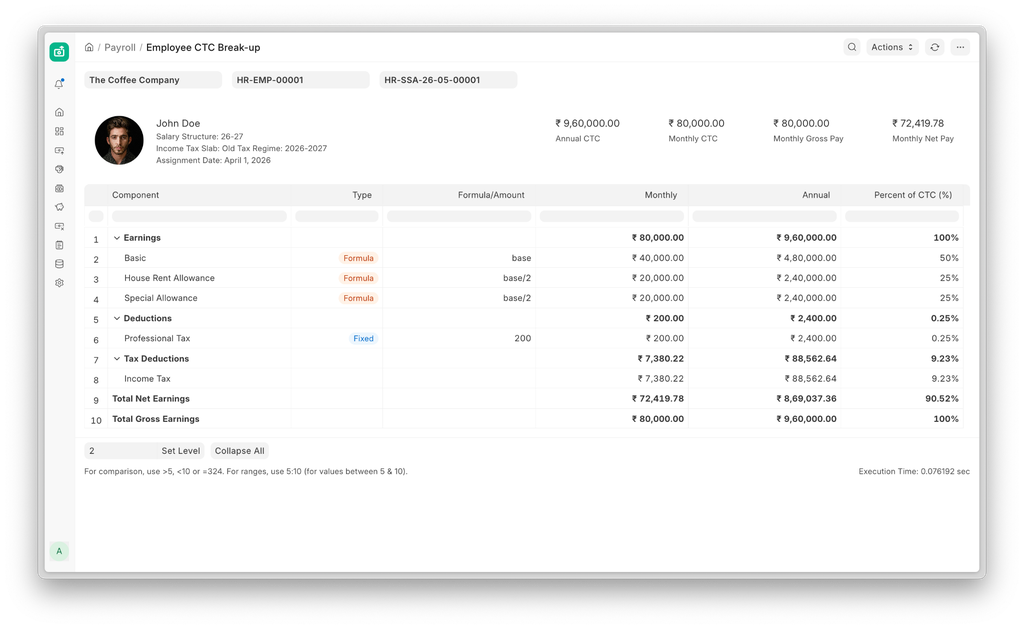
Sometimes it’s useful for HR managers to see employee’s salary break-up even before a payroll cycle is run. Or simply to refer to the annual percentages of any salary component. Now you can see that information with Employee CTC Break-up report
Set an employee's cost to the company in the salary structure assignment and access the report from the “Actions” menu in the document to see the full breakup as defined by the salary structure.

Expense Claim Settlement (#4494)
The expense claim advance allocation flow has been refactored to move away from document-level references (Payment Entry/Journal Entry) to a unified Advance Payment Ledger Entry (APLE). This simplifies tracking issues when claims are partially covered by advances.
Additionally, Expense Claims with partial advance coverage are now correctly marked as "Unpaid" instead of "Paid," ensuring the remaining balance is accurately handled for reimbursement. (#4563)
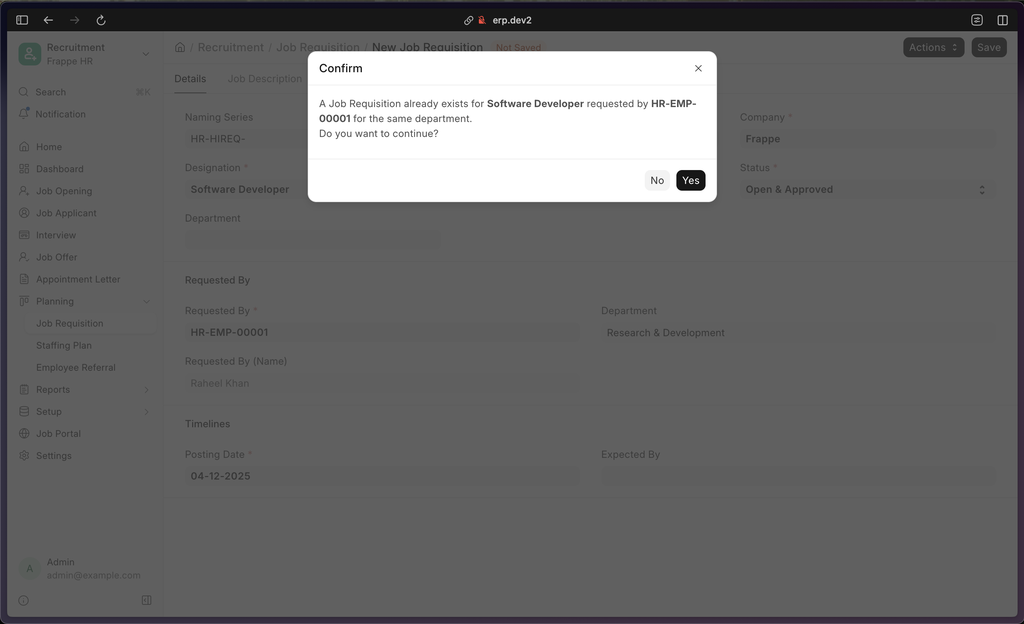
Job Requisition Duplicate Alert (#4587)
To reduce redundancy, a validation check has been added to the Job Requisition doctype. The system now alerts users via a confirmation dialog if a duplicate record is detected, offering the flexibility to proceed or cancel as needed.
Other Fixes
Leave Allocation Expiry (#4559)
- When a leave allocation expires using the Actions button in the doctype, the New Leaves Allocated and Total Leaves Allocated fields are now automatically reset to
0to prevent confusion. - The UI has also been updated to hide unnecessary fields for expired allocations.
- When a leave allocation expires using the Actions button in the doctype, the New Leaves Allocated and Total Leaves Allocated fields are now automatically reset to
Naming (#4521)
- Fixed an issue where the
naming_seriesfield remained visible in the Employee form even when the Employee Naming By setting was configured to a different option.
- Fixed an issue where the
PWA Link Fields (#4480)
- Improved label selection logic in the PWA link field component and the Roster page to prioritize labels over descriptions.
- This ensures consistent display across dropdowns.


This month we've shipped seven improvements across deployments, billing, support, partnerships, and the marketplace, all designed to make Frappe Cloud clearer and easier to use.
New Deploy Experience
Frappe Cloud processes over ten thousand deploys every week. Until now, tracking a single deploy meant jumping between the Deploys page and the Jobs page just to understand what was going on.
With the new deploy experience, every stage is visible in a single screen. Build and deployment steps now progress in real time, so you'll never again see a build marked successful while the actual deployment is silently failing in the background.
Failed steps, retries, and logs are all in one place. And for existing users, your full deploy history remains visible in the deploy history section.

Site Plans
Next, site-level support and resource settings. Plan names like Unlimited, Unlimited-supported, and Unlimited-low made it genuinely hard to know what you were signing up for. We've fixed that.
You'll no longer choose a confusing site plan at creation time. Support coverage and resource allocation have moved into dedicated server and site settings, where they're easier to understand and configure. Product warranty is now a toggle directly in your site settings.
Product Warranty on Hetzner Plans
Hetzner servers launched in February and already have over three hundred active servers. Product warranty is now enabled on all Hetzner plans at one hundred dollars and above, covering reproducible product bugs, security vulnerabilities, and defects on standard installations, all within our SLAs.

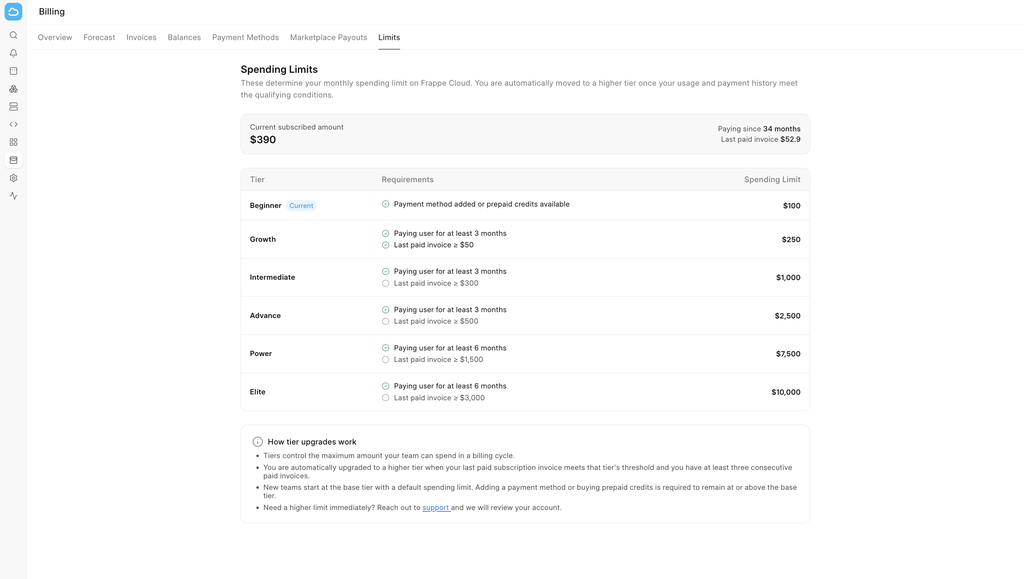
Spend Limits
We're introducing Spend Limits. Every account is assigned a usage tier based on account activity and payment history. As your billing history grows, your account automatically becomes eligible for higher infrastructure limits. Tiers run from Tier Zero up to Tier Five, with spend limits scaling from a single trial site up to ten thousand dollars. You can view your current tier under Billing, then Tiers.

Partner Onboarding
Becoming a Frappe partner is now entirely self-serve. The partnership fee has been waived. You no longer need to speak with a sales agent, just register your company directly inside Frappe Cloud and follow the onboarding steps.
Link your Frappe School certifications, track your MRR milestone, and submit for approval, all from a single guided journey inside the platform.
Marketplace App Auditor
For app developers on the marketplace: no more waiting days for a manual review. We've launched an automated App Auditor that kicks off the moment you publish a new release, automatically, in the background.
Every release is scanned across six areas: Each finding tells you what failed and exactly what to change. Results come back as Pass, Warn, Needs Improvement, or Fail. Depending on severity, a release may be blocked or flagged for review. Better for developers, and more secure apps for everyone on the marketplace.

Coming Soon
And finally, what's ahead. The most common feedback we hear is that Frappe Cloud feels too complex. New users get lost between sites, benches, servers, public benches, and multiple site creation flows.
We're working on a major simplification. The sidebar will reduce to just Sites and Servers. Benches will no longer appear as a top-level concept. Most site actions: marketplace apps, SSH access, custom apps, and updates, will live directly on the site. This is rolling out gradually over the coming months.

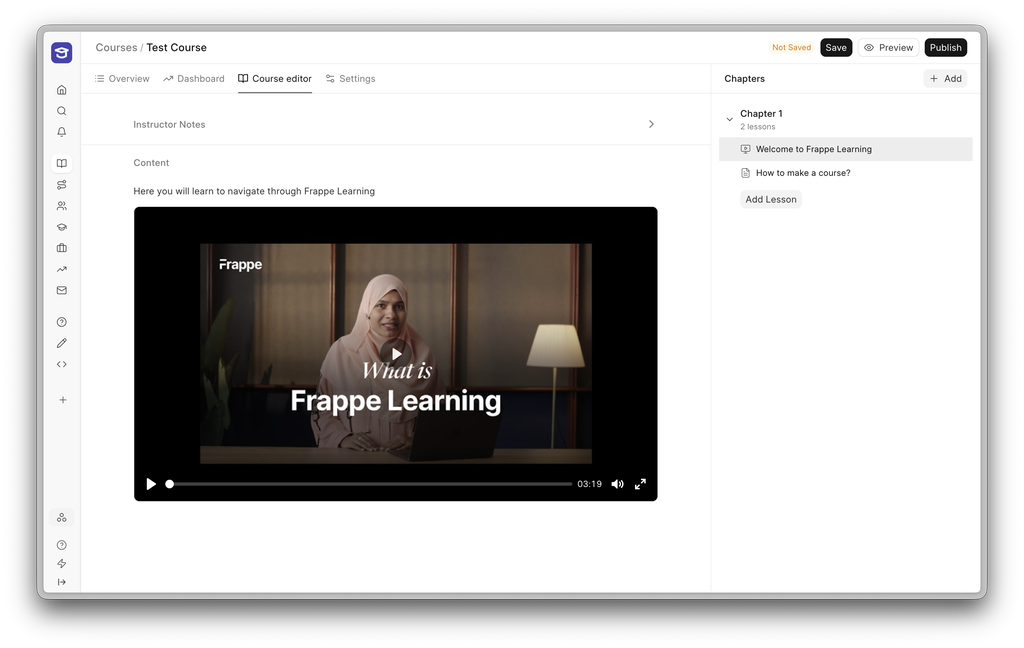
Course Editor is Now a Separate Screen
Editing a course has moved out of one long form into its own dedicated screen. This lets you move smoothly between multiple chapters during editing with student view available easily with the Preview button.
Configure How Students Progress in Courses
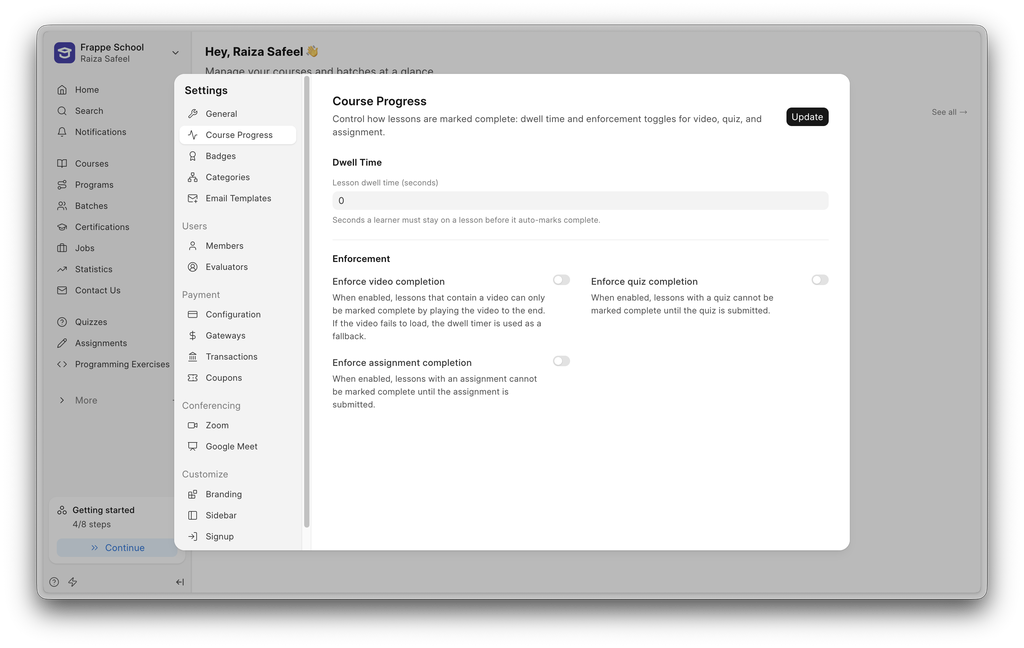
You can now control how learners move through a course. You can do this from your Settings → Course Progress.
You can control the following:
Lesson Dwell Time: Configure how long a learner must stay on a lesson before it is automatically marked as complete.
Enforce Video Completion: Require learners to complete the video before progressing.
Enforce Quiz Completion: Require learners to complete the quiz before progressing.
Enforce Assignment Completion: Require learners to complete the assignment before progressing.


ERPNext Integration
One of the biggest pain points of using ERPNext with Helpdesk was that users had to maintain the same customer records in two places: the HD Customer doctype in Helpdesk and the Customer doctype in ERPNext.
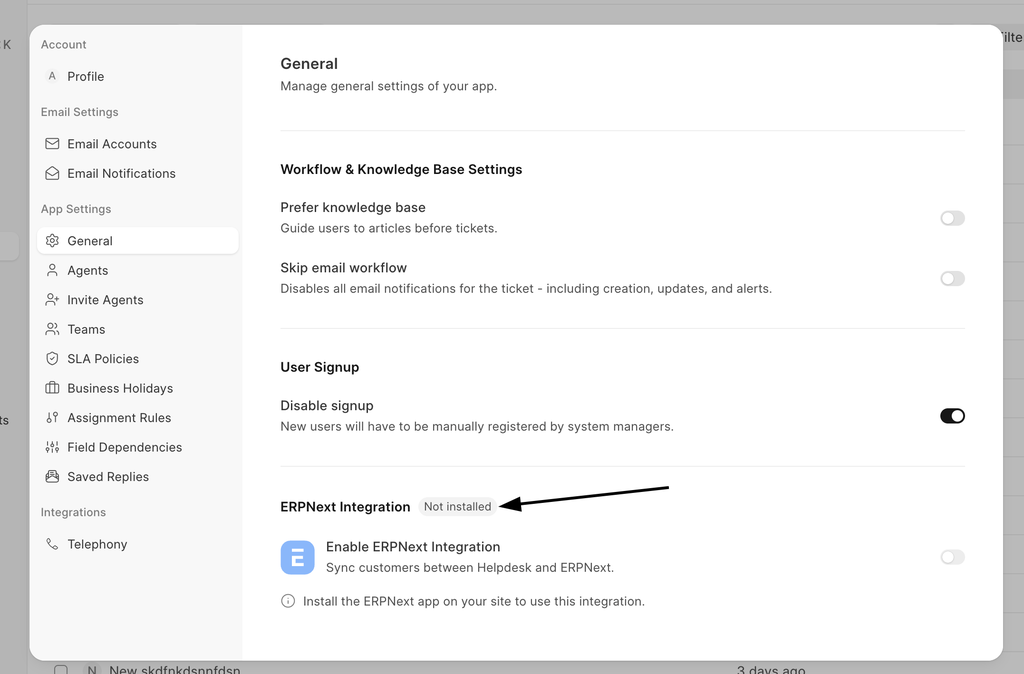
Every customer had to be manually created and maintained in both doctypes, which meant doing the same work twice and keeping both records in sync by hand. So we decided to build a proper integration between with ERPNext.
To get started, you'll need both apps installed on your site. Once that's done, head over to the ERPNext HD Settings DocType and enable the integration
After enabling it, you'll notice two new buttons:
- In the Customer list view in Helpdesk, a "Sync Customers with ERPNext" button.
- In the Customer list view in Helpdesk, a "Sync Customers with ERPNext" button.
- In the Customer list view in ERPNext, a "Sync Customers with Helpdesk" button.
Clicking either one syncs all the records across both doctypes, along with their user permissions and any shared documents. The operation performs a union of both masters, so nothing gets lost or duplicated.
If the integration is enabled, any document created in either HD Customer or Customer will be synced to the other document. So if you create a Customer in ERPNext named “Mero”, it will also be created in HD Customer.
You can read more about this in the documentation.
Bulk Reply
Bulk Reply lets an agent respond to multiple tickets at once, so you don't have to open and answer each one individually. Just write your reply once and send it across every selected ticket in a single click.
Your signature is added automatically, and you can attach files just like you would in a normal reply. And if you're not ready to send yet, your drafts are saved automatically so you can come back to them anytime.
You can read more about this in the documentation.

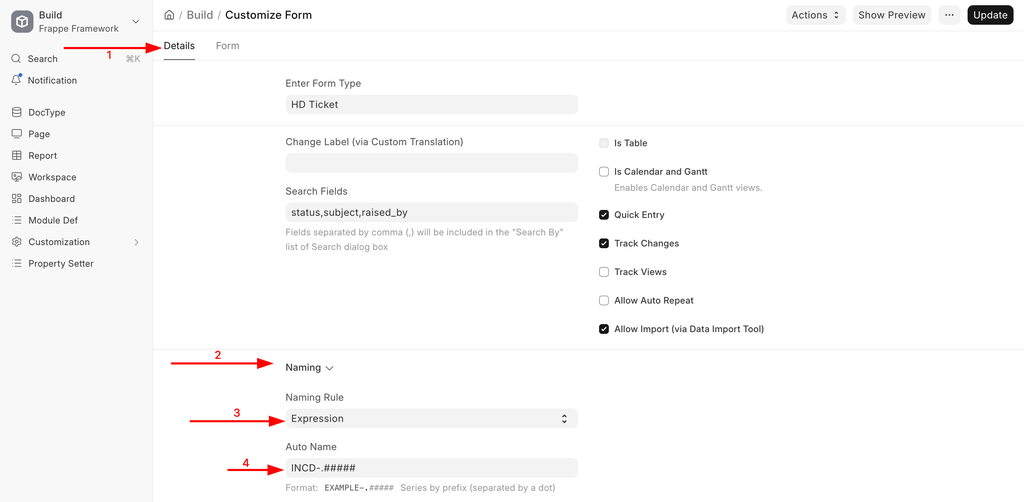
Custom Naming Rule
Until now, ticket IDs followed a fixed auto-increment format i.e, always 1, 2, 3, and so on, and there was no way to change it. Now you can customise the naming rule for the Ticket DocType to match whatever format works best for you.
You can read more about this in the documentation.
Contributed by Harshit from our community.
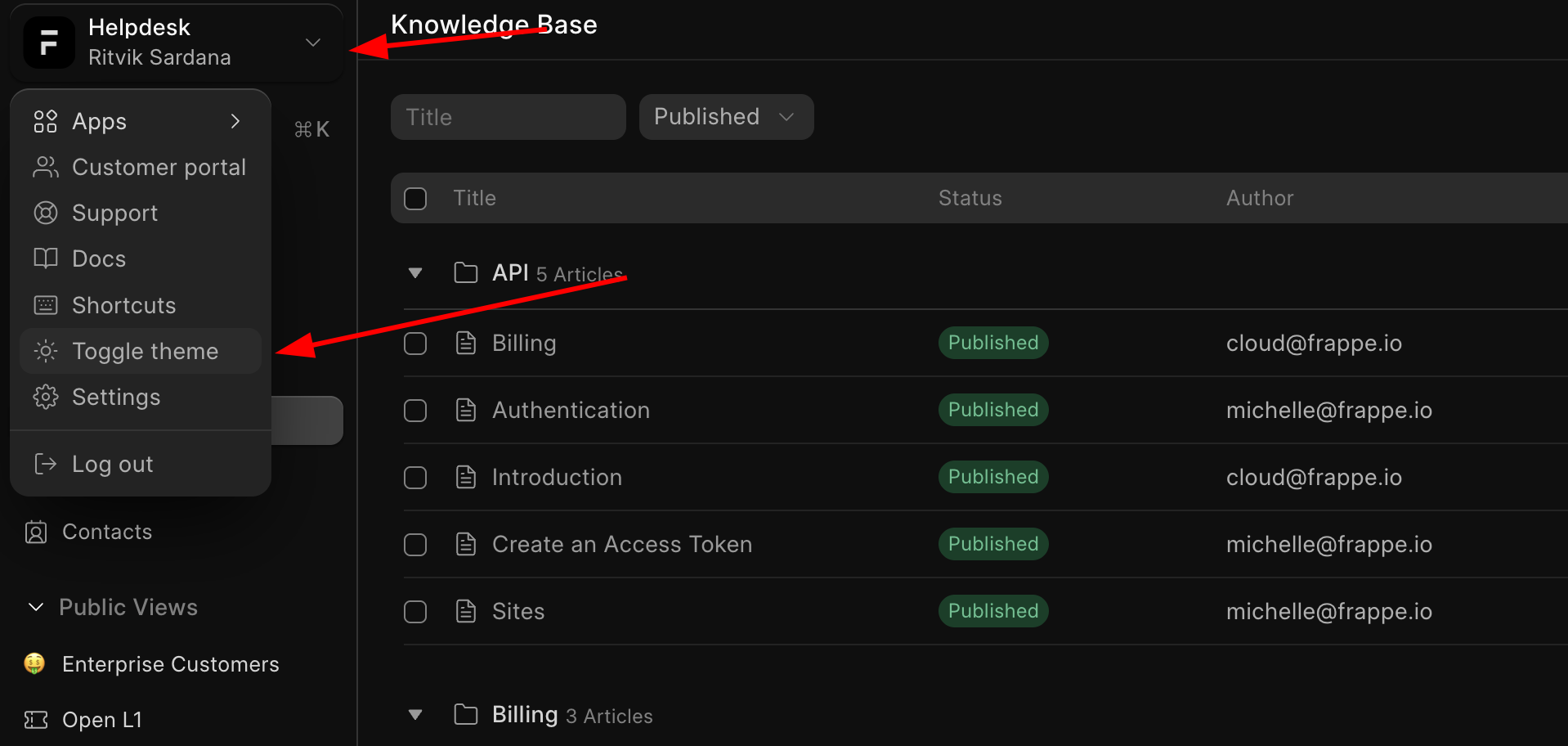
Dark Mode (3246)
Yet another feature that was requested in Helpdesk for a long time.
This feature was contributed by Harish, his first contribution to Frappeverse.

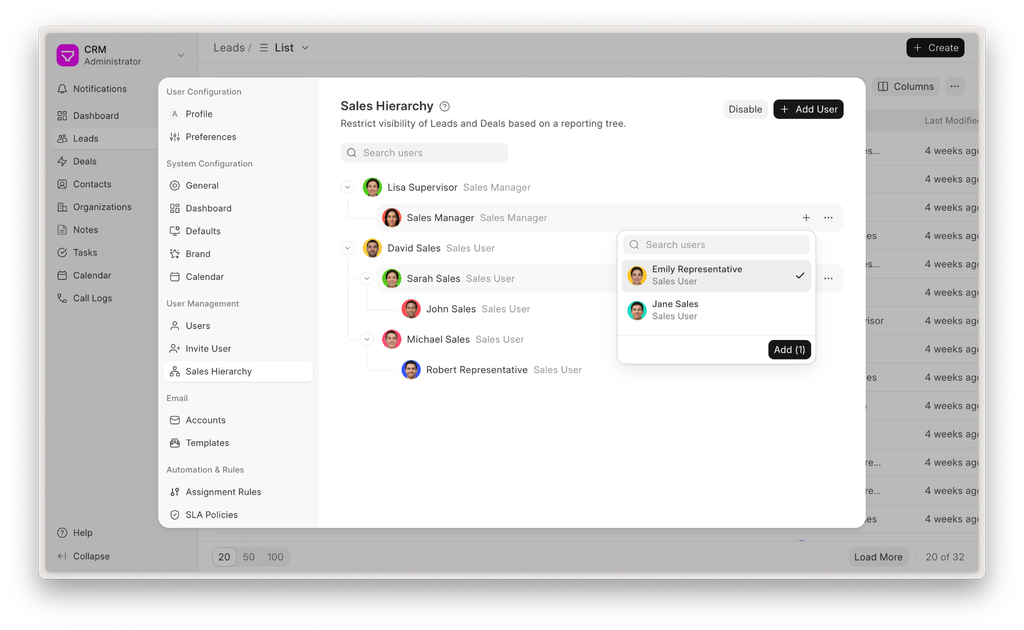
Introducing Sales Hierarchy
We’re changing how permissions work in Frappe CRM. By default, sales users will now only be able to see Leads and Deals assigned to them. Learn more about this feature in the blog


Exporting Presentations (#167)
You can now export your presentations from the app by clicking on the Export button from the top left dropdown options. This could come in handy when you want to share your presentation with others or just keep a copy of it once you're done working on it.
Shapes (#135)
You can now add shapes to your presentations from the Toolbar. These include rectangles, squares, circles, lines and more. You can edit their dimensions, positions and rotation to put together diagrams, flowcharts or however you want to visually organize your content. The editor also lets you customize properties like fill, border and shadow, and control which shapes sit in front or behind when they overlap. This is just the initial version and we'll be improving it over time.
Improved Thumbnails (#168)
Slide thumbnails in the sidebar were sometimes showing up blank or not updating after you made changes to a slide. This was happening because each slide was saving its own screenshot separately, which was pretty flaky and also slowed things down every time the presentation autosaved. Thumbnails now render directly from the slide content in real time, so they reflect what's actually on each slide as you work. Videos and GIFs in thumbnails are also handled better now.
Bug Fixes (#166)
Fixed a bunch of issues with lists:
- On emptying a text element, there was no visual outline to show where the element was but just the cursor blinking which was pretty confusing.
- Formatting like font size and color would get lost when clearing out the very first item content or adding a new list.
Indenting and unindenting list items with the keyboard was behaving incorrectly.
 Gursheen Kaur Anand Engineer
And that's it for this month 👋
We're excited to see what the next month brings as we continue exploring agentic coding and new ways of building faster.
PS: We have started publishing talks from Frappe Build 2026 on our YouTube channel. You can watch them in this playlist here.


·
That's pretty good, keep it up
·
Nice! - Keep up the great work team