


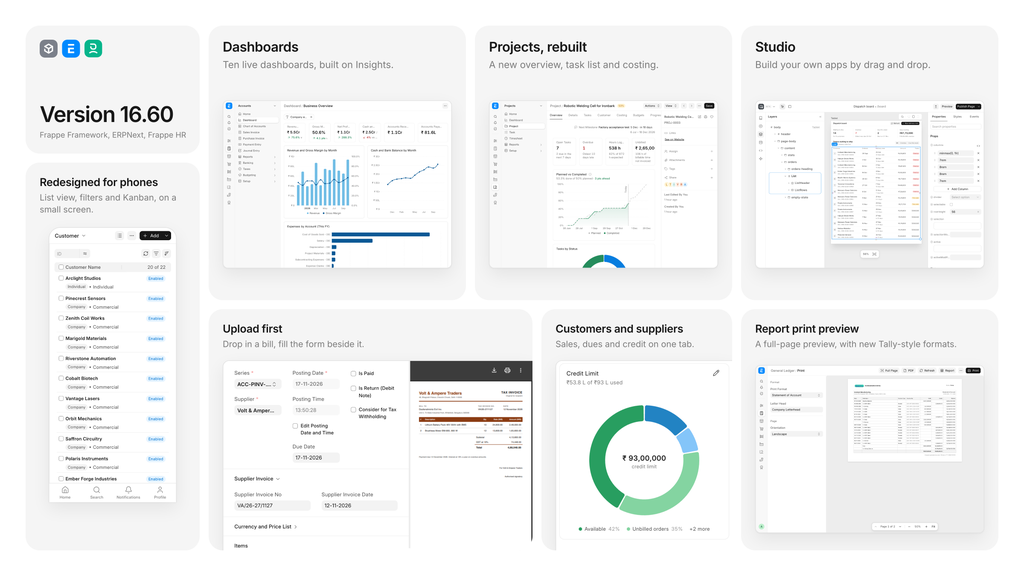
It’s been a month since we announced v16.50 - and if you recall, I promised monthly releases going forward. So today, we’re announcing v16.60 for our “trifecta” - Framework, ERPNext, and Frappe HR.
When I look at this release and the features we’ve introduced, all I can say to myself as an ERPNext user is “finally!” Last month’s release was about polishing the UI, and this month we’ve taken a big step towards making ERPNext the “Apple of ERPs”.
Curious? Let’s begin.
Dashboards, powered by Insights
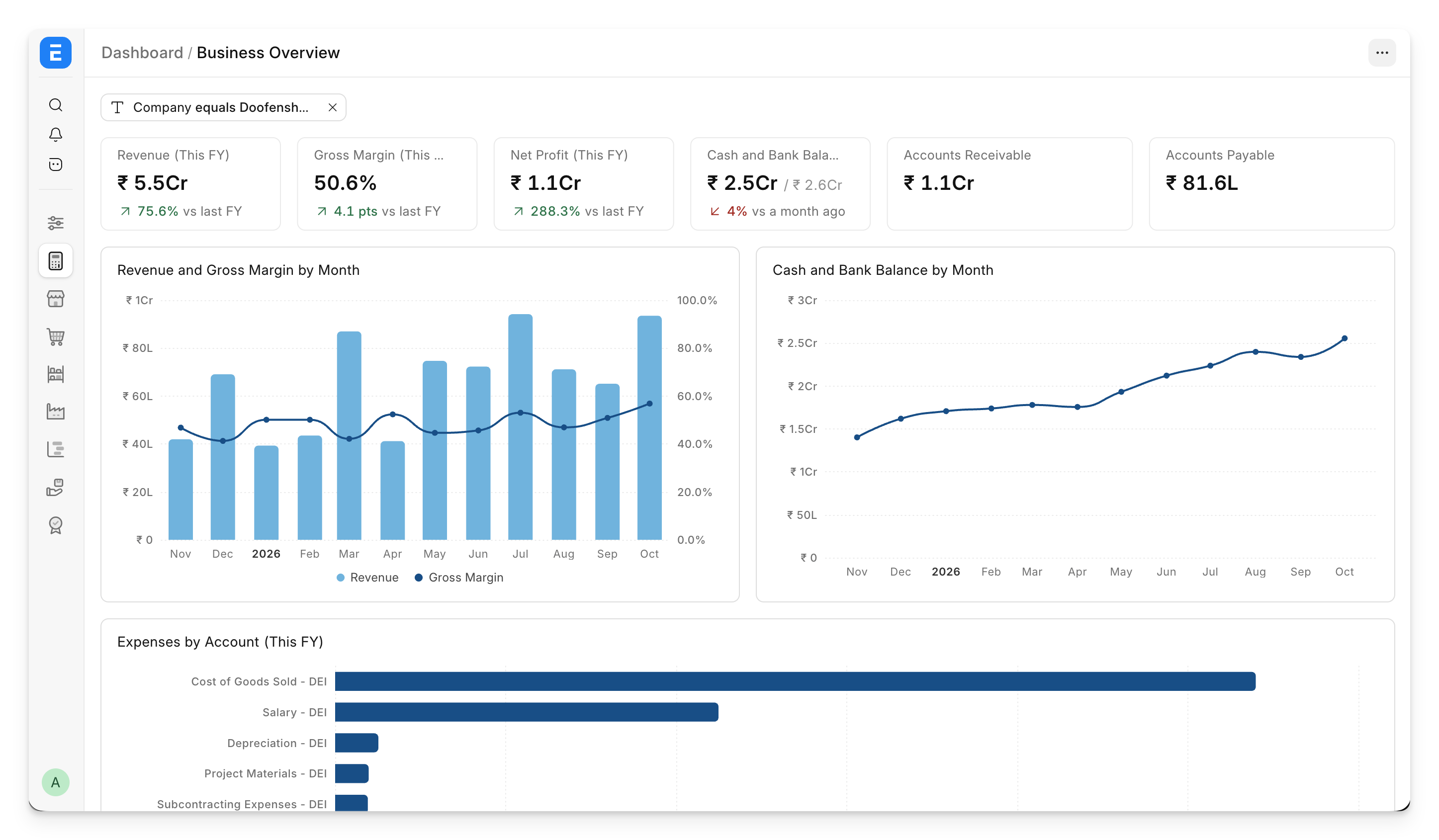
Finally! Saqib has been working on Insights - our BI tool - for over three years now, and he has now done all the hard work to bring its richness and power to ERPNext.
What does Insights unlock that the older dashboards just could not?
- Multi-axis charts
- New chart types like maps, heatmaps, trend lines and more
- Tables with color coding inside dashboards
- Filters in dashboards (huge for multi-company setups!)
- Deep drill-downs with hyperlinks to documents, and the ability to break down numbers by attributes
ERPNext and Frappe HR now ship with standard Insights dashboards out of the box. And if you need to add your own charts or dashboards to the Desk interface, you can now do that in just a few clicks. As a bonus, all existing dashboards in ERPNext (including custom dashboards you might have created earlier) look much better, since they now use frappe-ui’s chart library.
To enable this feature on your existing sites, you need to install Insights.
Studio, now in Framework
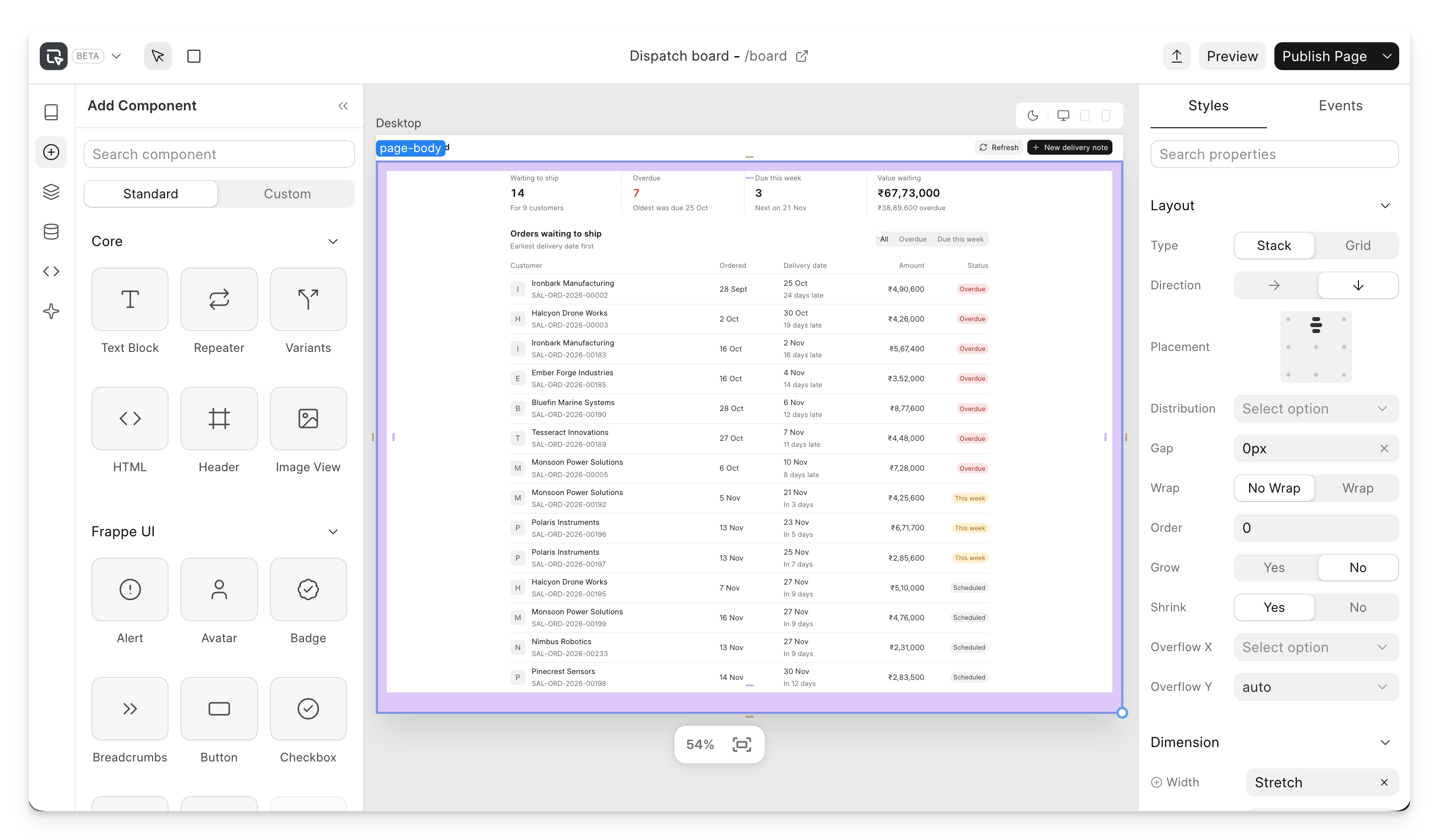
When Rucha showed the first cut of Studio two years ago at Frappeverse, she received a standing ovation, and the entire community (including me) has been looking forward to its release ever since. That day is finally here.
Studio has now been merged into Frappe Framework, and lets you build entire apps without writing code. “Who’s writing code these days?” - you might ask. Well, Studio also works very well with AI agents (including our own harness, Flow), so you can ask your agent to build apps and custom pages.
I consider Studio to be the next evolution in the customisability of Frappe Framework. ERPNext is already (arguably) the most customisable ERP in the world. Studio allows extremely high-fidelity customisations on top of it. If you want a custom interface for your workflow, or don’t like the standard interface in ERPNext, well, now you can just build it in Studio and it goes live immediately.
Here's a video of a manufacturing app that Rucha made with just one prompt to an AI agent using Studio.
A revamped Projects module
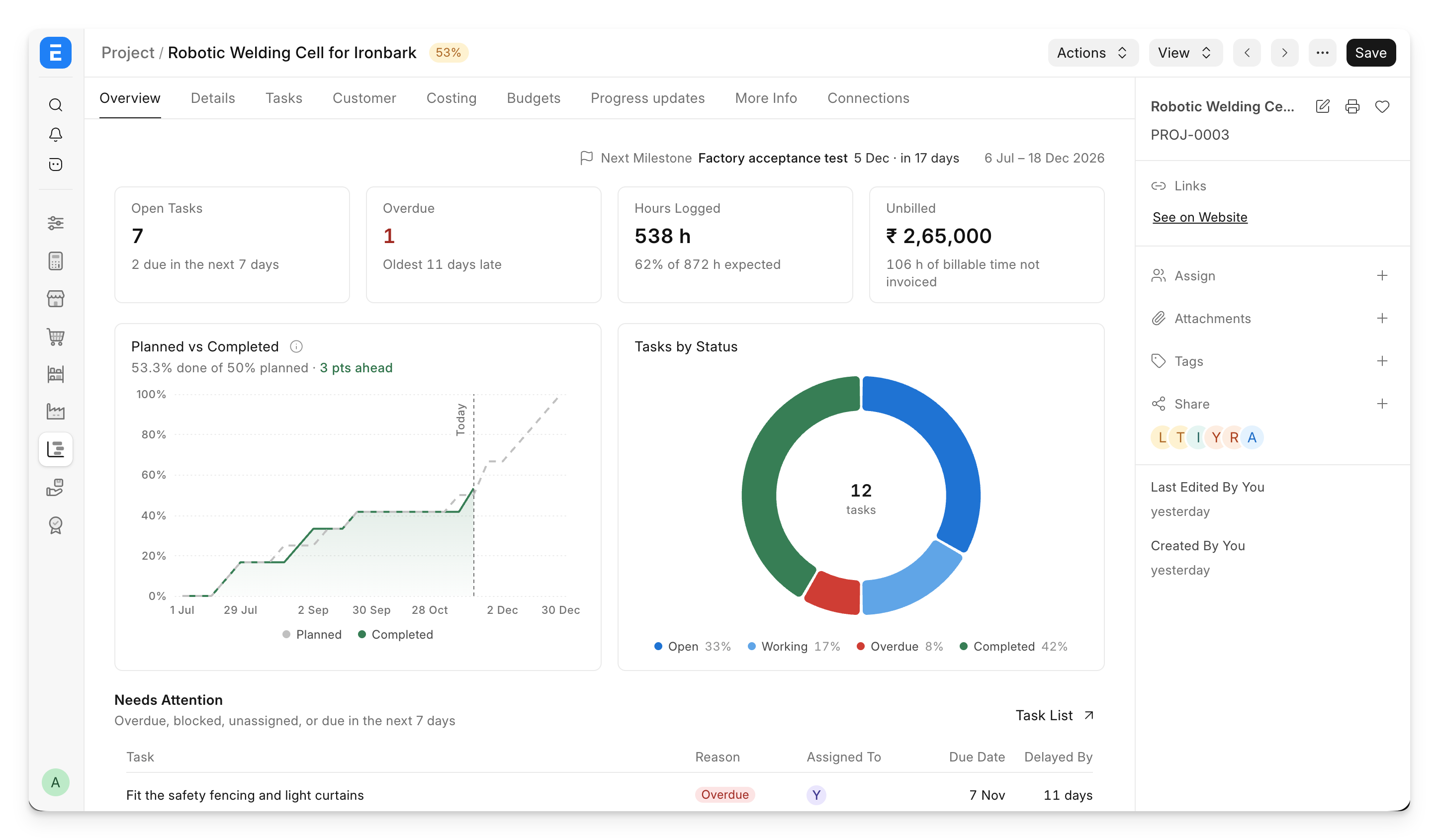
We have ignored the Projects module for far too long, and our users have asked us to improve it time and again. With this release, we’re starting a complete, three-month revamp of the Projects module.
With v16.50, we shipped a new Kanban board that made tracking tasks easier. In v16.60, we’re going a step further - when you open a project, you get a complete overview of its progress, blocked and overdue tasks, costing and billing. You don’t need to juggle multiple dashboards and reports; it’s all available inside the project.
You can also manage all your tasks directly inline - change their priority, assignments and status.
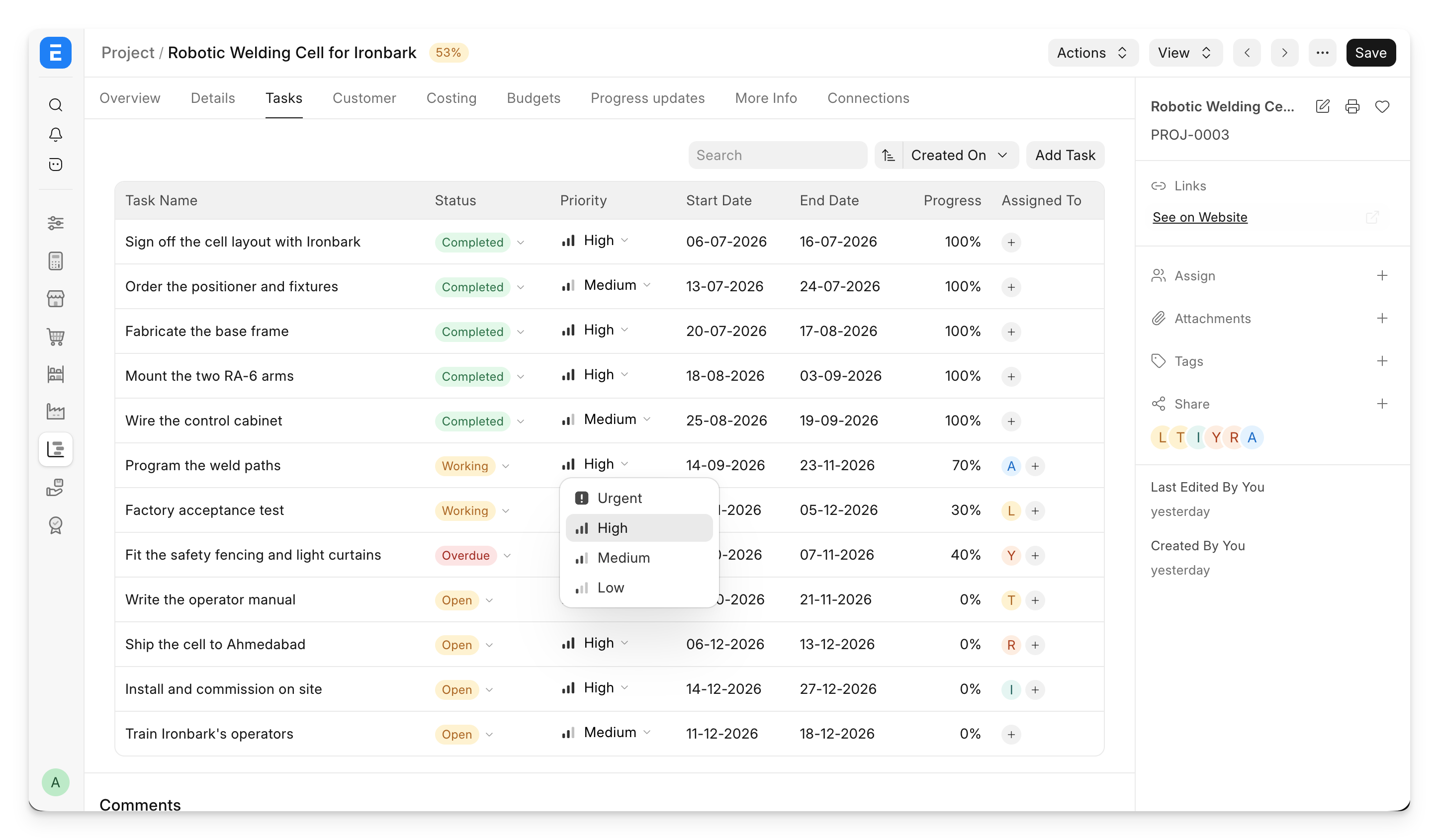
The Costing tab has been completely revamped as well. Instead of just showing numbers, it now shows you all the costs and billing related to the project, and compares them to any budgets you might have set.
By the way, this is just the first phase, so expect more improvements in the December release. To know more, read Nishka’s post.
Better customer and supplier forms
When I used ERPNext, a common complaint I had was that I had to navigate to a lot of reports and lists to get information about a customer or supplier. For instance, if you’re creating a Payment Entry for a supplier, you usually check that the supplier doesn’t already have unapplied payments, and that the corresponding invoice has been recorded in the system. This meant juggling between the Accounts Payable report and the Payment Entry and Purchase Order/Invoice lists.
In v16.60, we’re introducing an Overview dashboard inside the Customer and Supplier forms. It shows you their sales/purchase trends, recent transactions, unapplied payments, open orders, their current account position and credit limit utilisation. This makes the flow much easier - all you need to do is search for the party (hint: use the Global Search we added in v16.50 - it works very well), and then take action directly from the form.
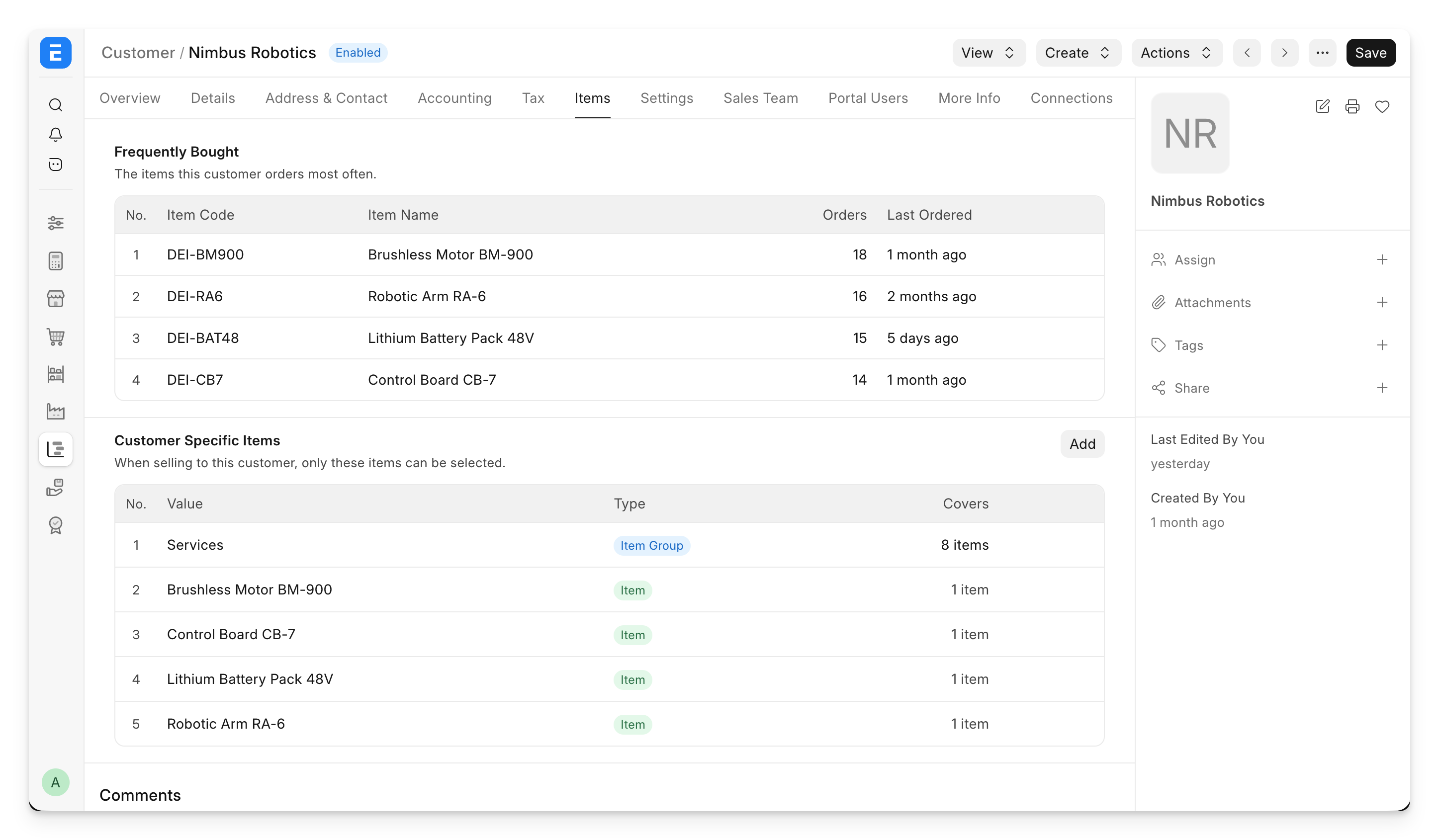
We also added an “Items” tab, which shows a list of the items most frequently sold to or purchased from the party.
There’s a “hidden” feature in ERPNext where you can restrict a party to only certain items - it’s called “Party Specific Item”. For example, if you are recording a purchase invoice from an airline like Indigo, there are usually just three or four items that appear in their invoices, out of the thousands in your system. Yet the invoice form shows the entire item list, so you always had to search for the correct one. This sometimes leads to incorrect entries or, even worse, duplicate items being created in the system. I used to face this issue myself, until I stumbled upon “Party Specific Item”. In v16.60, you can add these restrictions directly from the Supplier and Customer forms, so the feature is much easier to find.
Upload the document first, then fill in the form
Think about how you usually fill in a purchase invoice. Someone sends you the invoice, you open it, and then copy details from it into the form. There has to be a better way!
Now you can upload files in bulk for documents like Purchase Invoices and Expense Claims, and they sit in a queue. Pick a file, and you get a split view of the form and the file inside the ERPNext interface itself. No more juggling different windows or monitors. This feature can be enabled for any DocType.
In the next release, we will also autofill the form using our AI integration :)
Report printing
We’ve redesigned the report printing experience in Framework. You now get a live preview of the print as you switch print formats, letterheads and other settings.
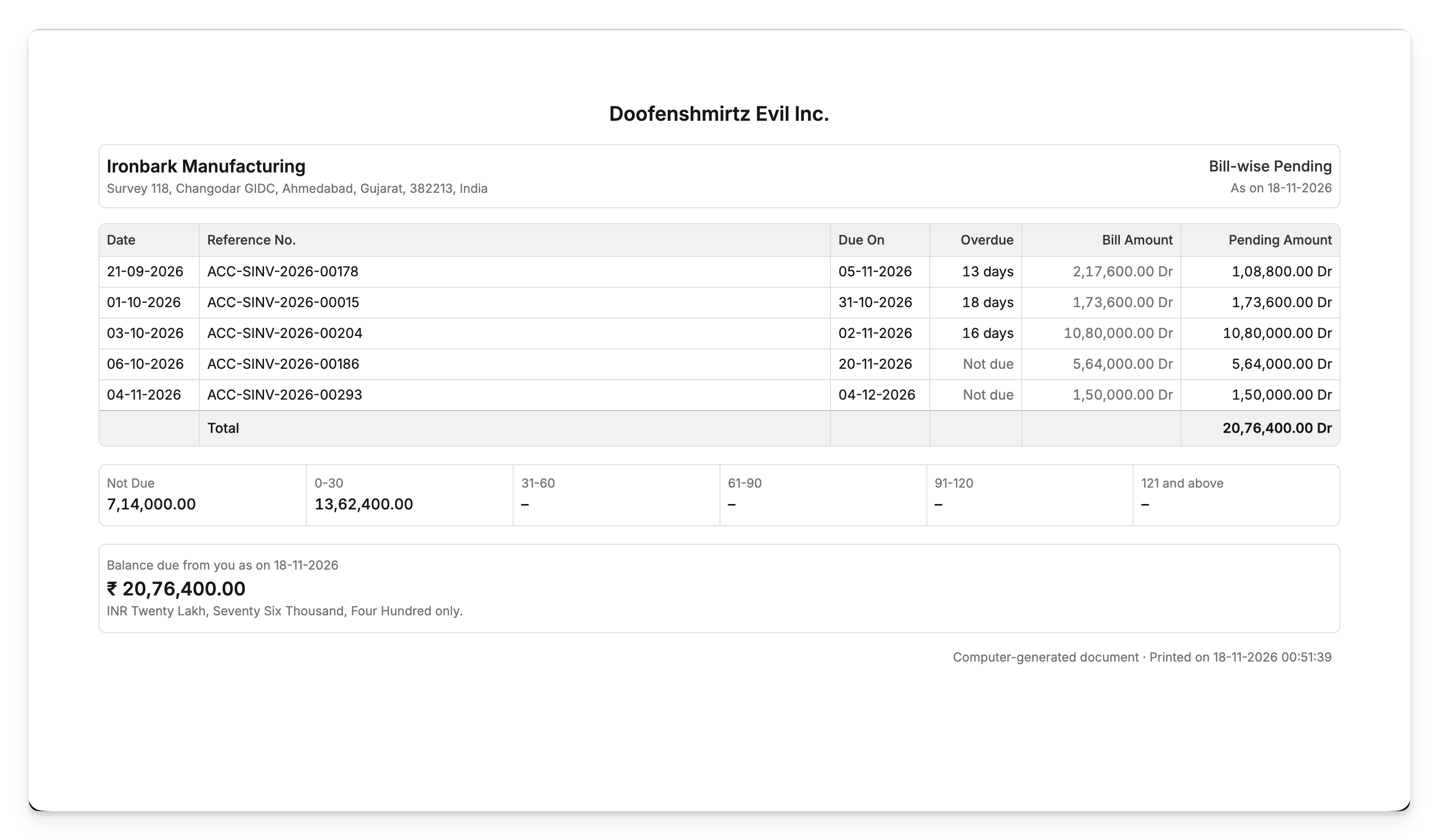
We’ve also added more standard print formats in ERPNext, making it easier for users to switch from other systems like Tally:
- Statement of Account (General Ledger)
- Customer Bill-wise Pending (Accounts Receivable)
- Supplier Bill-wise Pending (Accounts Payable)
- Customer Balance Confirmation (Accounts Receivable)
- Supplier Balance Confirmation (Accounts Payable)
- Sales Register
- Purchase Register
- Sales Orders Outstanding (Sales Order Analysis)
- Purchase Orders Outstanding (Purchase Order Analysis)
- Warehouse Stock Summary (Stock Balance)
There’s also a new report called “Day Book”, similar to the one in Tally.
Mobile UX
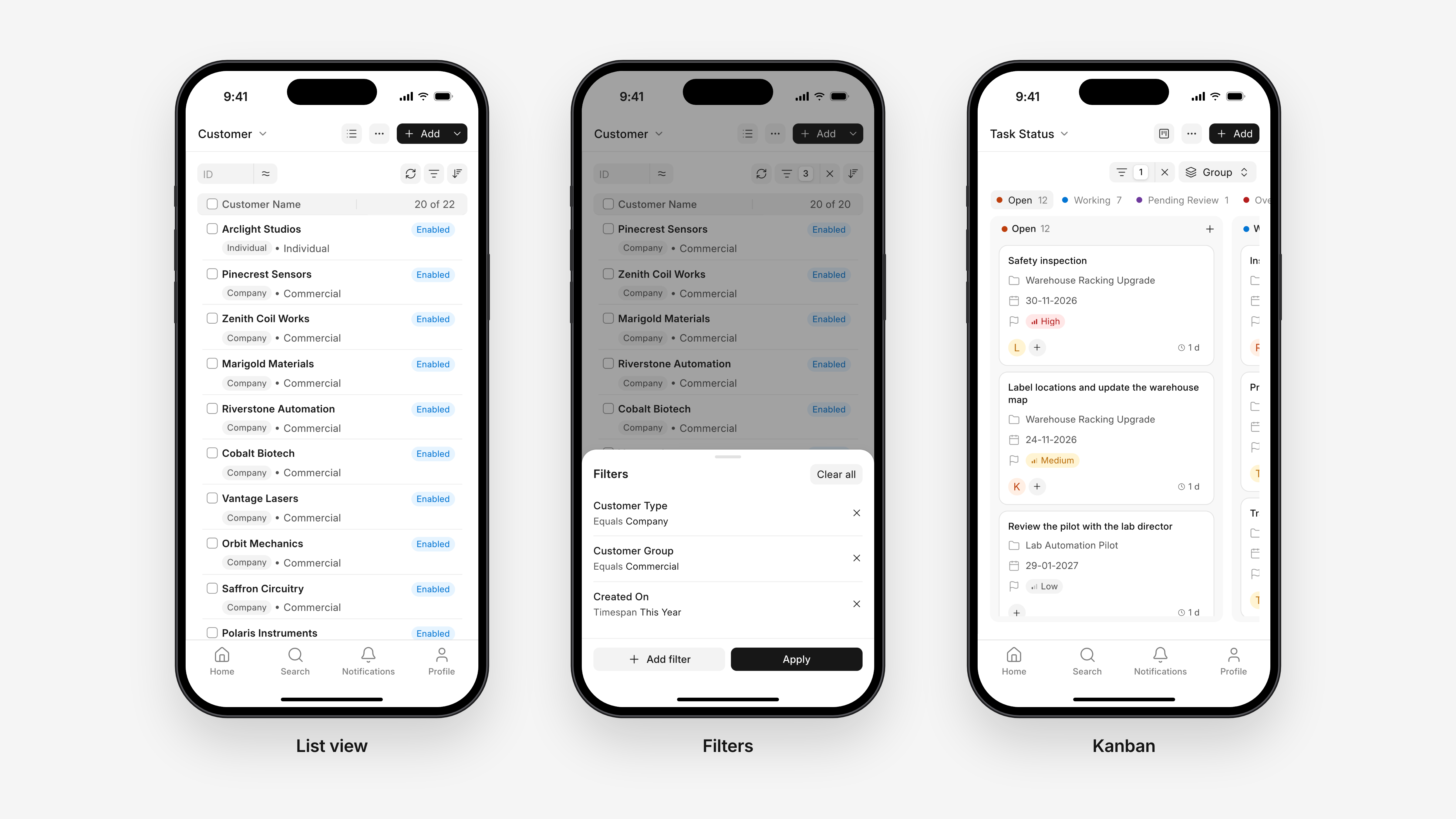
You’ll also see improvements to the mobile experience across all three apps. We’ve added a bottom bar that brings in the search and profile pages, navigation and filtering are easier with a new bottom sheet component, lists now have infinite scrolling, and the Kanban view has been adapted for mobile devices. We’re continuing our investment in this direction, and there will be more updates to the mobile UX in the December release.
A new importer for child tables
Earlier, child tables only supported import via CSV files in a very specific format. You couldn’t use Excel files, nor could you map columns. All of that changes in v16.60. The new importer follows the same pattern as the data import popup we added in v16.50, and supports more file types and column mapping.
Web Forms
Multiple improvements have been made to the web form experience:
- A new drag-and-drop form editor - similar to the DocType editor.
- Better UX for fetching fields - select which fields you want from a DocType.
- Web form requests - you can now share private links to a form, so someone can submit it without an account. You can also request data from users for a DocType (like Employee) via web forms, directly from the DocType form.
Frappe Flow
We’re also releasing an alpha version of Frappe Flow, our AI harness that runs alongside all Frappe apps. Flow allows you to perform tasks using LLMs - like analysing data or filling in forms. It respects the permissions of the user who calls it. You can bring your own AI provider keys to use Flow, and eventually, we will bundle AI credits directly on Frappe Cloud.
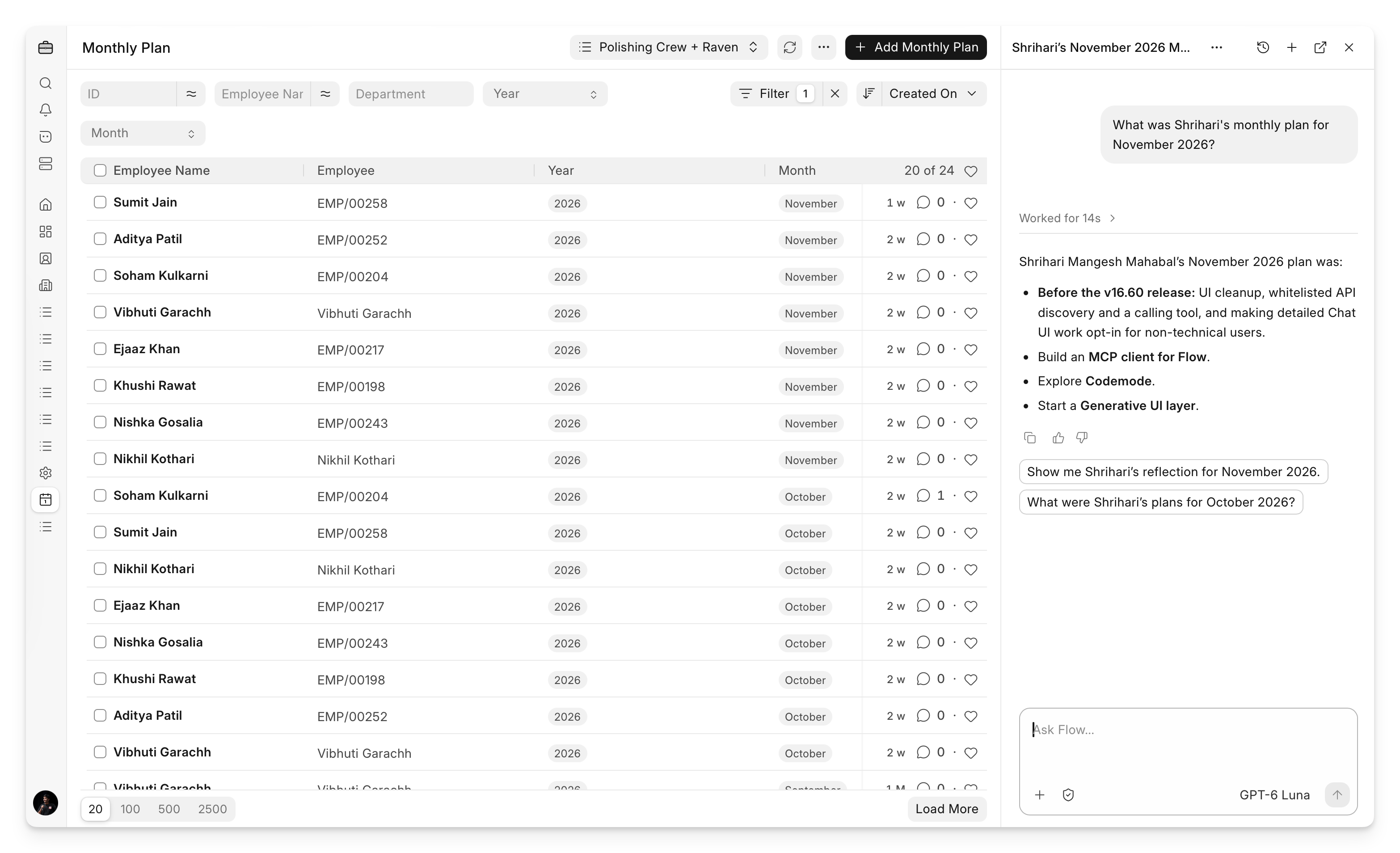
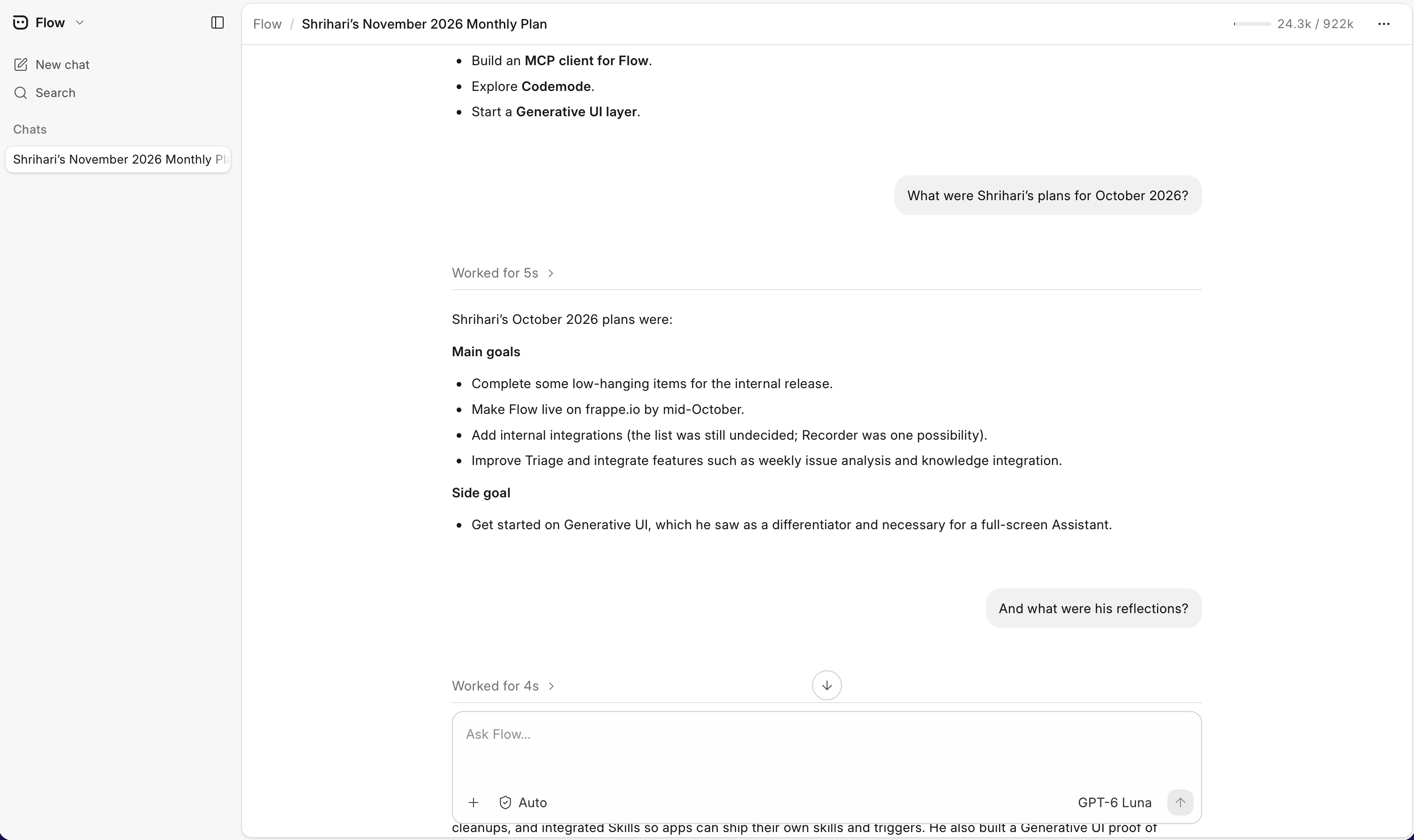
All Frappe apps are already pretty easy for models to work with. The metadata-driven architecture and standard APIs go a long way here. Over the next few months, we will be making our apps much easier to use with agents, and ERPNext and Frappe HR will ship with skills out of the box that Flow can use. Imagine your bank and payment reconciliation being completely automated via Flow :)
PS: the above screenshots are from our own Frappe instance where we maintain monthly plans for all our members. Shrihari's (the creator of Flow) plan for this month was to launch Flow :)
And there’s more…
Next week, we’ll also release a new Customer and Supplier portal built on top of Studio, and a Cheque management feature that was missing in ERPNext.
The team has also squashed more than 2,500 bugs in the last month alone.
We’re continuing our focus and investment in ERPNext and Frappe HR, so gear up for the December release as well :)

