


Frappe Build 2026 is happening in Mumbai on April 2nd and 3rd!
Over the past few weeks, our developers have been busy preparing for their talks, refining ideas, running mock sessions, and getting everything ready to share with the community.
The schedule is now live, featuring a lineup of insightful and exciting sessions. Do check it out and join us for an opportunity to learn, share, and connect with fellow open-source contributors and Frappe enthusiasts.
Table of Contents

Dynamic Filters in Auto Email Reports (#38069)
Dynamic filters defined in the client-side script of reports were not being applied in Auto Email Reports. The report’s onload logic is now triggered when configuring filters, ensuring that fields like year (and other dynamically set filters) are correctly populated based on the report configuration.


UI/UX
List View
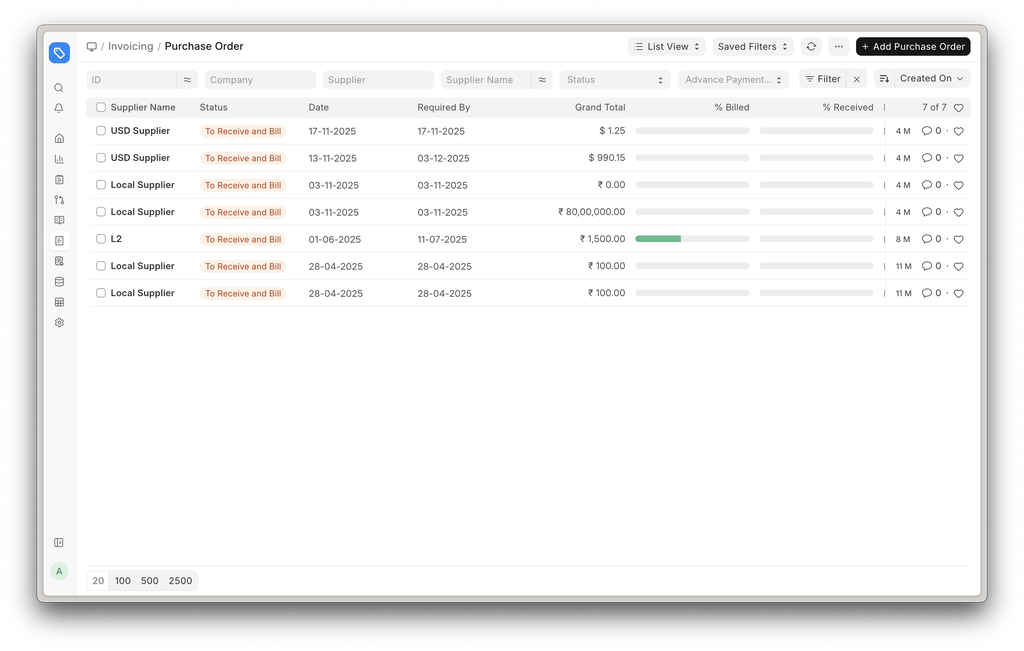
List view columns of core accounting doctype - Sales Invoice, Purchase Order, Journal Entry, etc., have been improved. Fields that provide more context are given priority and shown by default.
.png)
Payment Request
Users can now select the payment schedule from which a Payment Request should be created.
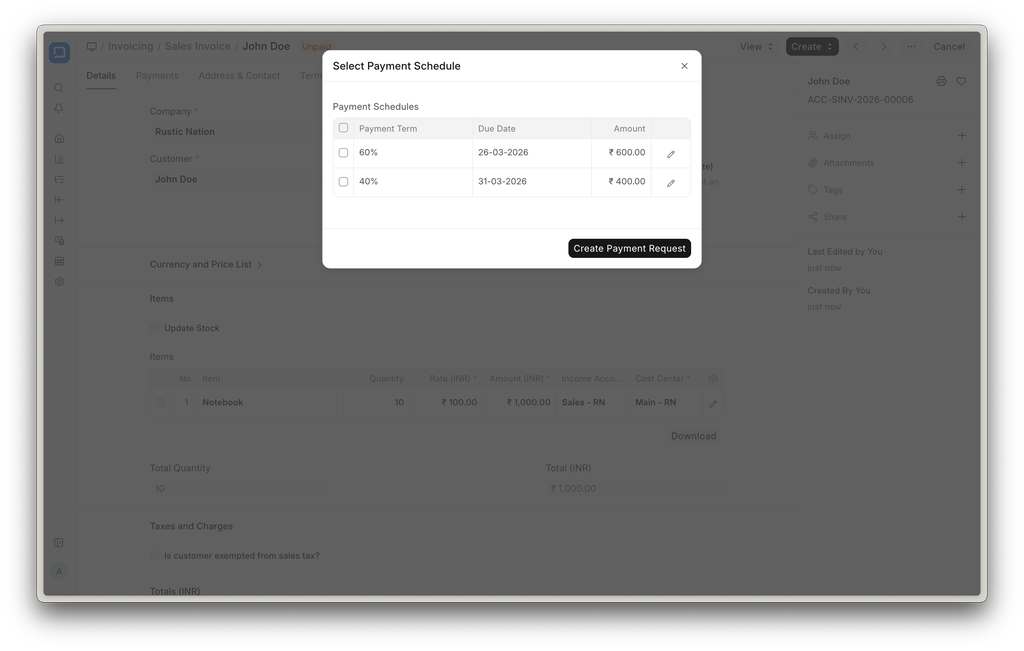
Chart of Accounts
Accounts got a new Account Category field. This will be primarily used in making custom financial reports using the Financial Report Template.
Reposting Refactor (#52152)
Refactored the reposting feature in version 16 to improve performance. After the fix, performance has improved by 10×.

BOM Stock Analysis Report
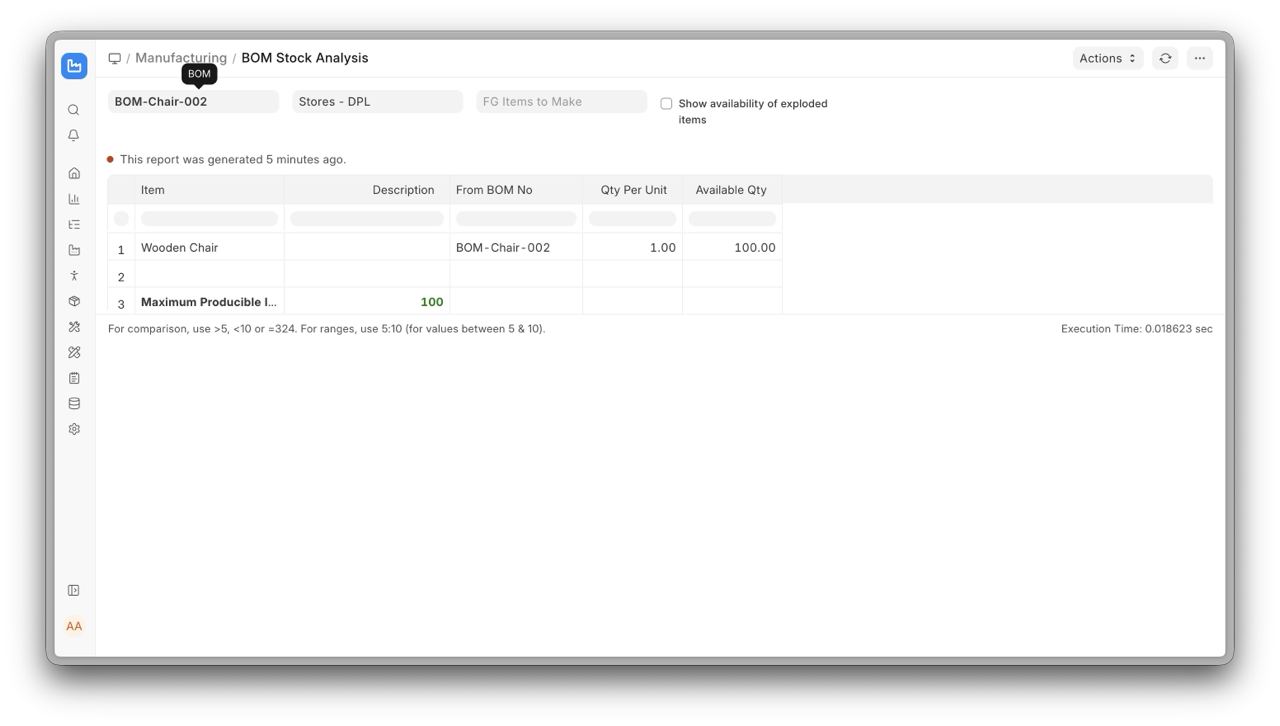
We’ve introduced a new BOM Stock Analysis Report in ERPNext that consolidates and replaces the earlier BOM Stock Calculated and BOM Stock Report. This report helps you quickly determine whether you have sufficient raw materials to complete a production run for a given Bill of Materials (BOM). It offers two flexible modes: Detailed Mode, which provides a comprehensive breakdown of material availability, shortages, and purchase rates for selected finished goods, and Summarised Mode, which shows how many finished goods you can produce with the current stock in the warehouse.

Secondary Items in Manufacturing
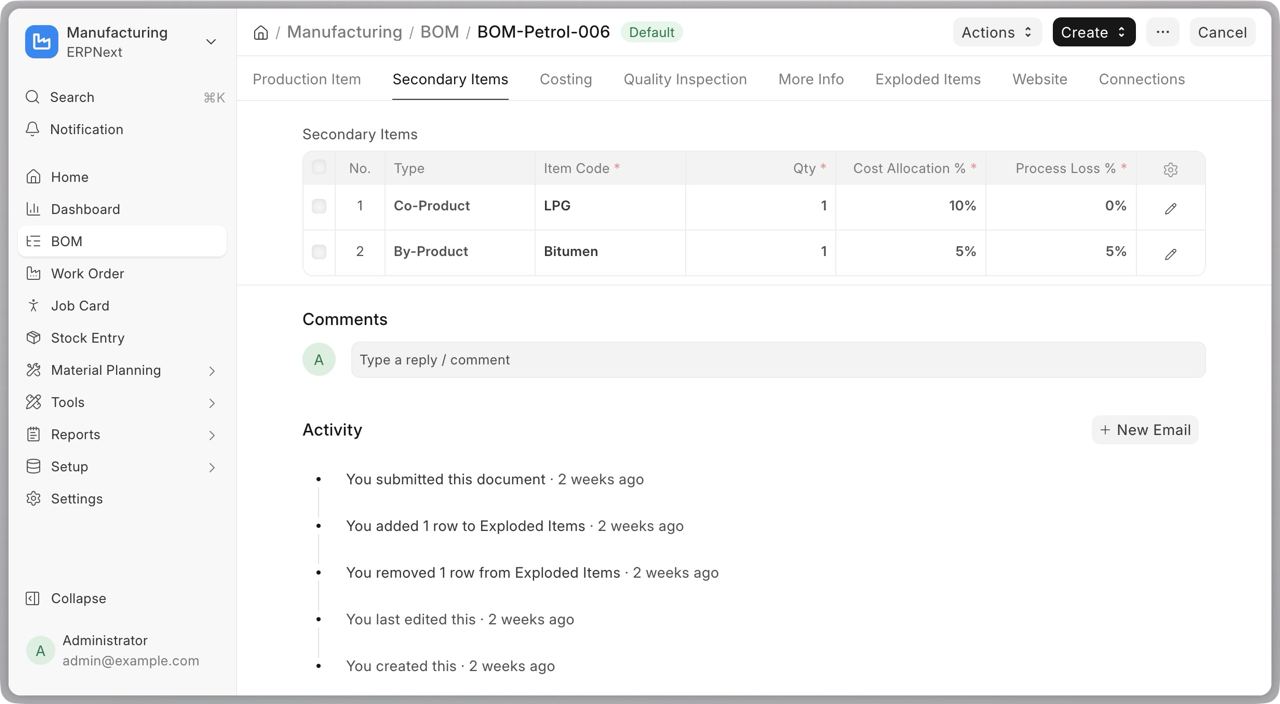
The Scrap Items table in BOM has been renamed to the Secondary Items table. Users can now specify multiple types of outputs instead of just finished goods and scrap. These types include “Scrap”, “Co-Product”, “By-Product” and “Additional Finished Good”. The distribution of the raw material cost is based on a percentage system between the finished goods and the secondary items. Read more about the feature here.


Employee Creation Flow (#52726)
The User ID can be linked to the Employee. User accounts can be created and associated with an Employee in different ways.
Option 1: During Employee Creation (Automatic)
While creating a new Employee:
- Enable the Create User Automatically checkbox to create a User when saving the Employee.
- The Create User Permission checkbox is enabled by default. This ensures that the newly created User has access only to their own Employee record and associated Company.
- Ensure that either the Company Email or Preferred Contact Email field is populated.
.png)
Option 2: For Existing Employees (Via Button)
If an Employee is created without linking a User ID, a User can be created later from the Employee record: - Click on the Create User button from the top actions menu. - A dialog will appear with the Create User Permission option enabled by default. You can set or update the email in the dialog before creating the User. - On confirmation, the system will create the User, assign the necessary permissions, and link it to the Employee.
.png)
Option 3: Via Data Import (#52726)
User accounts can also be created during Employee import by including the required fields in the import template: - Ensure that either the Company Email or Preferred Contact Email field is populated. - Include the Create User Automatically column and set the value 1 for the required rows.
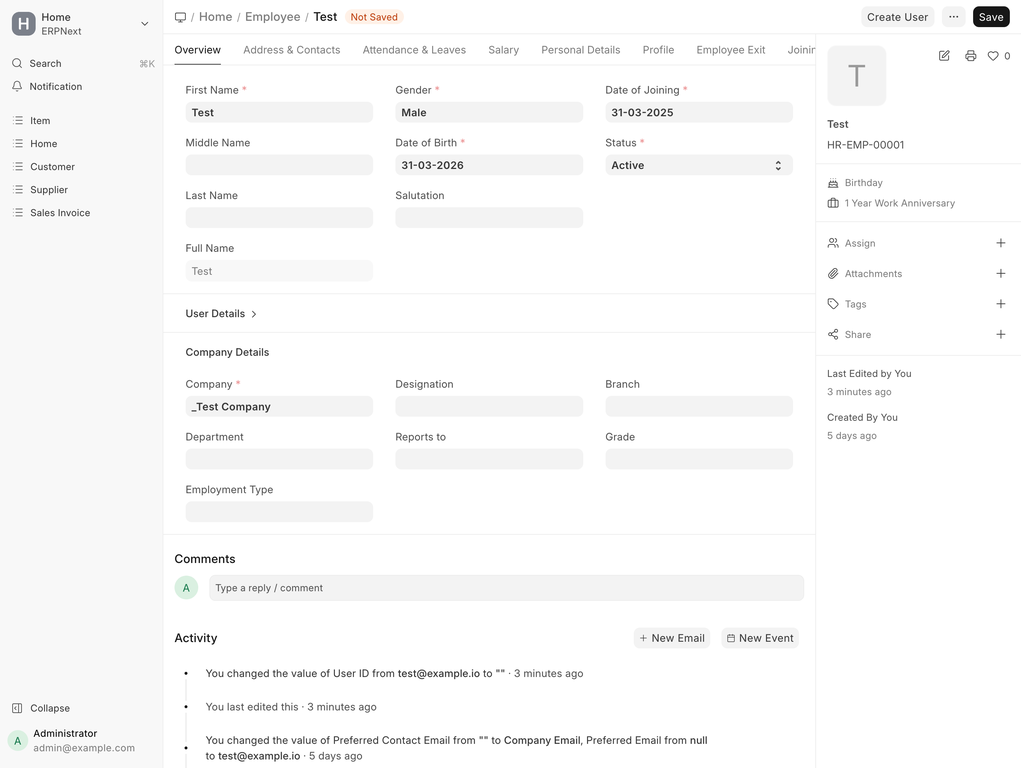
Employee Milestone Indicator (#53245)
The sidebar shows the birthday and work anniversary indicators.

Support Multi-currency advance & claim in PWA (#4083)
Multi-currency support has been added to Expense Claim and Employee Advance forms in PWA. Transaction and base currency values are now handled with real-time conversion and exchange rate. Currency labels dynamically update based on the selected currency, and advance allocation logic has been refined for accurate calculations.
Bug Fixes
Reimbursed Amount Calculation in Expense Claims: (#4240) Reimbursed amounts were incorrectly calculated when expense claim included advance payment transactions. Payment amounts tied to advance vouchers are now excluded from the reimbursed total.
Voucher Type Based on Account: (#3842) Payroll Entries always created Journal Entries with “Bank Entry” as the voucher type, even when using a cash account. It now sets the voucher type based on the selected payroll account type, ensuring correct handling of both cash and bank transactions. Contributed by [elshafei] (https://github.com/elshafei-developer)

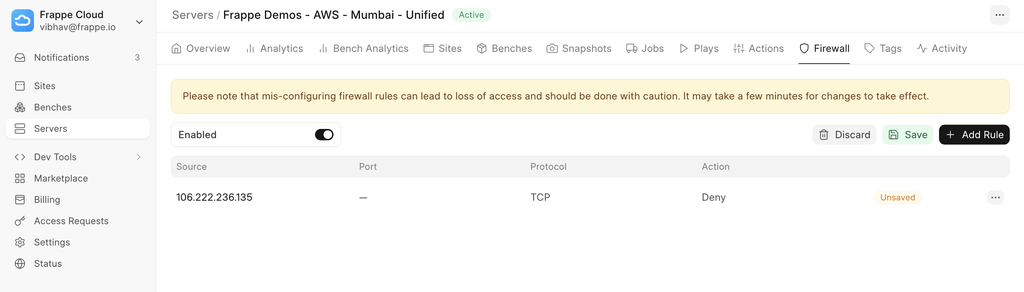
Server-level Firewall
Until recently, Frappe Cloud has been using Firewall solutions offered out of the box by cloud providers (e.g. ClamAV). This month, we launched our own server-level firewall. This gives you direct control of which traffic can reach your servers and which cannot. You can define rules to allow or block access based on IP addresses, ports, and protocols. This is especially useful for limiting access to sensitive endpoints like SSH or internal services, without needing external tools or complex configurations.
The firewall can be managed directly from the dashboard. You can enable or disable it, and also configure rules through a very simple interface. For those who are curious to know what’s under the hood, the system uses ufw with ufw-docker to ensure rules work reliably even in containerised environments.

On-prem Replication & Failover
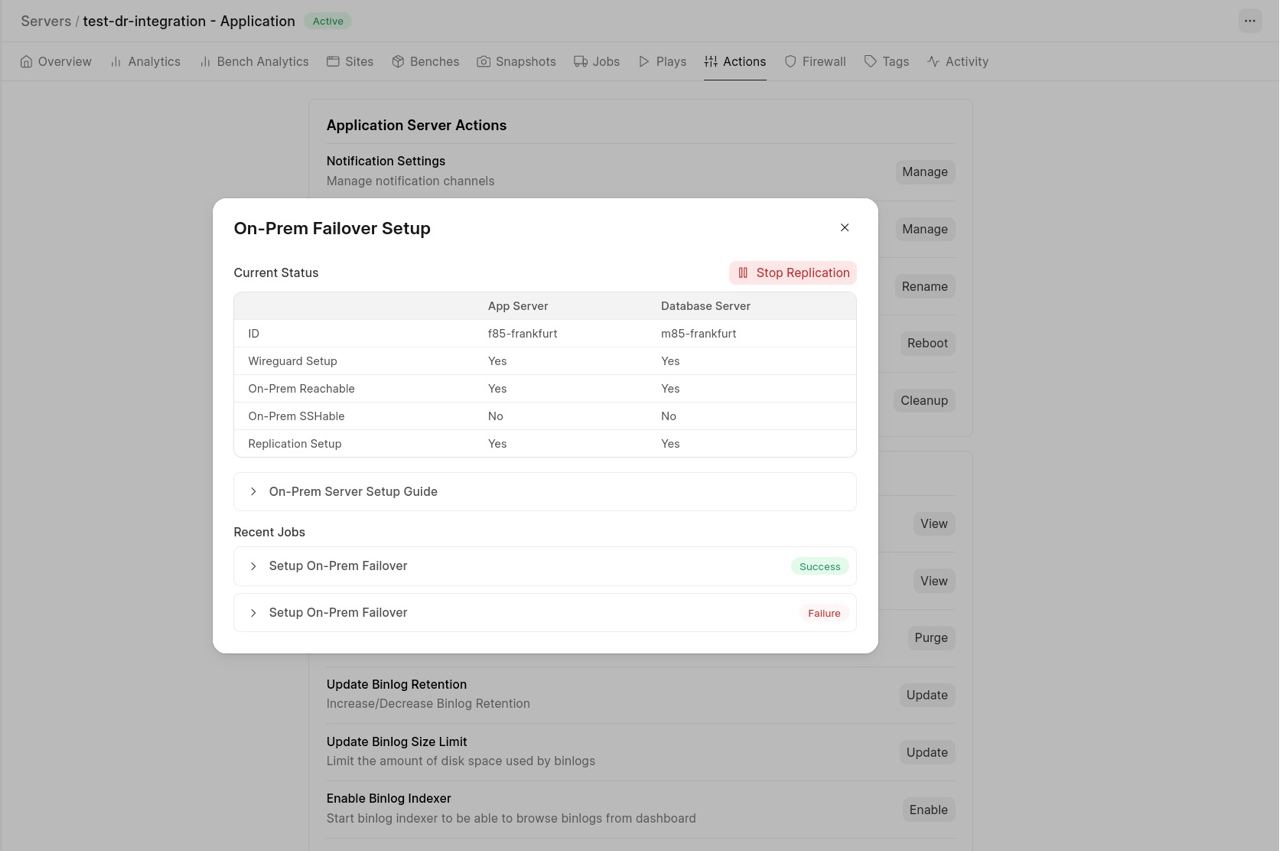
The ongoing conflicts in West Asia let to multiple feature requests of customers and partners demanding cross-region replication support, or at least a basic replication setup, so they can trigger a failover and continue accessing their sites even without internet access, if something happens to their FC servers. So we built on-premise replication and failover support, allowing users to maintain a near realtime backup of your production environment on a secondary machine, such as a local server or even a high-performance system outside Frappe Cloud. In the event of infrastructure outages or regional connectivity issues, you can switch to this backup and continue operations with minimal disruption, targeting a data loss window of under 10 minutes.
The setup connects your Frappe Cloud server to the secondary machine over a secure network and continuously syncs application data, Docker images, and database changes. In a failover scenario (even without internet access), you can activate the backup environment locally and resume operations. The process is managed through a guided setup and a lightweight interface, making it accessible while still giving you control over critical recovery workflows. Note that this feature is not activated by default. If you need this feature, you are requested to raise a ticket at support.frappe.io.


Status Page
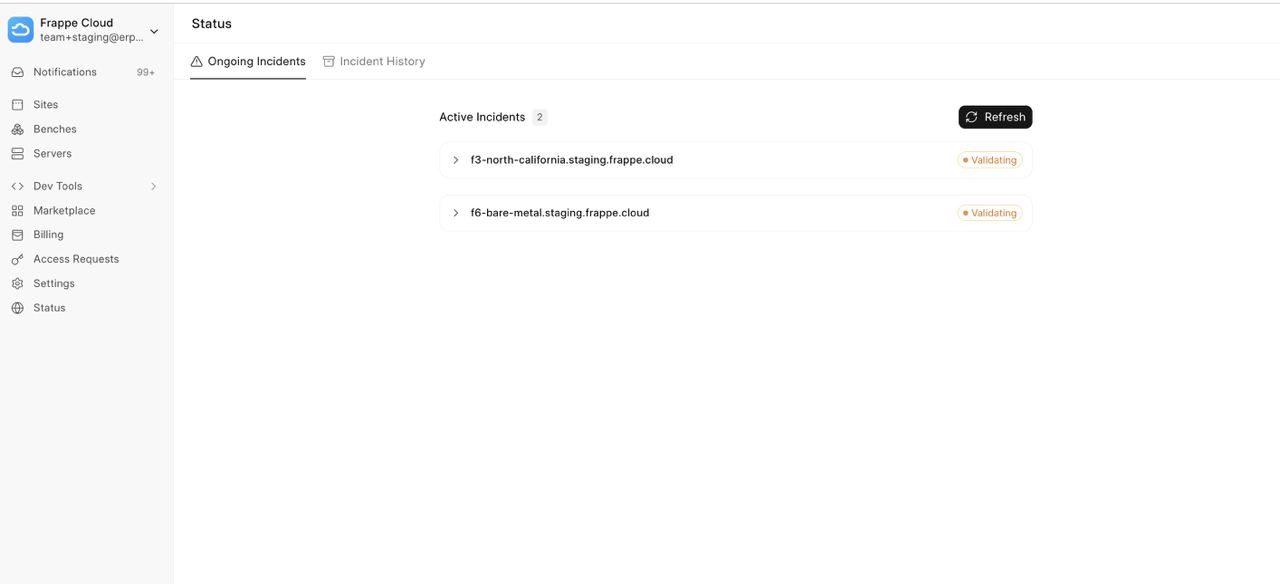
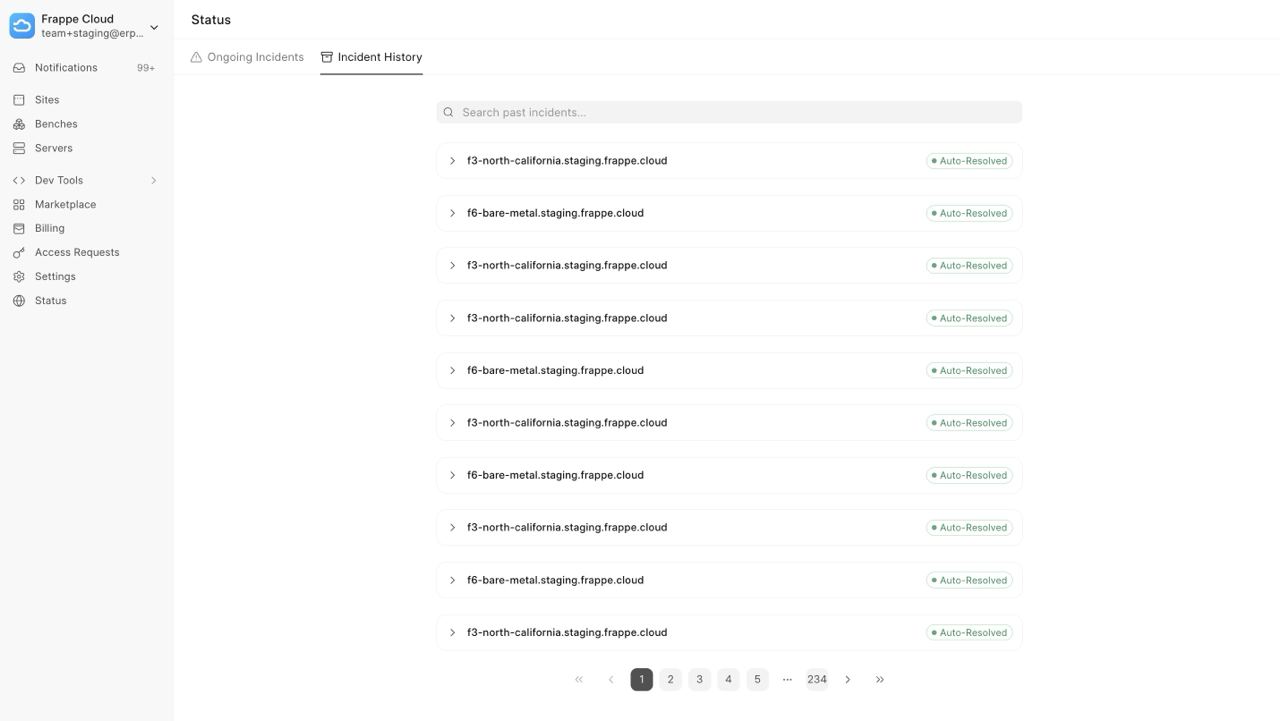
Earlier, when incidents occurred, we used to send users Email Notifications. These were often missed, and users felt a lack of visibility. This month, we introduced a Status Page on the Frappe Cloud dashboard. It gives you real-time visibility into incidents affecting your servers. You can now view ongoing issues as well as the history of past incidents directly within the dashboard (along with relevant details for each event).
Currently, this feature is available for dedicated server customers only. Also, it covers only critical infrastructure failures such as network and disk issues. Over time, this will evolve into a broader status system covering additional areas like builds, DNS, and more, providing a single, reliable source of truth for your system’s health.


Enhancements in Quizzes
Previously, quizzes were sequential. Students had to attempt one question after another. They couldn’t go back to an older question in case they wished to review it before submitting. This behaviour was limiting.
With the latest update, students can now navigate between questions in a quiz. This navigation will be visible only if showing answers is disabled. This will also work for open-ended questions.
But this pagination is not enough. If there are 50-100 questions in a quiz, going back to a specific question would require a lot of clicks. To solve this, students can now mark questions for review. Such questions are maintained as a separate list, which can be seen below the question. Clicking on the question number in this list takes the user directly to that question. They can also unmark the questions once they are sure of their answer.
The submission behaviour has been improved, too. When a user submits, they will now see a dialogue informing them of the number of questions they have attempted and the number of questions that are left. This will ensure they get reminded of questions they missed before they submit.
Live Classes with Google Meet
Previously, live classes were only possible with Zoom. This is not the case anymore. You can now conduct live classes with Google Meet, too. All you have to do is create a Google Meet account in settings and link it to your Google Calendar.
Once that is done, head to the batch, select the conferencing provider as Google Meet, and then select the account that you created. You can then proceed to the live class section and create them as usual. A calendar invite gets sent to all the students along with the Google Meet link. Contributed by Vaibhav Rathore

Work with HTML in Lessons (#2207)
Lessons now support rich HTML content. Previously, when users pasted HTML into lessons, such as headings, code blocks, or lists, the content wouldn't render correctly and appeared as plain text or got stripped away. With this update, that is no longer the case. Course creators can now paste HTML content directly into lessons and have it display as intended.


Sankey Chart (#938)
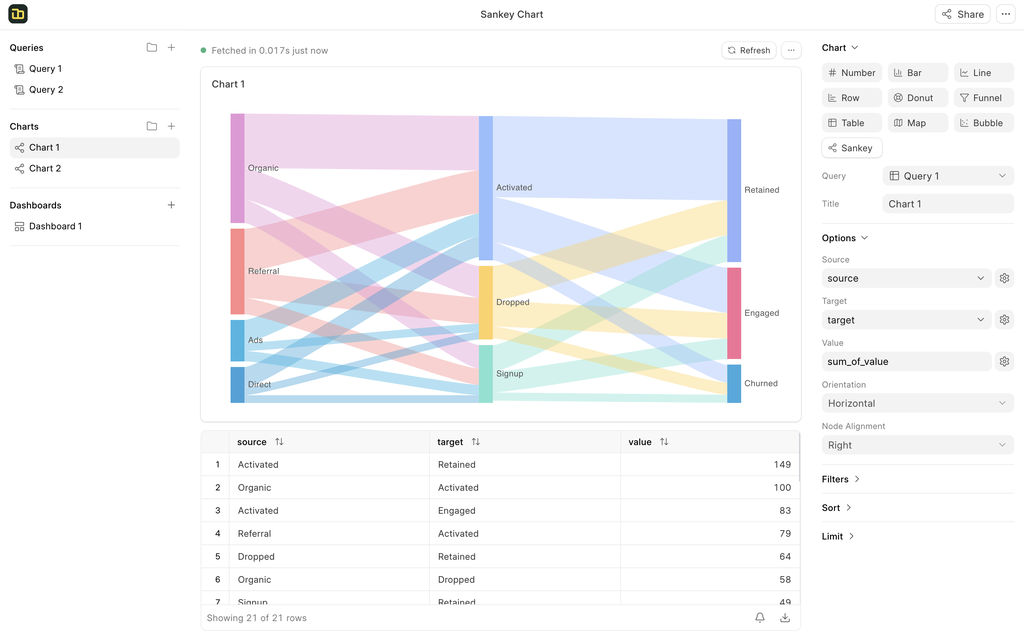
Perfect for tracking the flow of data between multiple stages or categories. A Sankey chart is ideal for visualizing customer journeys, supply chain movements, or budget allocations. It allows you to see not just the "where" but the "how much" as data moves through your defined paths, which makes complex relationships easy to figure out.
Fiscal Year Granularity in Charts (#922)
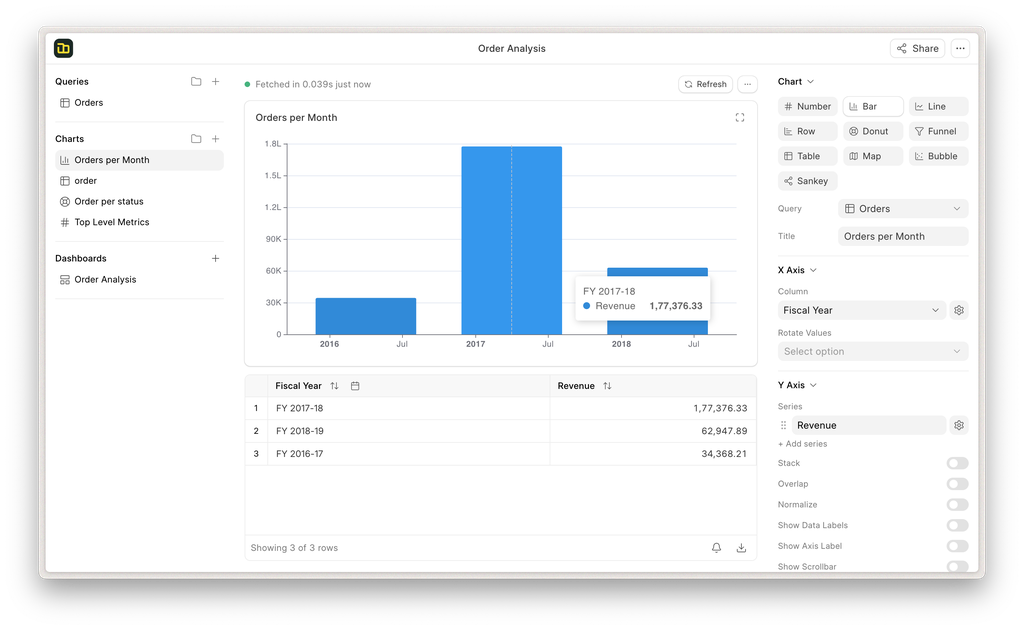
Standard calendar years don't always align with business cycles. We’ve introduced FY Granularity for charts, which allows you to group and filter data based on your specific fiscal period (eg, April to March). This will help generate reports that natively respect your accounting periods
Default Dashboard Filters (#799)
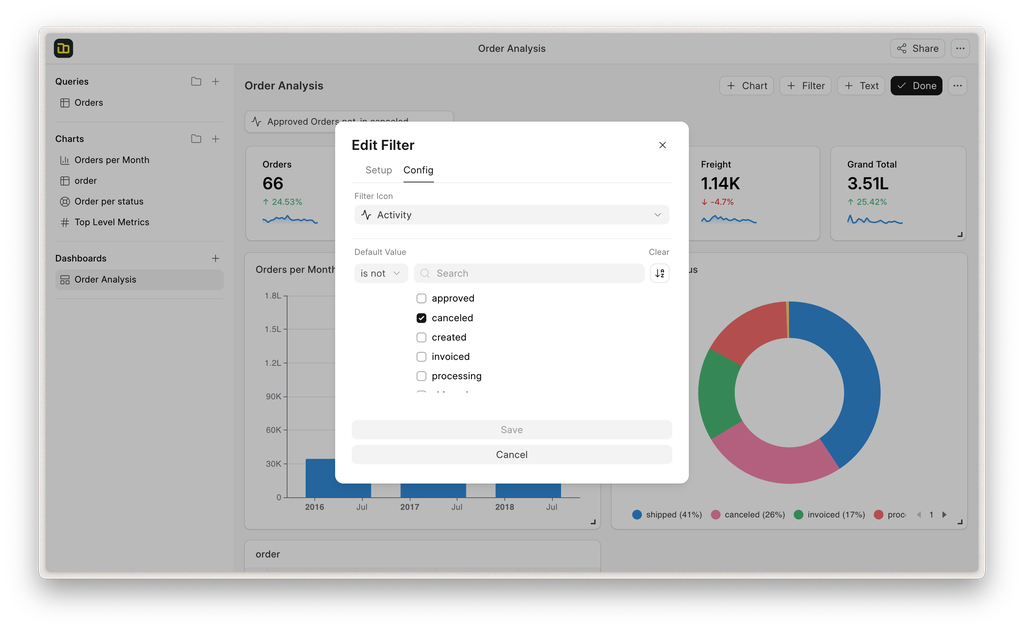
Dashboards are most effective when they show you exactly what you need the moment you open them. You can now set Default Filters at the dashboard level. Whether you want your team to always see "Current Quarter" data by default or filter by a specific "Active Region" this preset will save time and ensure everyone starts their analysis from the same baseline context
Column Width and Text Wrap in Table Chart (#934)
You can now manually adjust Column Widths and enable Text Wrapping. This is necessary for dashboards containing long text fields to ensure your tables remain readable without data being awkwardly cut off or taking up unnecessary horizontal space
Misc
- 12x Faster Data Store Imports (#897)
- Fixed issues related to uploading Excel/CSV files (#964)
- Demo Data (#905)


Introducing the New Agent Home Page
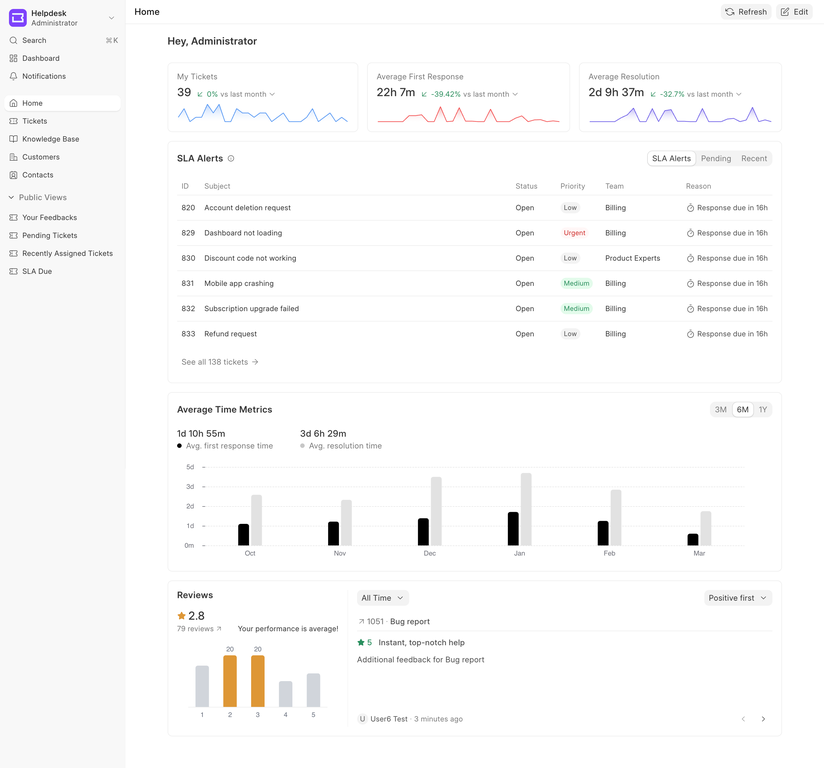
Start your day with a clear view of your workload and performance. Our new Agent Dashboard provides a centralized, fully customizable home page the moment you log in.
Make It Your Own:
- Drag-and-Drop: Easily move and resize chart widgets to fit your workflow
- Personalized Views: Add the charts you rely on and remove the clutter
- Saved Layouts: Your custom configuration is automatically saved for your next session
Available Widgets at a Glance
- Track Workload: My Tickets, Pending Tickets (Open), and Recently Assigned.
- Monitor Performance: Average Response/Resolution Times, First Response/Resolution Cards, and Your Customer Rating.
- Stay on Track: Upcoming SLA Violations.
Dive into the official documentation to start configuring your perfect home page.

UI/UX improvements in Frappe Helpdesk (#2969)
Frappe Helpdesk has undergone significant UI/UX improvements following last month’s bug sprint and UI teardown. This PR addresses active issues, resolves existing bugs, and eliminates UI inconsistencies across the app.
Improved UX in Knowledge Base
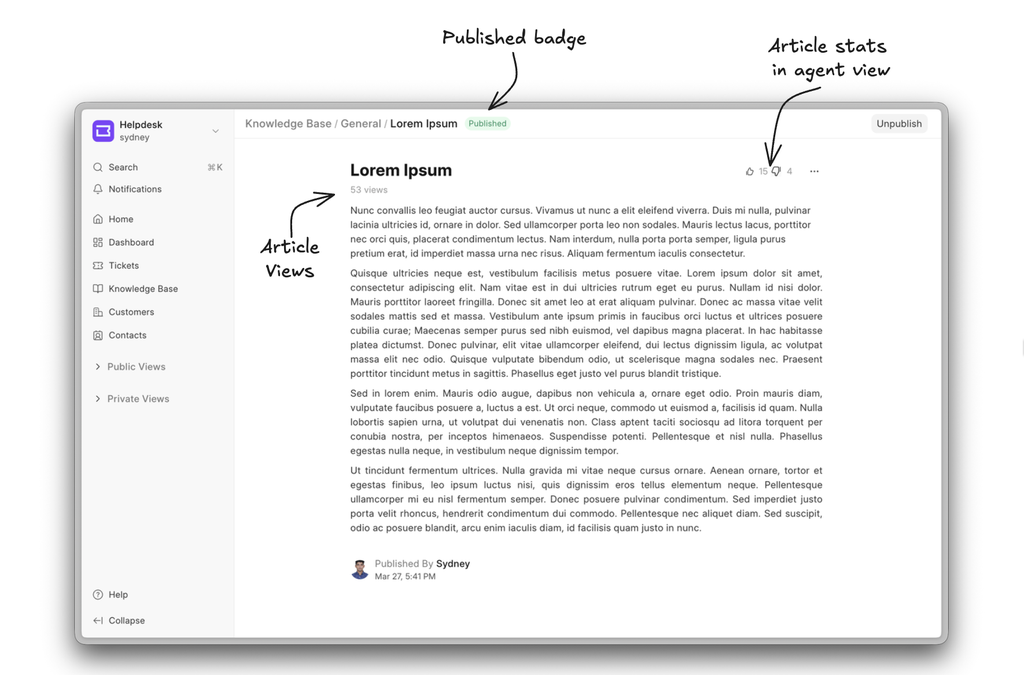
- Articles now give agents better visibility into engagement, with clear indicators for likes, dislikes, and total views. A published badge is now also added to indicate the article's status.
- Customer portal articles have been redesigned for a more modern and user-friendly experience.
.png)
Enhanced empty states for list views and dashboards: Empty states are now more informative and clearer based on user actions & feedback.
- List views now provide clearer empty states that explain when filters are applied and why no data is available.
.png)
- Empty states and skeleton loaders for dashboard charts have been added to give a rich user experience to our users. Additionally, a quick action has been added to compare stats between the organisation and the agent user.
This PR addressed key UI issues, resolved inconsistencies, and enhanced overall usability, making Helpdesk more reliable, consistent, and user-friendly for everyone.


Translatable Link Field Values (#1823)
Link field values across the CRM are now fully translatable. This ensures that linked records like status, source, and categories are displayed in the user’s preferred language, improving usability for multilingual teams.
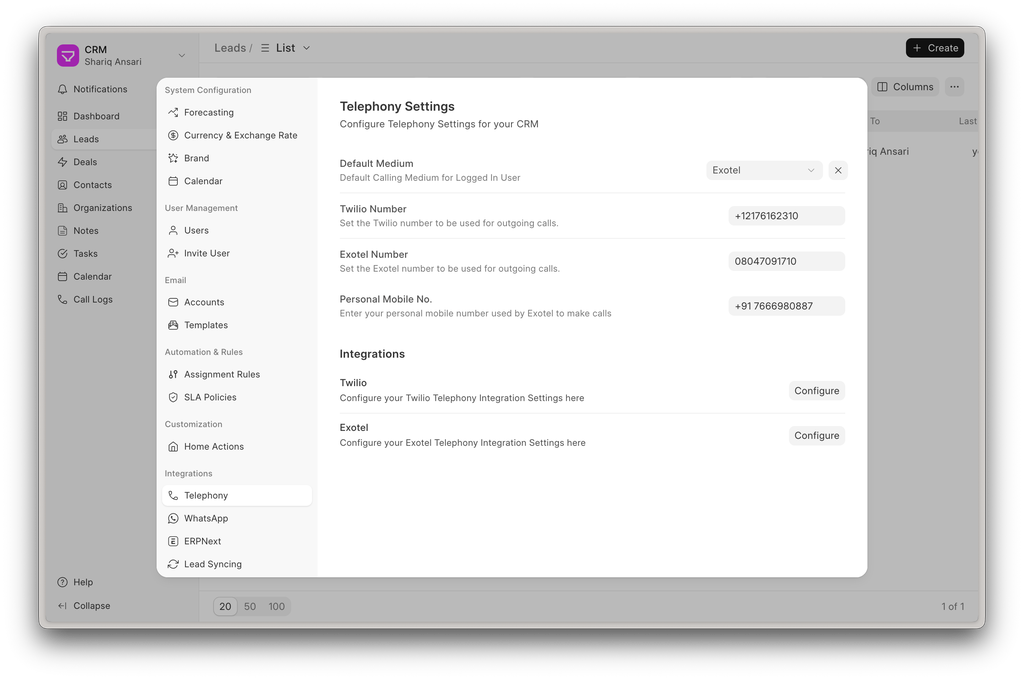
Telephony Settings & Recording Improvements (#1848)
Improved the overall telephony experience with multiple fixes and enhancements. Call recordings from providers like Exotel and Twilio now play seamlessly without authentication prompts.
Additionally, Telephony Agent management previously limited to the desk has been brought into the CRM interface with a cleaner and more intuitive UX, making it easier to configure and manage telephony integrations.
Profile & Preferences Revamp (#1859)
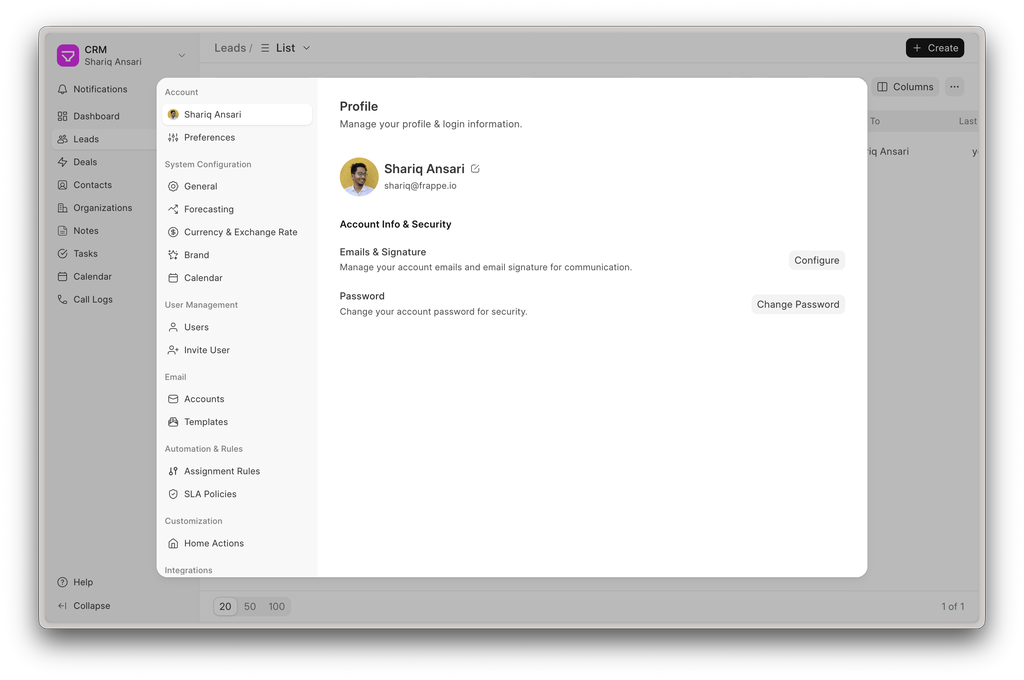
Refactored Profile Settings to provide a more comprehensive and user-centric configuration experience.
Users can now: - Set up a personalized Email Signature & Outgoing Email Accounts
.png)
- Select a From Email with linked email account configuration
.png)
- Manage Preferences, including theme, language, and timezone
.png)
This makes communication and personalization more flexible, especially for teams operating across different regions and identities.
Improved Activity Tracking (#1871)
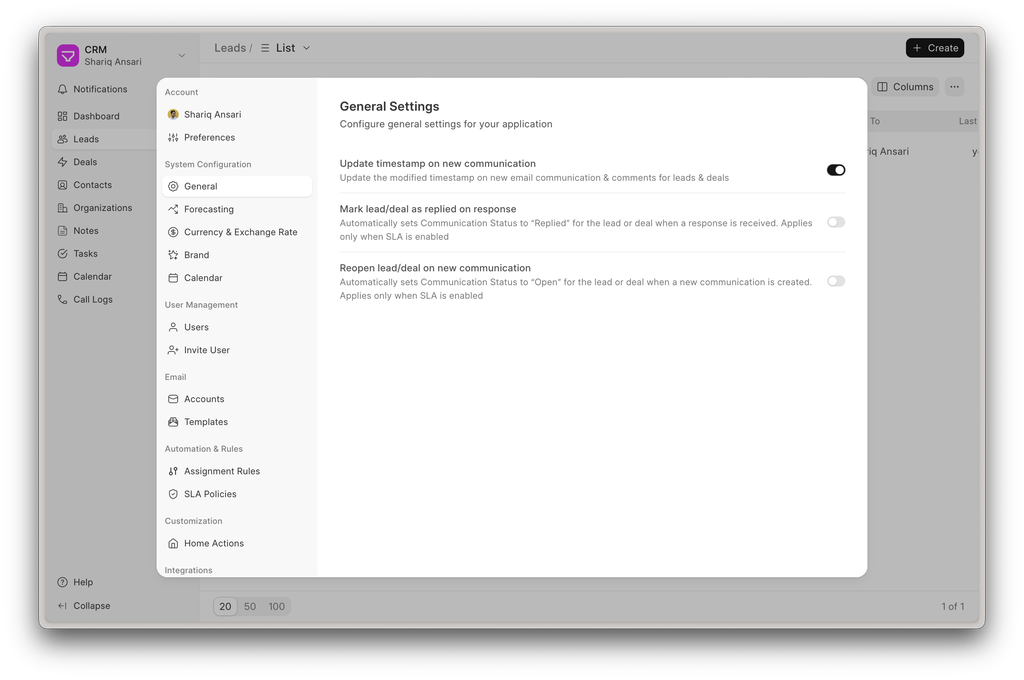
The modified timestamp of Leads and Deals now updates automatically whenever a new communication or comment is added. This ensures activity-based sorting and filtering always reflect the latest interactions.
Automated Communication Status
Communication status can now be automatically managed based on activity. You can configure the system to: - Mark records as Open when a new communication is received - Mark records as Replied when an email response is sent
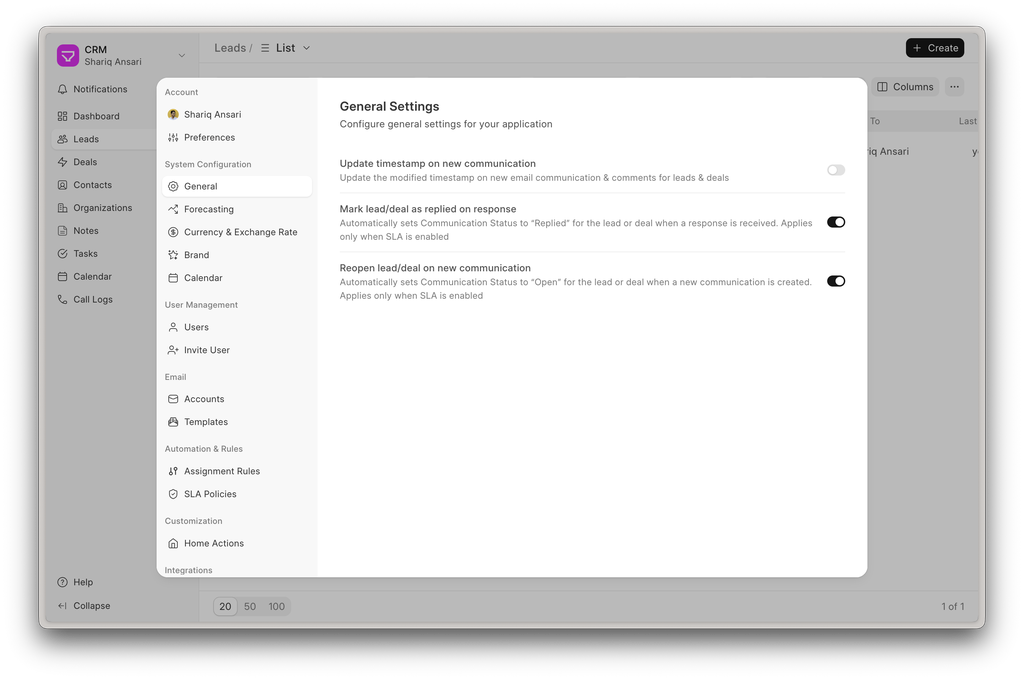
This reduces manual effort and keeps the communication state aligned with real-time interactions.
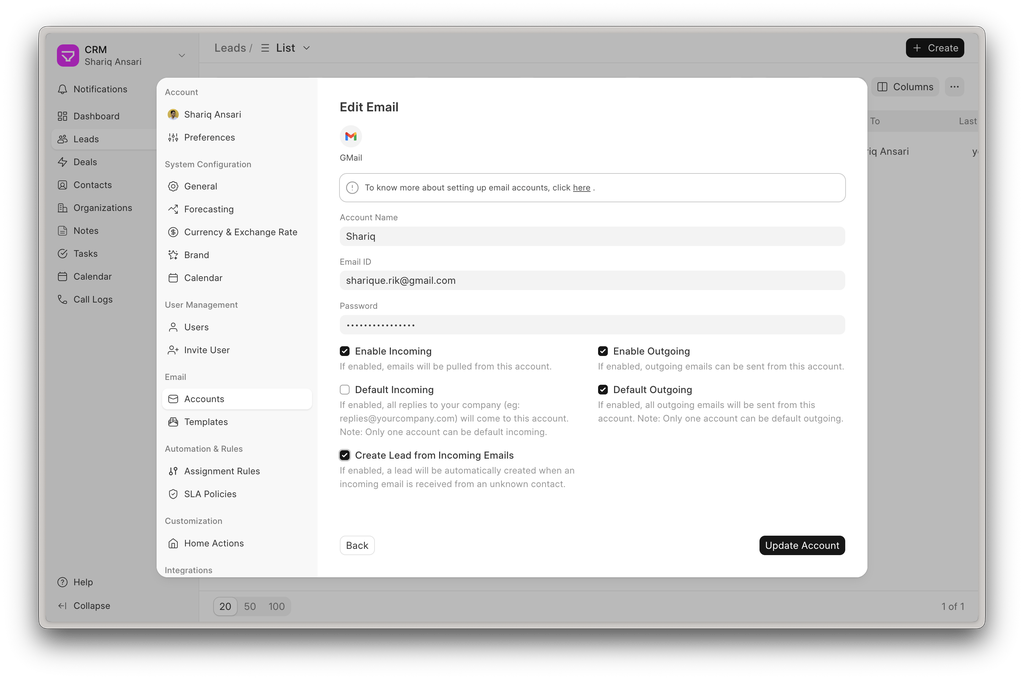
Create Leads from Incoming Emails (#1878)
Each email account with incoming mail enabled can now be configured to automatically create Leads. This ensures that inbound emails are directly captured as potential opportunities without manual intervention.
Automatic Demo Data Setup (#1899)
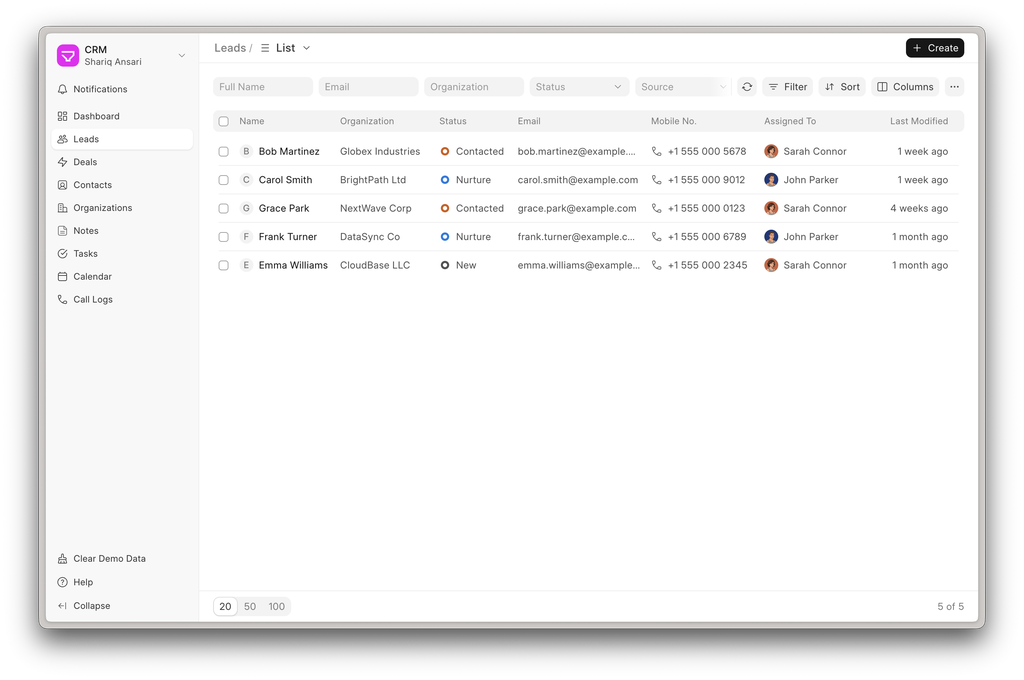
Demo data is now automatically created when a new site is set up and the setup wizard is completed. Users also get a one-click option to clear demo data from the sidebar, making it easy to reset the system for fresh use or demos. This is especially useful for trials, demos, and onboarding—allowing users to explore the product with realistic data and reset it easily.
.jpg)
.jpg)
.jpg)


Scriptable block with props support (#459)
Now users can create their own functional components inside builder by adding their own scripts and exposing props as an input for variable values. Check out the following demo of this feature.
Gradient Editor (#521)
Shadow%20Editor%20(PR%20Link).png)
Shadow Editor (#531)
To manage complex shadows right from the editor.
Shortcut Dialog (Shift + /) (#516)
To check out all the available shortcuts in the editor
%20(PR%20Link).png)


The biggest update to Drive since its inception is brewing. Instead of a standalone app, Drive will now act as a powerful extension of the Framework File Doctype!
While over the past year we’ve added many useful features (like S3 integration, or basic Office files viewing) the biggest thing we’ve heard from users so far is that Drive is completely separate from Frappe Framework/ERPNext. This means that Drive’s features are not particularly useful for most users in the Frappeverse.
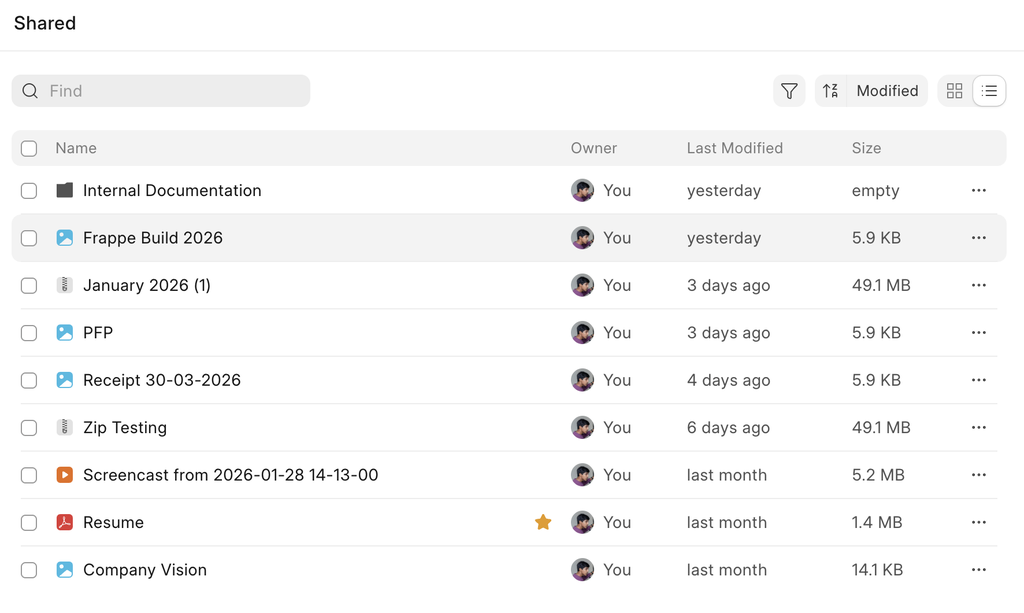
All of that is changing with Drive v0.4. Drive files are now first-class citizens on Desk - they can be used everywhere, just like normal files. But you also get all of Drive’s features, like advanced permissions or folder structures.
You don’t have to use the File list view anymore - Drive offers a powerful and aesthetic frontend over the File doctype.
You can see the attachments on your site in a separate page, categorized by doctype and record - allowing you to quickly analyze where the attachments in your sites are.
.png)
There are also lots of cool small features, like seeing all the records to which a file is attached to:
.png)
Drive v0.4 is in beta, and we’re looking for testers. Please go ahead and check it out at frappe/drive#604 to test!

And that's it 👋
That’s all for this month’s updates. See you at Frappe Build!


·
Do you guys sleep?
·
Nice... keep up the great job guys