


At the beginning of this month, we hosted Frappe Build — and it was a big success! The event featured around 20+ talks by 25+ speakers over the course of two days. We had about 200+ people attending each day, listening to talks and connecting during the breaks. If you missed it, you can watch the livestreams for Day 1 and Day 2 on our YouTube channel.
Here are the updates from April...
Table of Contents

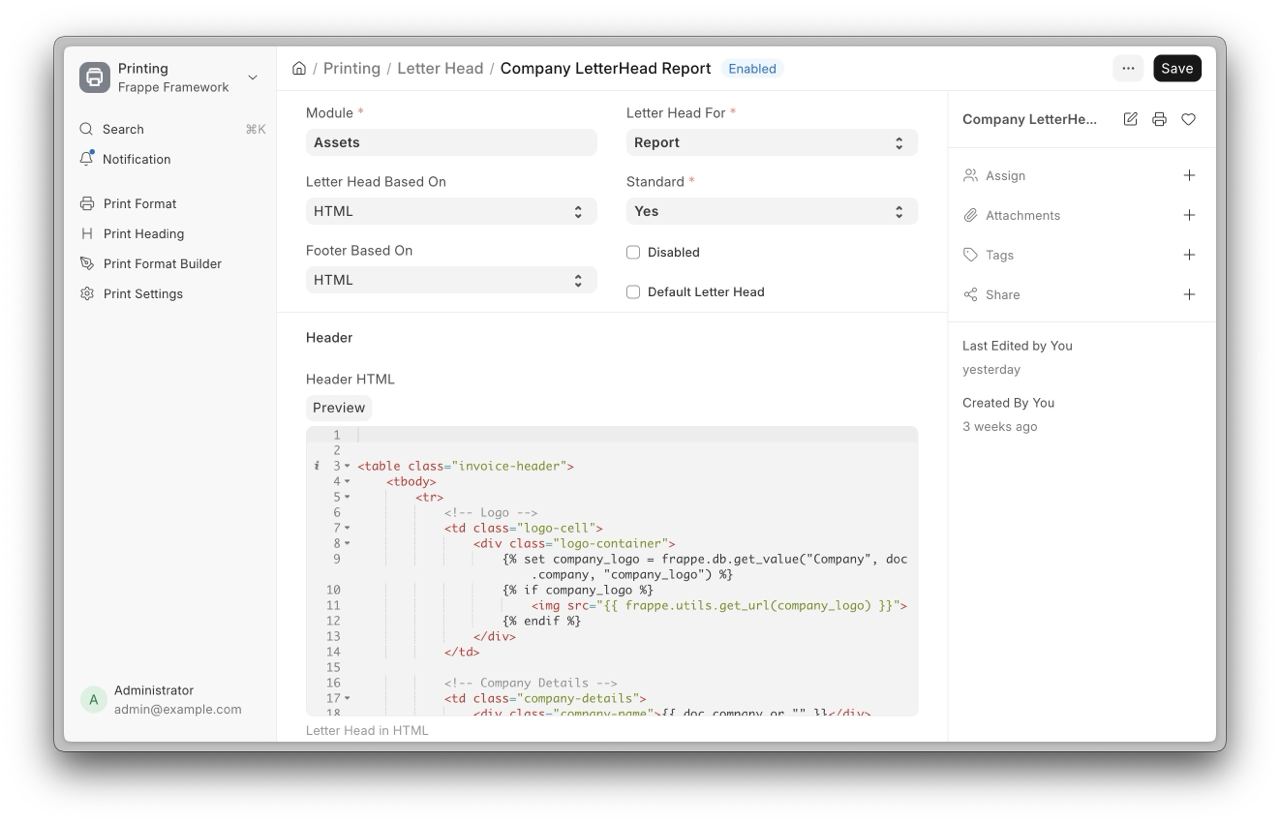
Standard Letter Heads (#38417)
The Framework now allows Letter Heads to be defined and shipped directly through code, making them part of the app’s standard setup. Each Letter Head can be explicitly assigned using the “Letter Head For” field, which supports either DocType or Report, ensuring it is applied in the correct context during print template rendering.

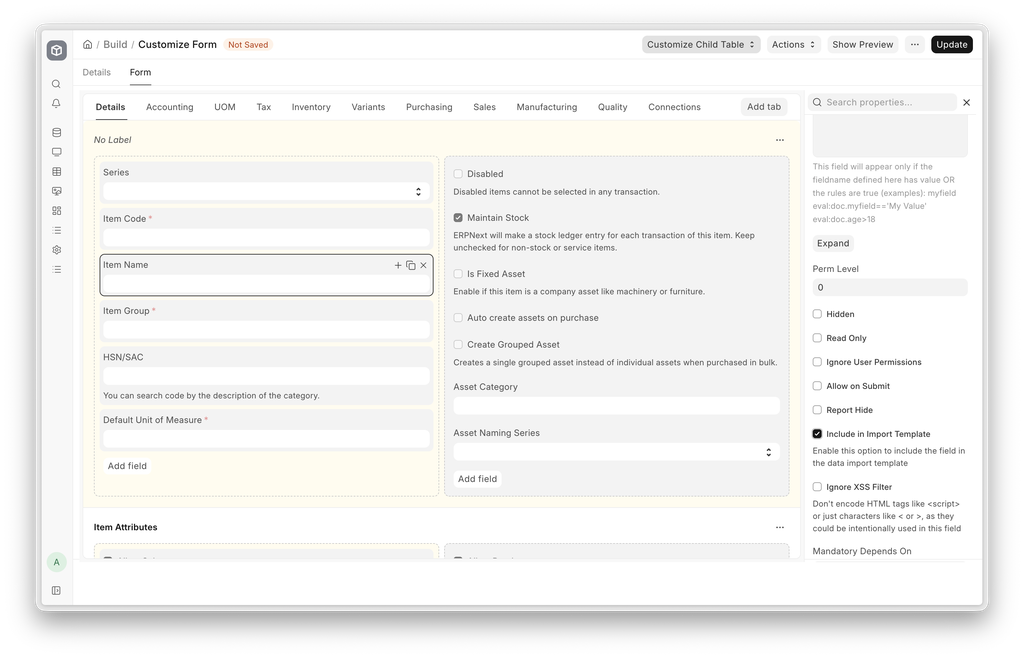
Import templates & export modal (#38523)
When importing or exporting data, Framework used to select only the mandatory fields by default, and users had to manually select other important fields that they wished to import or export. Now, you can set fields to be Included in import template (either in the DocType configuration or through Customise Form) so the ones that matter are already selected. We also cleaned the UI in the column selection dialog to show required and dependent fields.
.png)
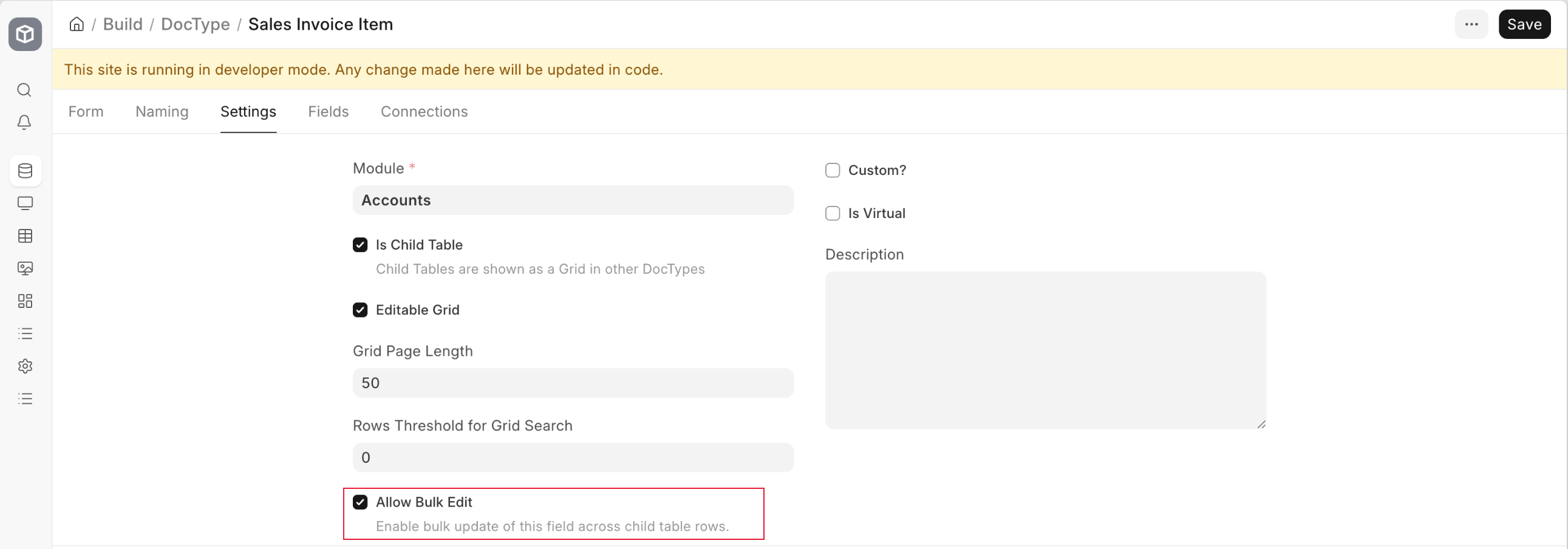
Bulk Edit in Child Tables (#38567)
Framework now supports bulk editing values in a child table. This would be helpful in a lot of scenarios especially in ERPNext: think setting a Warehouse for multiple items in a Purchase Invoice in one go.

Bulk Fetching Documents
The Framework now includes a frappe.get_docs API, designed as an optimized replacement for the common get_all and get_doc pattern. This new method significantly reduces database overhead by fetching parent and child table data in bulk, rather than executing a separate query for every individual document.
It supports two modes: Eager fetching, which loads all documents into memory at once, and Lazy fetching, which uses iterators to yield documents in chunks (default chunk_size = 1000). This lazy approach is particularly effective for handling large datasets or background jobs where maintaining a low memory footprint is a priority.
Usage:
invoices = frappe.get_docs("Sales Invoice", {"docstatus": 0}, order_by="posting_date desc")

for invoice in invoices:
    invoice.status = "Processing"
    invoice.save()

for doc in frappe.get_docs("Log Doctype", as_iterator=True, chunk_size=500):
    doc.process()
Undo Email
The Framework now allows you to undo emails after sending. Clicking the undo toast notification reopens the communication UI, letting you make quick corrections or add attachments before the message is dispatched.


Standard Print Format for Reports
Replaced outdated and inconsistent HTML-based print templates used in report backends with standardized print formats. This update introduces clean and consistent print layouts for key reports, including General Ledger, Accounts Receivable (AR), Accounts Payable (AP), AR and AP Summary, and financial statements such as Balance Sheet, Profit & Loss Statement, Cash Flow, and Trial Balance.
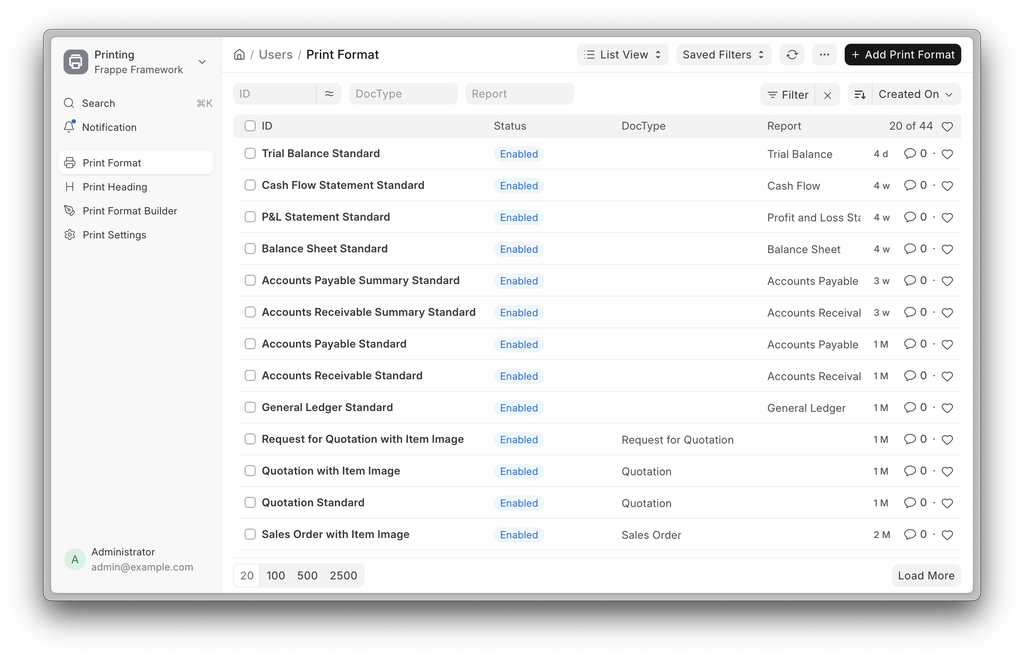
General Ledger Report Print Format Example
.png)
“Not Applicable” Tax option in Item Tax Template
“Not Applicable” check is added in Item Tax Templates to clearly distinguish between a 0% tax rate and taxes that should not apply at all, ensuring items are fully excluded from irrelevant tax calculations.
Project Filter Enabled for Accounts Receivable and Accounts Payable Reporting
A new Project filter has been introduced in AR/AP reports, allowing users to view receivables and payables specific to individual projects.
Contributed by (Lakshit Jain)
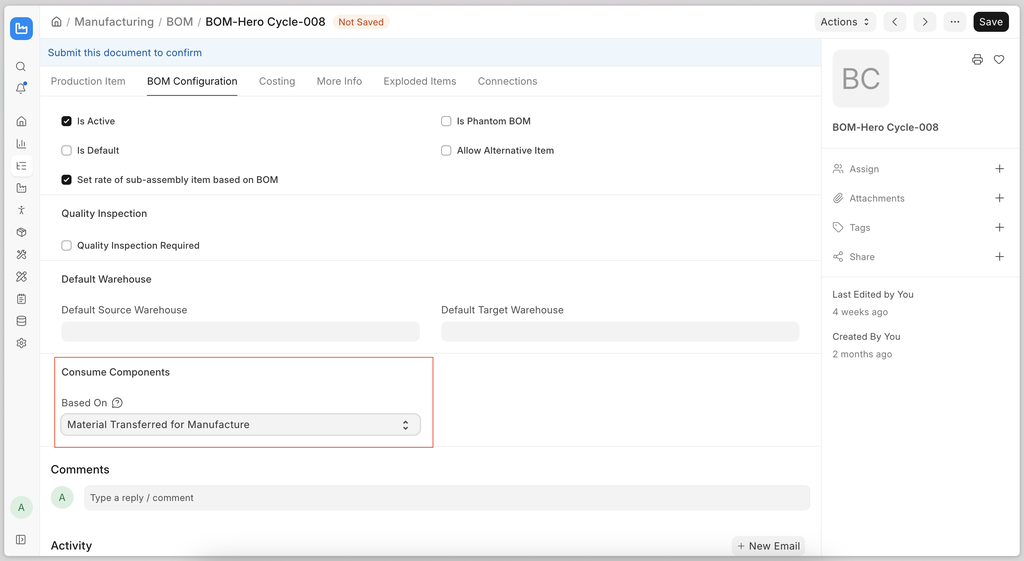
Backflush based on the BOM
The ‘Backflush Based On’ option is available in Manufacturing Settings. The same option has been added to the BOM in v16. If a value is set in the BOM, the system will ignore the 'Backflush Based On' setting in Manufacturing Settings.

Polishing Crew
This month, we assembled a team to focus on polishing and improving the user experience and interface across ERPNext (including Framework). We’re going through each form in ERPNext one by one and reorganising fields, setting proper labels and adding sufficient descriptions in fields to make it easier for users to understand what a particular setting does.
So far, the polishing crew has “polished”:
Other forms are in progress.
We’re also surfacing more tools like document naming right in the module settings pages - earlier this used to be very difficult to find for new users under “Document Naming Settings” (#54554).




Recruitment Improvements
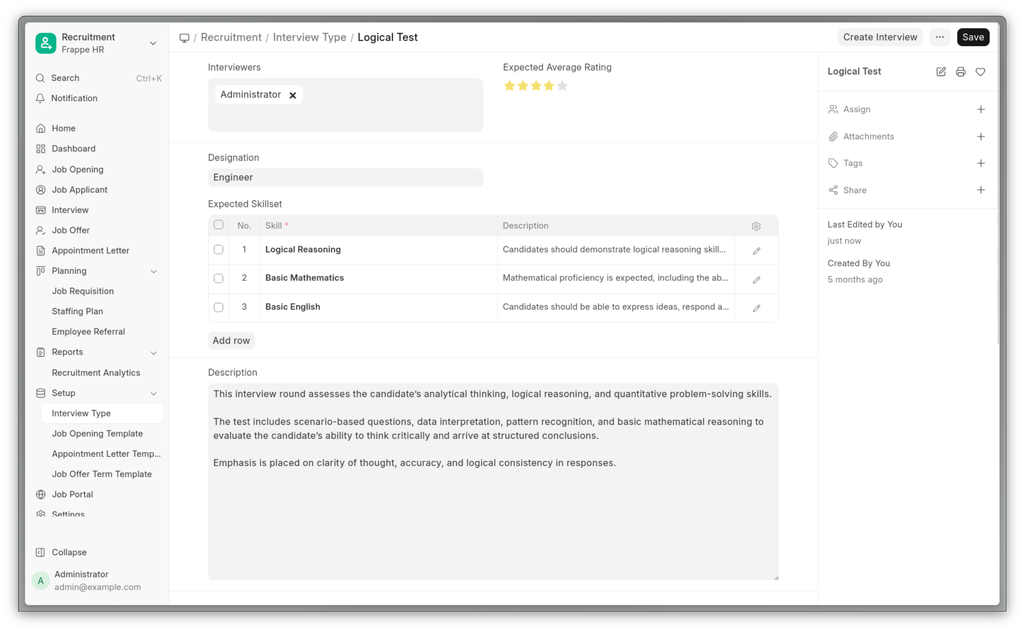
The interview type only had name and the description of the interview type, which was linked to the interview round. It seemed a good idea to merge the two, so now all the interview type details live in the same doctype.
Create a job opening right from the template and have more job openings auto-populated.
See important information about the job applicant at a glance and shortlist or reject candidates quickly with action buttons on the toolbar, and yes, the next document buttons are back on the job applicant doctype to help users navigate between applicants quickly.

Leave Application Dialog Calendar view
Before, it used to take to the leave application form. Now we can create the leave through the dialog, and if we want to take a half day or edit the full form, we can just use the open full form button, which will keep the changed fields as they are.

Improved Default Role Permissions for HR Users and Managers (#4264)
Default role permissions across HR modules have been updated to ensure consistent access to reports, dashboards, and linked doctypes.
Earlier, incomplete permission settings limited access for HR Manager and HR User roles. Users often had to manually add permissions to access required data, making the process time-consuming
Employee-Specific Advances in Expense Claims (#4276)
Earlier, advances from other employees could be linked to an expense claim, leading to data inconsistencies. Now, advances are filtered based on the selected employee, and incorrect linking is prevented through checks on both client and server side.
This improves data accuracy and prevents cross-employee mismatches
Repeated Additional Salary Entries in Salary Slip (#4378)
When a zero-valued additional salary was created and Remove if Zero Valued was disabled in the salary component, the component was added once on save as expected. However, on submitting the salary slip, the same component was added multiple times.
This has been corrected to ensure additional salary components are added only once, maintaining accurate salary slip during submission.
Leave Application Self-Approval Restrictions in PWA (#4395)
Earlier, even when Prevent self approval for leaves even if user has permissions was enabled in HR Settings, users could still see Approve/Reject actions on their own leave requests. While backend checks prevented the action, this created an inconsistent experience.
Now, these actions are no longer shown when self-approval is restricted, improving clarity and overall user experience

Other Fixes
Email notifications for salary slips with future posting dates are now queued and sent only on the posting date, instead of being triggered immediately on submission. This applies to both direct submission and Payroll Entry flows. Contributed by: March Ramser
The
/hrmspage now correctly passessite_namein the context, fixing an issue where the frontend received a placeholder value. This ensures the Socket.IO connection uses the correct namespace and real-time works as expected. Contributed by:Daniel RadlAttendance Request list in the Frappe HR Mobile App now correctly shows total days instead of the raw placeholder. Contributed by:Nareshkanna S

Right to Left Support
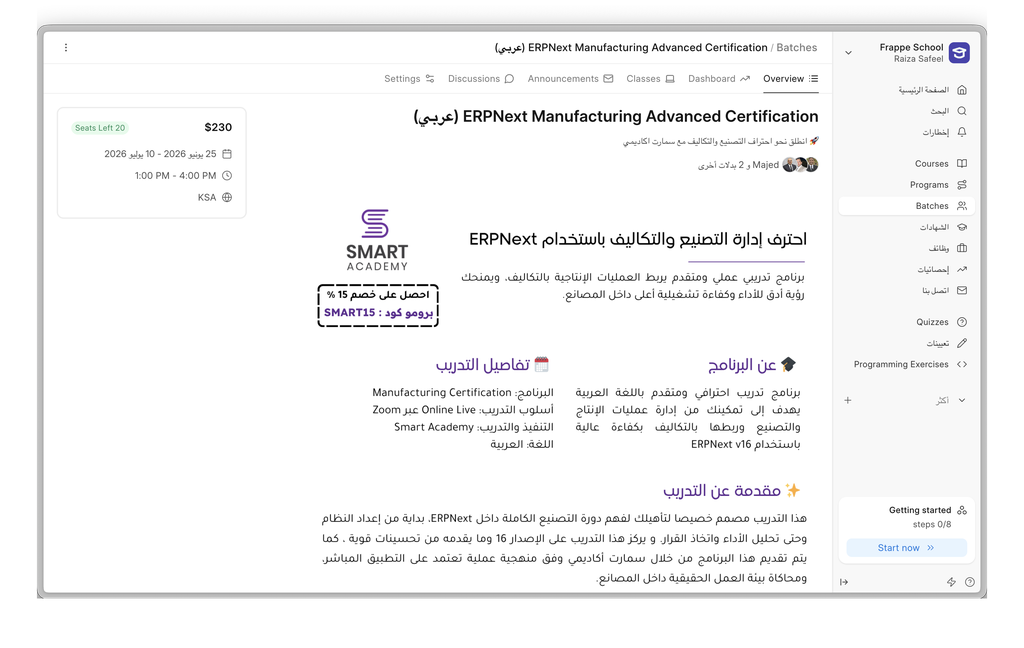
Learning now has RTL support for languages that require it, like Arabic, Farsi, Hebrew, and Urdu; the entire interface automatically mirrors when you switch to one of these languages.

Duplicating a Course
There was no easy way to duplicate a course from one site to another. There are just too many doctypes involved. So duplicating a course required a lot of manual effort.
This feature simplifies duplicating a course from one site to another. You can now export a course as a zip. This zip contains all the course metadata along with all its chapters, lessons, assessments, and assets.
You can then import this zip package on another site with the Learning app installed. This process would create the course along with all its dependencies on the new site.


Datastore for SQL Queries
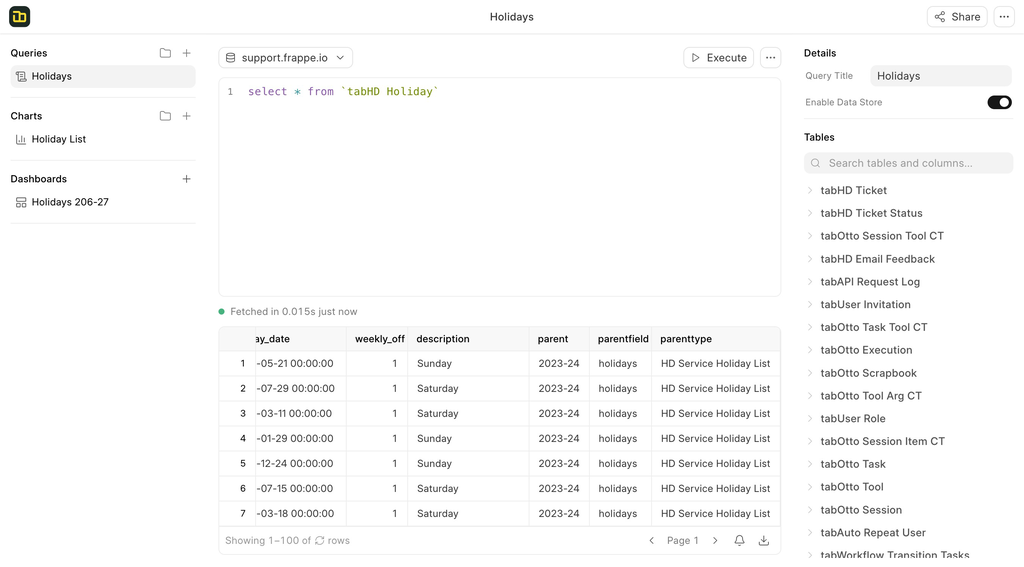
For a long time, only visual queries were supported in datastore which is powered by DuckDB. Now you can write SQL Queries directly from the warehouse when data store toggle is enabled for a query. This will exponentially improve the querying speed of the slowest queries.
When datastore is enabled, tables referenced in the SQL are automatically imported into the warehouse if they’re not already present otherwise, it connects to DuckDB to query your data.
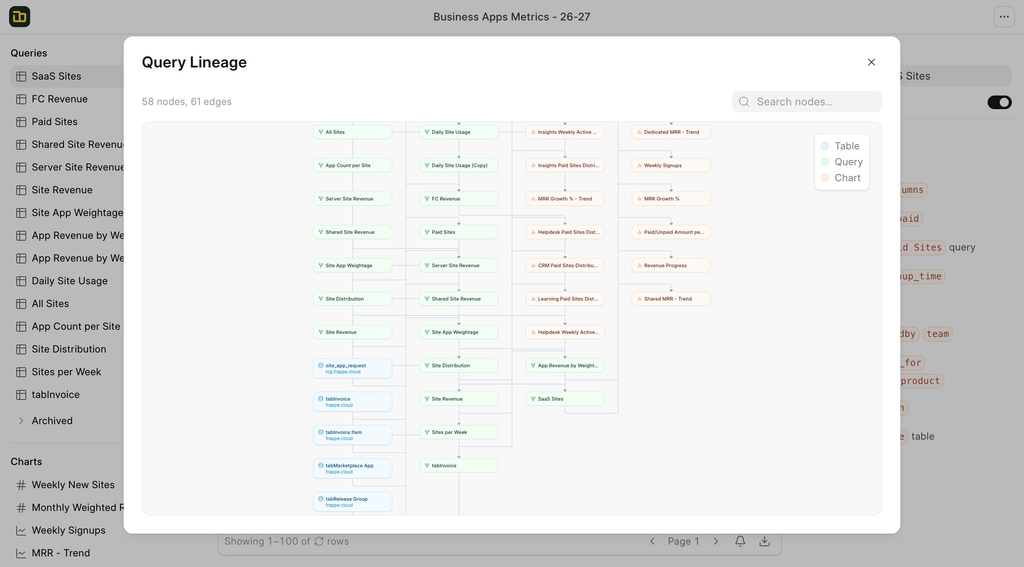
Lineage Graph
When the number of queries and charts grows in a dashboard, after a certain point it becomes difficult to manage the lineage of the chart to find out which queries and tables its based on.
Query Lineage graph makes it easier to visualize the dependent queries and tables which are used in a chart to investigate issue quickly and also solve circular dependency issues you may come across.


Threading in Helpdesk (#3215)
Email threading has been a long-standing pain point in Frappe Helpdesk.
Issues often arose when emails were forwarded or when important email headers were missing during communications occurring in a ticket. In such cases, the backend would treat a reply as a brand new, unique communication, spawning a duplicate ticket instead of appending it to the existing thread. This led to fragmented conversations, lost context, and a lot of confusion between agents and customers.

To fix this, we introduced a fallback threading strategy that uses the References email header. Unlike In-Reply-To, which points to a single parent message and is often stripped during forwarding, the References header contains a full chain of message IDs from the entire conversation thread — and is preserved even in forwarded mails.
.png)
When In-Reply-To is missing or unresolvable, we now parse the References header, iterate through the message IDs in reverse to find the most recent match, and correctly link the communication to the existing ticket.
Feels like we've finally put the final nail in the coffin on this one.
Email Signatures are here! (#3188)
In our ongoing efforts to enhance the agent experience, we have improved the settings panel and added new features, including the widely requested Email signature.
No more copy-pasting your name, title, and contact info into every response.
Setting up is really easy. All you have to do is go to your profile settings and click on the configure settings as shown below.
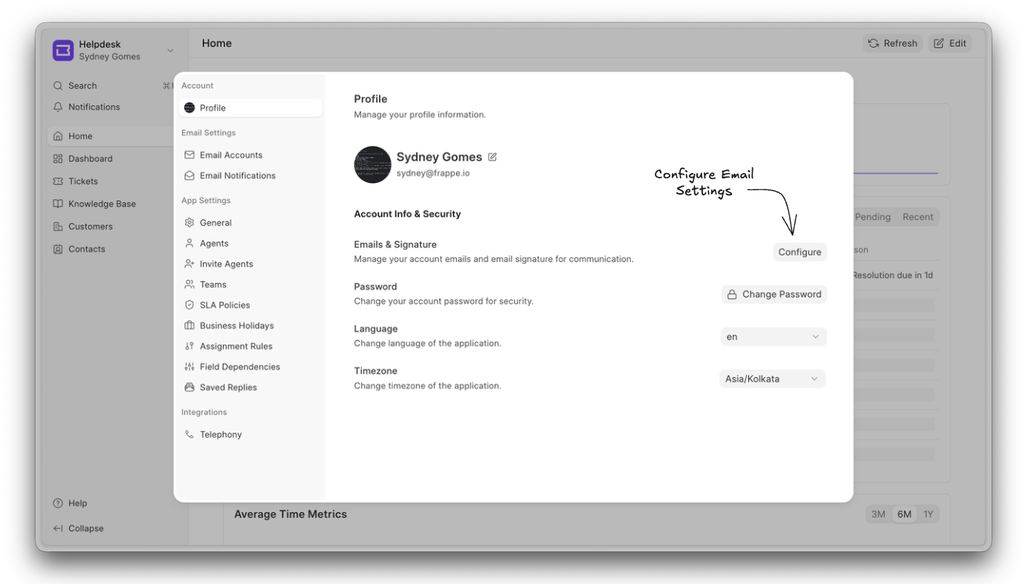
In this section, users can set or change their email signatures and also configure their outgoing emails.
.png)
Users can now also switch quickly between their configured outgoing emails in the From section of the email editor.
.png)
This makes communication simpler and faster without any extra back and forth.


Here is a quick look at what we've been working on for Frappe CRM this month. We spent a lot of time adding new field types, cleaning up the UI, and making the developer experience much better for form scripts.
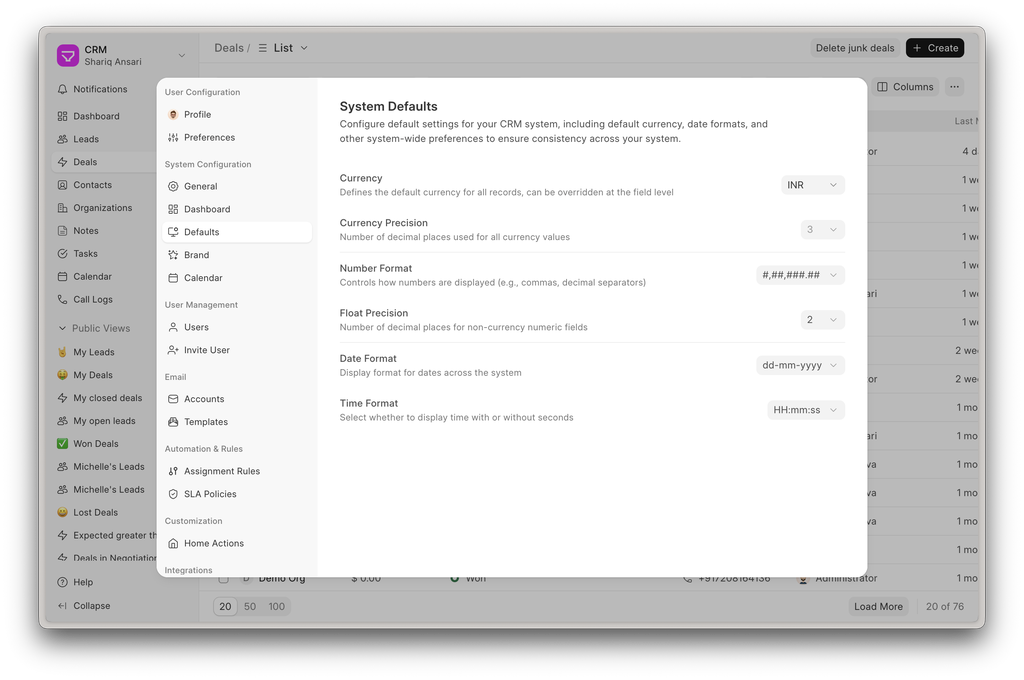
System Defaults & Dashboard Settings
We moved the System Defaults and Dashboard settings to their own dedicated tab inside the Settings modal. It just makes things a bit cleaner and easier to find:
Field Layout Editor Improvements
We did some UI cleanup on the Field Layout Editor to make it feel smoother. The biggest update here is that you can now drag and drop sections, columns, and individual fields directly from one tab to another.
New Field Types Supported
We’ve added support for a bunch of new field types to bring the CRM closer to Desk, but with a much better UI/UX. Here is what’s new:
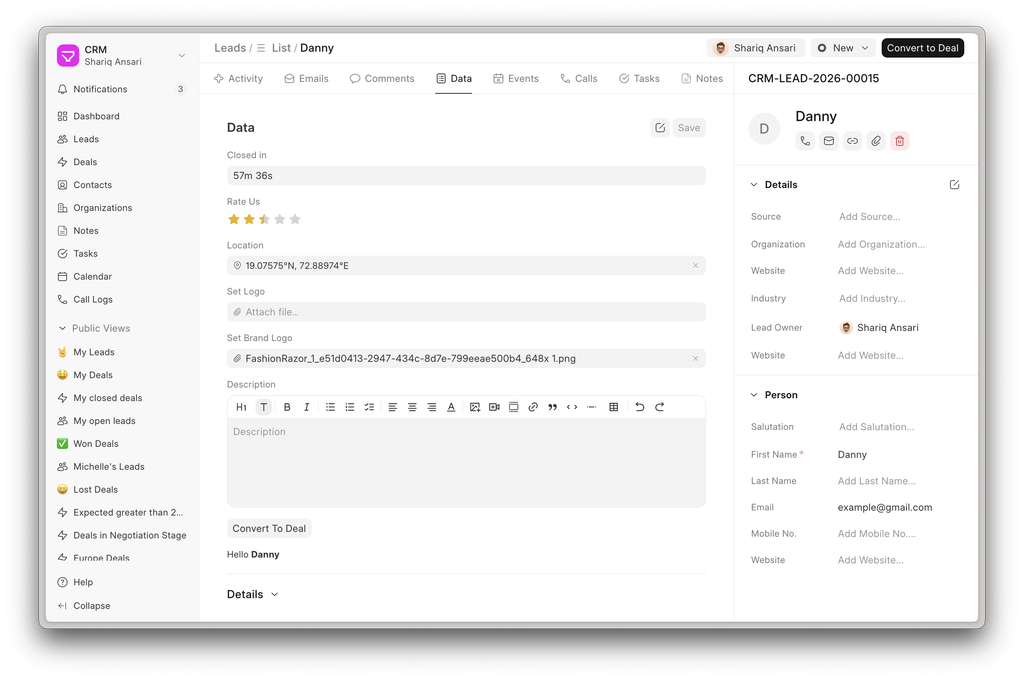
- Duration: Time data actually looks readable now (e.g.,
1h 2m 3s) - Rating: Star ratings are here. It supports half-stars, just like Desk
- Geolocation: Map UI is fully supported with a much better layout than standard Desk
- Attach & Attach Image: Both are supported now with a cleaner upload UI
- Text Editor: Standard rich text support
- Button: You can now add buttons and trigger them easily via Form Scripts
class CRMLead {
    // Button field with fieldname 'send_brochure'
    send_brochure() {
        if (!this.doc.email) {
            throwError("No email address on this lead");
        }
        call("send_brochure", {
            lead: this.doc.name,
            email: this.doc.email
        }).then(() => toast.success("Brochure sent to " + this.doc.email));
    }
}
- HTML: You can inject custom HTML dynamically using
setFieldHTML
class CRMLead {
    async status() {
        await this.doc.trigger("renderSummary"); // calls _renderSummary on this controller
    }
    renderSummary() {
        this.setFieldHtml("lead_summary", `<b>${this.doc.status || "—"}</b>`);
    }
}
If you don't call that, the field will just act as a static template. It reads the text from the field's Options and substitutes tokens automatically, like this:
<b>{{ lead_name }}</b> — {{ status }}
Form Script Upgrades
We pushed some major updates to Form Scripts to make client-side customizations much easier to handle.
- onRender/on_render method: fires every time a page renders or is revisited. It’s perfect for route-aware side effects like switching to a specific tab or updating a summary banner
class CRMLead {
    async onRender() {
        // Always refresh the HTML summary banner
        await this.doc.trigger("_renderSummary");

        // Only jump to the Emails tab when arriving from a *different* page
        const prevPath = router.previousRoute?.path;
        const currPath = router.currentRoute.value.path;
        if (prevPath === currPath) return; // same-page re-render — skip

        router.replace({ ...router.currentRoute.value, hash: "#emails" });
    }
}
- onValidate/on_validate method: fires right before a save. If you need to block the save, just throw a
new Error(or callthrowError) and the error message will automatically pop up as a toast
class CRMLead {
    onValidate() {
        // Require at least one contact method
        if (!this.doc.email && !this.doc.mobile_no) {
            throwError("Provide at least one contact method (email or mobile)");
        }

        // Validate a number field
        if (this.doc.annual_revenue < 0) {
            throwError("Annual revenue cannot be negative");
        }

        // Validate a Check field
        if (!this.doc.is_gdpr_consent && this.doc.source === "Website") {
            throwError("GDPR consent is required for website leads");
        }
    }
}
- Field Property Overrides: You can now dynamically change field visibility, editability, and options at runtime without needing a page reload
class CRMLead {
    onLoad() {
        // Hide a field
        this.setFieldProperty('lost_reason', 'hidden', true)

        // Make a field read-only
        this.setFieldProperty('annual_revenue', 'read_only', true)

        // Make a field mandatory
        this.setFieldProperty('email', 'reqd', true)

        // Change Select options
        this.setFieldProperty('status', 'options', 'New\nQualified\nLost')

        // Change label
        this.setFieldProperty('annual_revenue', 'label', 'Revenue (USD)')

        // Set Link filters
        this.setFieldProperty('lead_owner', 'link_filters', { enabled: 1 })

        // Hide a section or tab
        this.setFieldProperty('financial_section', 'hidden', true)
        this.setFieldProperty('advanced_tab', 'hidden', true)

        // Child table column (dot notation)
        this.setFieldProperty('products.discount', 'hidden', true)

        // Specific row in child table
        this.setFieldProperty('products.rate', 'read_only', true, row.name)
    }
}
- Form Dialogs: Need to collect some quick data? The new
formDialog()function opens a modal using the exact sameFieldLayoutcomponent used on Lead/Deal pages, collects the data, and hands it right back to your script.
class CRMLead {
  mark_as_lost() {
    formDialog({
      title: 'Mark Lead as Lost',
      fields: [
        { fieldname: 'lost_reason', fieldtype: 'Link', label: 'Lost Reason', options: 'CRM Lost Reason', reqd: 1 },
        { fieldname: 'lost_notes', fieldtype: 'Small Text', label: 'Notes' },
      ],
      submitLabel: 'Mark as Lost',
      cancelLabel: 'Cancel',
      onSubmit: async (data) => {
        this.doc.lost_reason = data.lost_reason
        this.doc.lost_notes = data.lost_notes
        this.doc.status = 'Lost'
        toast.success('Marked as lost')
      },
    })
  }
}
- File-Based Scripting: Creating standard form scripts in the database wasn't a great approach. We added file-based support, so you can now write standard customizations directly in your codebase at
src/doctypes/<doctype-name>/form.js
// src/doctypes/crm_lead/form.js
export class CRMLead {
    async status() {
        await this.doc.trigger("renderSummary"); // calls _renderSummary on this controller
    }
    renderSummary() {
        this.setFieldHtml("lead_summary", `<b>${this.doc.status || "—"}</b>`);
    }
}


Improvements for Block Scripts and Components
- Access inherited block data in current block script using the same
blockkeyword. (#540) - Access
route_variablesin Block Data Script. (#518) - Highlight blocks with scripts in Block Layer in the Left Panel. (#553)
- Component Props now can be assigned dynamic values. (#526)


Meet is Now Open Source!
We open sourced Meet at the start of the month during Frappe Build ‘26 and, since then, have made it easier for the community to self-host it. Check out the self-hosting guide and give it a spin!

And that's it 👋
Frappeverse Mumbai 2026 is officially announced, and registrations are now open!
Join us in celebrating the spirit of open source with the Frappe community!


·
Thank you for the information. It's great to keep up with latest enhancements.