



Imagine running a server that is designed to handle peak loads. During business hours, the system is kept busy by users, justifying the server size. However, outside business hours, usage drops sharply. But server capacity remains the same (unfortunately, so does the bill). Here is an example: You have an online learning platform, and a short exam is scheduled next week. You need extra capacity briefly, but keeping a large server running all the time makes no sense.
When systems slow down under load, the default response is often to upgrade the server plan. More CPU and memory usually fix the immediate issue. But this approach has drawbacks. Planned upgrades require downtime, and they are also more expensive. Once the spike is over, teams often forget to scale down (or maybe just avoid it to prevent another downtime). The server stays over-provisioned, and extra capacity continues to be billed.
In short, plan upgrades are a blunt tool. They trade flexibility for simplicity and don't adapt well to workloads that change over time. To fix this problem, there are ways that enable dynamic adding and dropping of servers, and it is called "auto scaling".
Introducing auto scaling on Frappe Cloud
Our goal was simple: allow application servers to scale up and down exactly when needed. Users should be able to:
- Scale based on rules (CPU or memory usage)
- Scale on schedule
- Manually trigger scaling from the dashboard.
The idea looks straightforward, but building it reliably is not. On Frappe Cloud, sites run on application servers that host one or more benches, and each bench can host multiple sites. Any auto scaling solution had to work within this model.
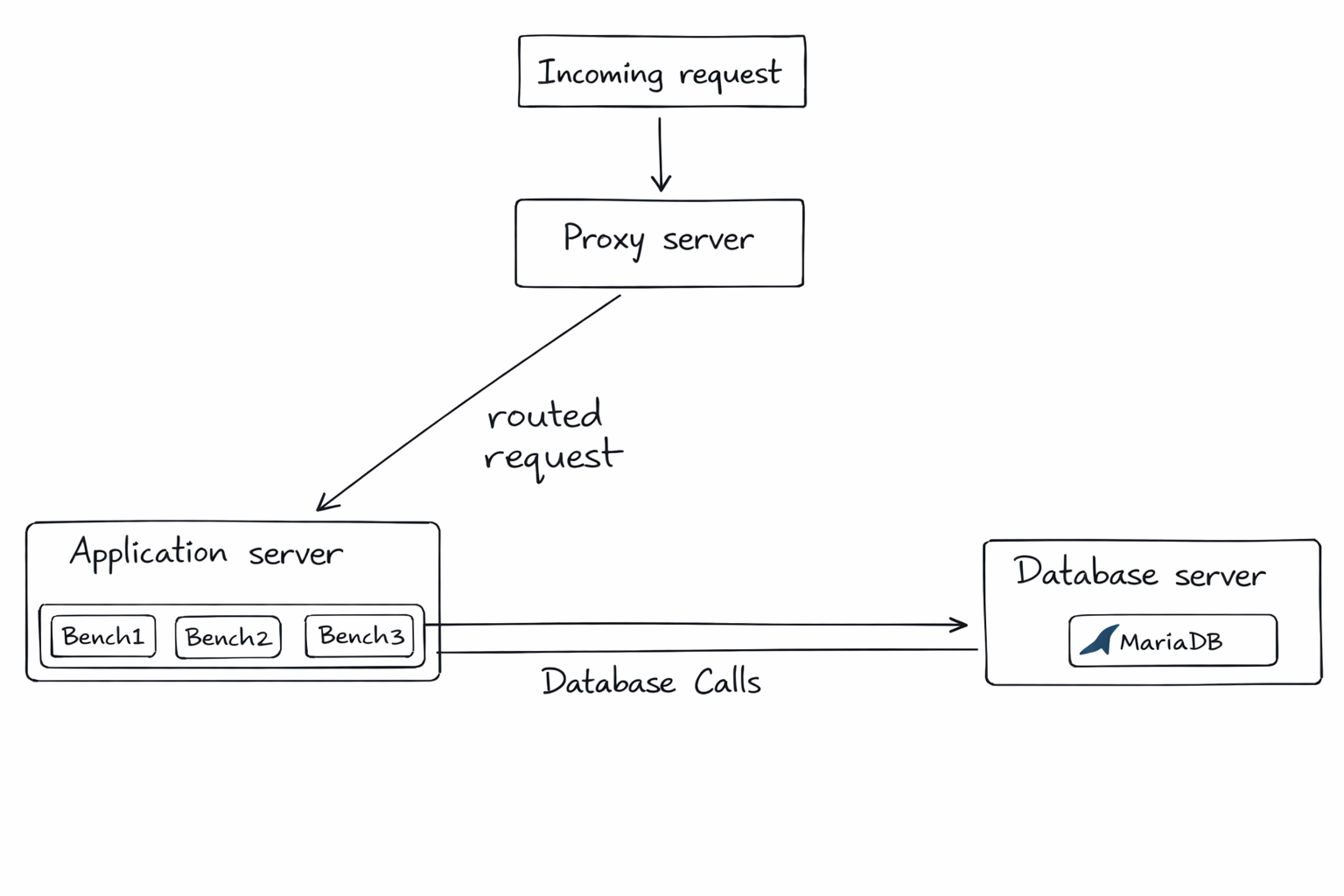
So, we defined a few core principles early on:
- Capacity should be prepared in advance (not created under pressure)
- Scaling must not interrupt running sites or background jobs
- Additional compute should be billed only for the time it's used
- Scale only when required
These constraints shaped every design decision that followed.
1. Preparing capacity in advance
This is the part that differentiates horizontal autoscaling from plan upgrades or vertical scaling. When a user enables autoscaling, we provision a secondary application server upfront. This server remains "stopped" during normal operation and incurs no charges when it's inactive. By preparing capacity ahead of time, we avoid provisioning delays during traffic spikes and ensure the secondary server is fully configured in advance.
2. Sharing data between servers
Application servers hold everything required to run a site: benches, site data, logs, and files. For horizontal scaling to work, the secondary server must access this data immediately when it starts. Copying or syncing data during a scale event would be slow and unreliable, breaking the promise of zero downtime.
To avoid this, we set up data sharing upfront. When autoscaling is enabled, we configure shared storage using a Network File System (NFS). All site and application data lives on this shared storage and is accessible to both servers. Since the data is already shared, the secondary server can start serving traffic immediately without any syncing, duplication or interruption.
3. Sharing cache and background job state
Sharing files alone isn't enough. Application servers also rely on in-memory state for caching and background job coordination. In a typical Frappe setup, Redis and RQ handle caching, queues, and background jobs. If each server ran its own Redis instance, jobs could be lost or duplicated, and cache entries could fall out of sync.
To prevent this, we made primary and secondary servers share the same Redis layer. The primary server continues running Redis, and the secondary server connects to it. With that:
- All background jobs go into the same queues
- Workers on both servers can process jobs
- Cache remains consistent regardless of which server handles the request
All of this is configured upfront. The secondary server is fully prepared, ready to step in instantly and without cost.
4. Scaling up
By now, you may have recognised that one piece is still missing - the proxy layer is unaware of the secondary server! According to it, only one application server exists, so all traffic continues to flow to the primary server. To complete the setup, the proxy must be able to recognise the secondary server and route traffic intelligently. How is that achieved?
When a scale-up is triggered, the system follows a carefully ordered sequence to ensure zero downtime. First, the secondary application server is started. Since it was already provisioned and configured, this step is quick. Next, we wait until the server is fully healthy (viz., benches and services are running correctly). Once ready, the proxy layer is informed about the secondary server. Incoming requests are then distributed across both servers, gradually reducing load on the primary server.
This is what the new architecture looks like when the application server is scaled up.
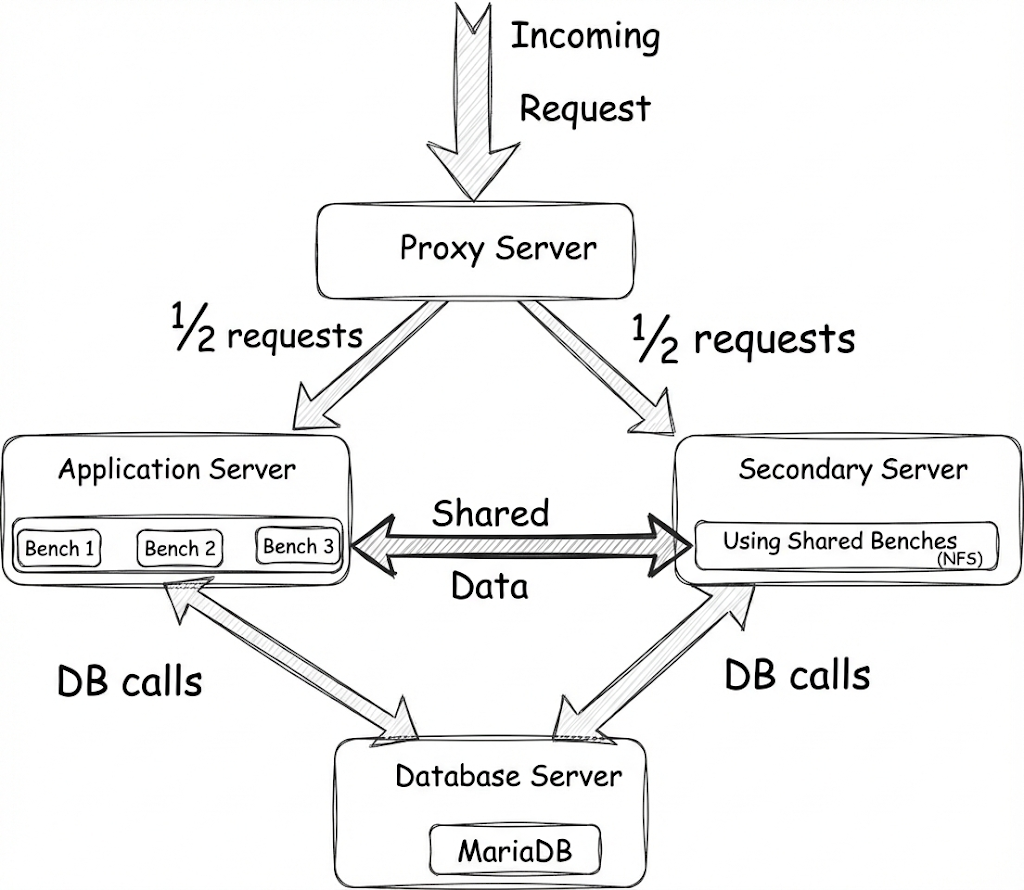
Because traffic is routed only after the secondary server is fully ready, this entire process happens without interruption. Since both servers have identical compute resources, the proxy splits traffic evenly. While the secondary server is serving requests, users are billed for its compute.
5. Scaling down
When the load returns to normal, the proxy first stops sending new requests to the secondary server (of course, any in-flight requests are allowed to be completed). Then, a gradual shutdown is initiated. The server waits for remaining requests and background jobs to finish before stopping services. Once all workers exit cleanly, the secondary server is stopped. The system returns to its original state (with a single server). The billing for the additional compute also ends.
This controlled handoff ensures scaling down happens smoothly, without downtime or disruption.
Using auto scaling on Frappe Cloud
Here is a step-by-step guide to help you explore this feature.
Step 1: Set up a secondary application server
Go to the "Actions" in the "Servers" section of the console and click enable.
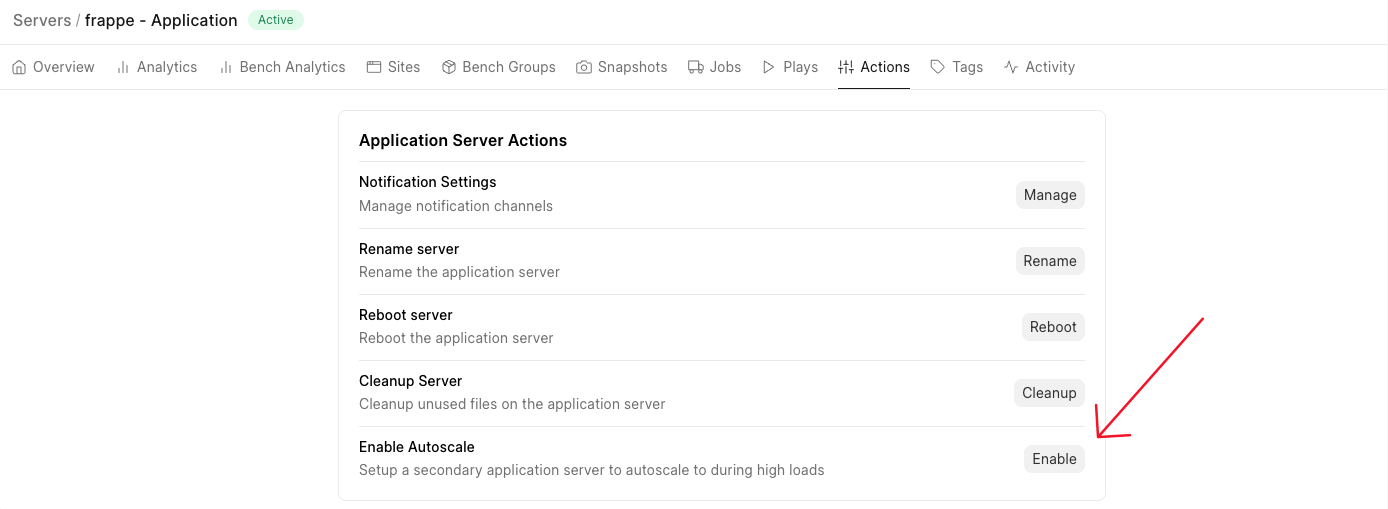
This will provision and set up the secondary server. Once completed, the server will be marked 'Active'. The secondary server will remain on 'Standby' until scaling is triggered.
Here is how the dashboard would look.
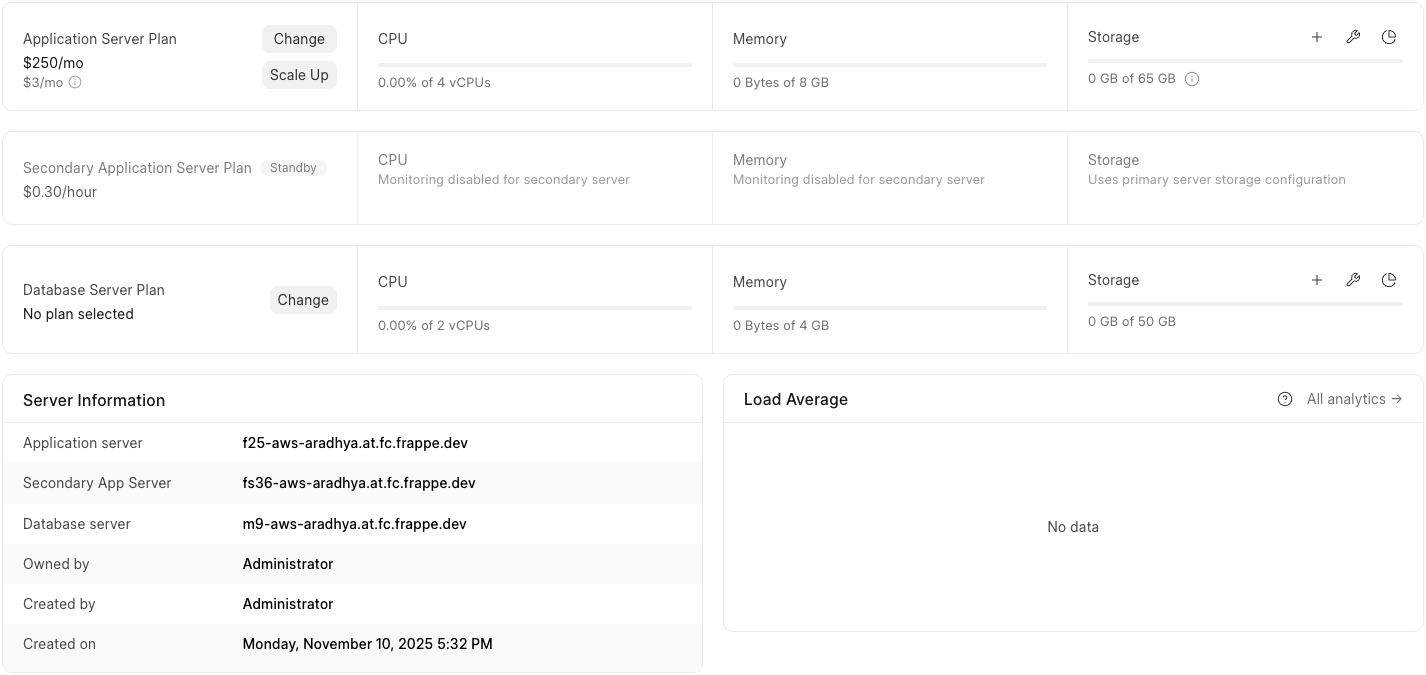
Note that the plan of the secondary server will be identical to the primary server plan in terms of compute resources.
Step 2: Choose how you want to scale
On Frappe Cloud, scaling can be triggered in three different ways.
1. Manual scaling
You can manually scale your application server up or down when you notice a spike in load and want immediate control. To do this, click on the "Scale Up" button given near the "Application Server Plan" section on the dashboard.

2. Scheduled scaling
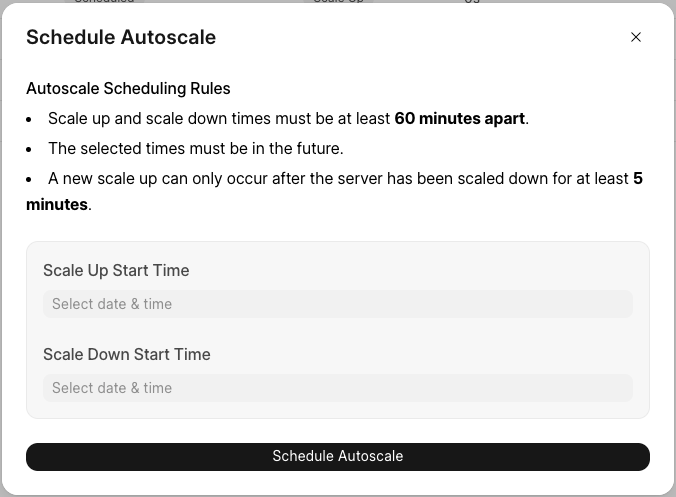
Alternatively, you can plan scale-ups and scale-downs when you predict a traffic spike (e.g. concurrent reports planned, batch jobs, or other events such as a sale or campaign). To schedule scaling, click on the "Schedule Auto Scale" button on the "Scheduled" sub-tab under the "Auto Scale" tab.
And then, set up the timing for scale-up and scale-down.
3. Automated scaling
This is the most powerful and flexible option (naturally, my favourite). Here, you can define CPU and/or memory thresholds to trigger server scale-up or scale-down. To set it up, click on the "Configure Automated Scaling" button on the "Triggered" sub-tab under the "Auto Scale" tab.
And then, set up autoscaling triggers.
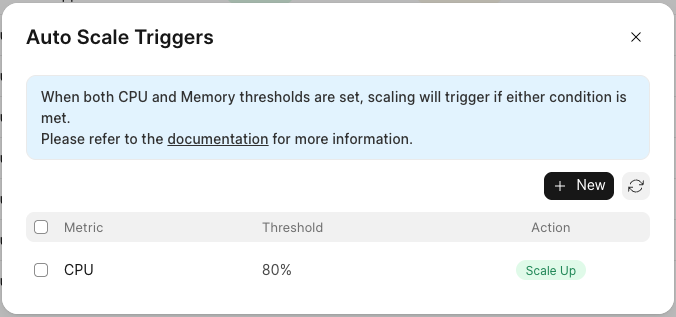
For the curious, here's what happens under the hood - Frappe Cloud servers are monitored using Prometheus and Grafana. Autoscaling rules are translated into Prometheus alerts. If thresholds are crossed continuously for a defined window (typically, 5 mins), a scale event is triggered automatically. This approach ensures that scaling decisions are driven by real load patterns, not one-off bursts, keeping performance stable while avoiding unnecessary scaling.
To understand more details about the steps, rules of thumb to keep scaling stable and how pricing works, refer to the Autoscaling documentation.
Final comments
Autoscaling is currently in beta, and enabled only in the Mumbai region. If this blog was helpful, do try a hand at it and let us know your feedback.
Happy scaling!

