Frappe
Products
CRM
Customizations & Controls
Frappe
Products
Insights
features
Customizations & Controls
Every team sells a little differently, so Frappe CRM lets you change it to fit how you work. You can add your own fields, decide what to fill in when creating a deal, set your own stages and control who sees what.
Most of this is done from the CRM itself, without writing code. When you need something more specific, you can add a form script.
1.
Add the fields you need
2.
Choose what to fill in when creating a deal
3.
Use your own stages
4.
Add your own buttons with form scripts
5.
Decide who sees which leads and deals
Add the fields you need
Add the details your team needs to track, like the number of seats, the contract term or the competitor you're up against. Then open the layout editor on the lead or deal page and place them where you want.
You can group fields into sections and columns, and reorder them by dragging. Everyone on your team sees the same layout.
Choose what to fill in when creating a deal
When someone creates a lead or deal, they see a short form. You can choose which fields go on it, so your team fills in what matters at the start and nothing more.
Edit the form from the pencil icon at the top of the form, and the change shows up for everyone the next time they create a record.
Use your own stages
Lead and deal statuses are yours to set. Add the stages that match how you sell, give each one a color, and set a probability for each deal stage so your forecast uses it.
Moving a deal to the next stage takes one click on the deal page or a drag on the Kanban board.
Add your own buttons with form scripts
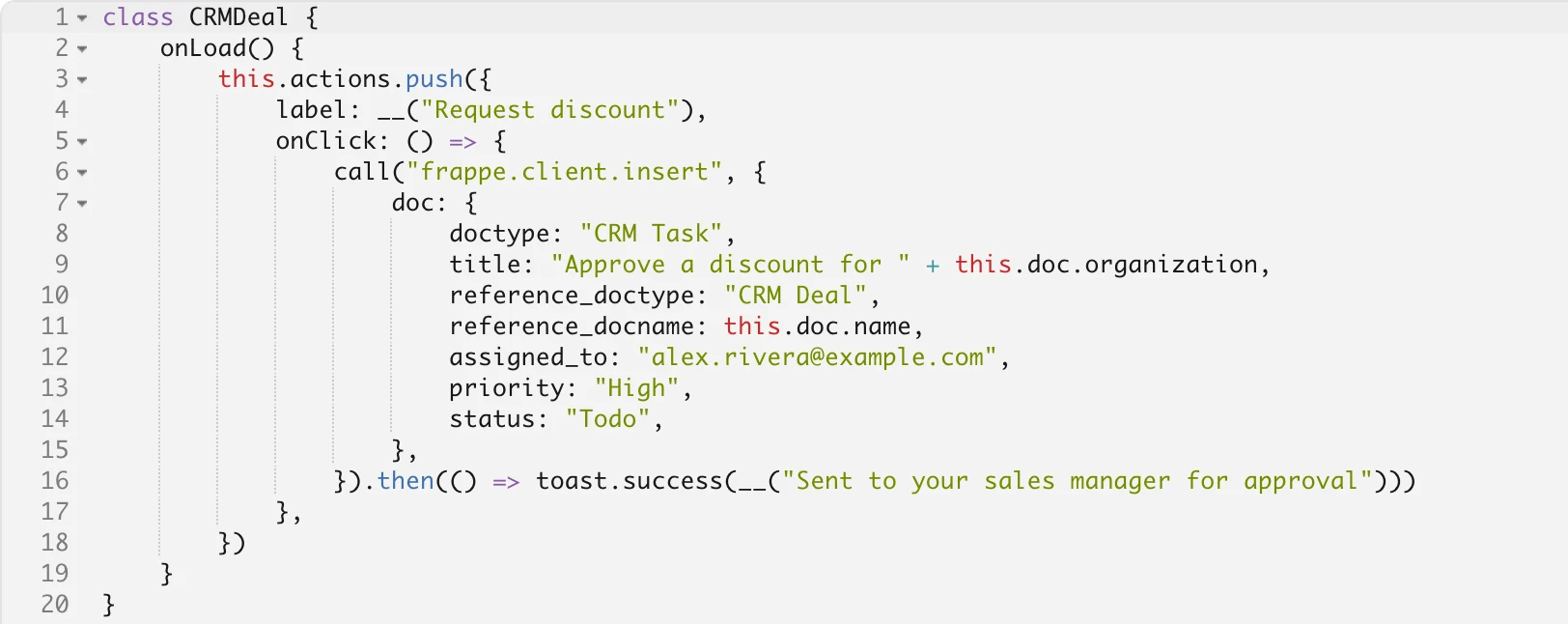
Form scripts let you add buttons and actions to the lead and deal pages. A script is a few lines of JavaScript that can read and update the record or call any API on your site.
For example, this script adds a Request discount button that creates a task for the sales manager to approve the discount.
Decide who sees which leads and deals
Choose a role for each person on the Users page: Admin, Manager or Sales User. The role decides what they can access and change in the CRM.
Then set up your sales hierarchy to match your team. Add people under their manager, and drag them to a new manager when they move teams. Sales users see the leads and deals assigned to them, and managers also see those of the people who report to them.
Admins see everything. You can turn the hierarchy off if everyone should see all records.
previous feature
Views & Reports
next feature
Integrations