Frappe
Cloud
Features
Sites
Frappe
Products
Insights
server plans
Get started with your favourite Frappe apps
Site plans give you a ready-to-use Frappe site with shared infrastructure and usage-based pricing.
explore plans
Choose based on your cost and performance needs


Amazon Web Services
Most reliable
Recommended for single site production workloads
🇮🇳 Mumbai, India
Auto app upgrades
Auto backups
Offsite backups
Private benches
DB
access
Product Warranty


Hetzner
Cost effective
Suitable for experimental or demo sites
🇮🇳 Mumbai, India
Auto app upgrades
Auto backups
Offsite backups
Private benches
DB
access
Product Warranty
₹410 / mo
₹820 / mo
₹2,050 / mo
₹3,075 / mo
₹3,075 / mo


Suitable for single site workloads in supported regions
🇮🇳 Mumbai, India
Auto app upgrades
Auto backups
Offsite backups
Private benches
DB
access
Product Warranty
₹410 / mo
₹820 / mo
₹2,050 / mo
₹3,075 / mo
₹3,075 / mo
Best performance
Most reliable
Recommend for single site production workloads
Suitable for single site production workloads
🇮🇳 Mumbai, India
Offsite backups
Offsite backups
Offsite backups
DB + SSH Access
Product Warranty
₹820 / mo
₹2,050 / mo
0.5 hrs CPU, 0.2 GB DB, 2.5 GB Storage
Cost effective
Suitable for experimental or demo sites
🇮🇳 Mumbai, India
Offsite backups
DB + SSH Access
Offsite backups
DB + SSH Access
Offsite backups
DB + SSH Access
Offsite backups
DB + SSH Access
Offsite backups
DB + SSH Access
Product Warranty
0.5 hrs CPU, 0.2 GB DB, 2.5 GB Storage
0.5 hrs CPU, 0.2 GB DB, 2.5 GB Storage
For single site workloads in supported regions
🇮🇳 Mumbai, India
0.5 hrs CPU, 0.2 GB DB, 2.5 GB Storage
0.5 hrs CPU, 0.2 GB DB, 2.5 GB Storage
Offsite backups
Offsite backups
Offsite backups
DB + SSH Access
Product Warranty
0.5 hrs CPU, 0.2 GB DB, 2.5 GB Storage
0.5 hrs CPU, 0.2 GB DB, 2.5 GB Storage
how it works
Run the site, while Frappe manages the infrastructure
Behind the scenes, Frappe rents dedicated servers from cloud providers, splits them into benches, and runs multiple sites on them in a controlled way. Your site shares compute resources with others, but the platform handles scheduling, limits, and stability for you.
Compute-based pricing
You’re not charged on how long your business operates or how many users log in, but on how much work your site actually performs (such as background jobs, reports, imports, and workflows). This model keeps costs low and removes almost all operational complexity.
Made for simple requirements
As workloads grow, Server plans are usually a better fit.
Ideal for beginners
Trials, experimentation, learning, simple production setups, and teams that want the easiest possible starting point.
under the hood
Private and Shared bench groups
Bench groups are a stack of containers to host multiple sites in an isolated environment for specific versions and applications.
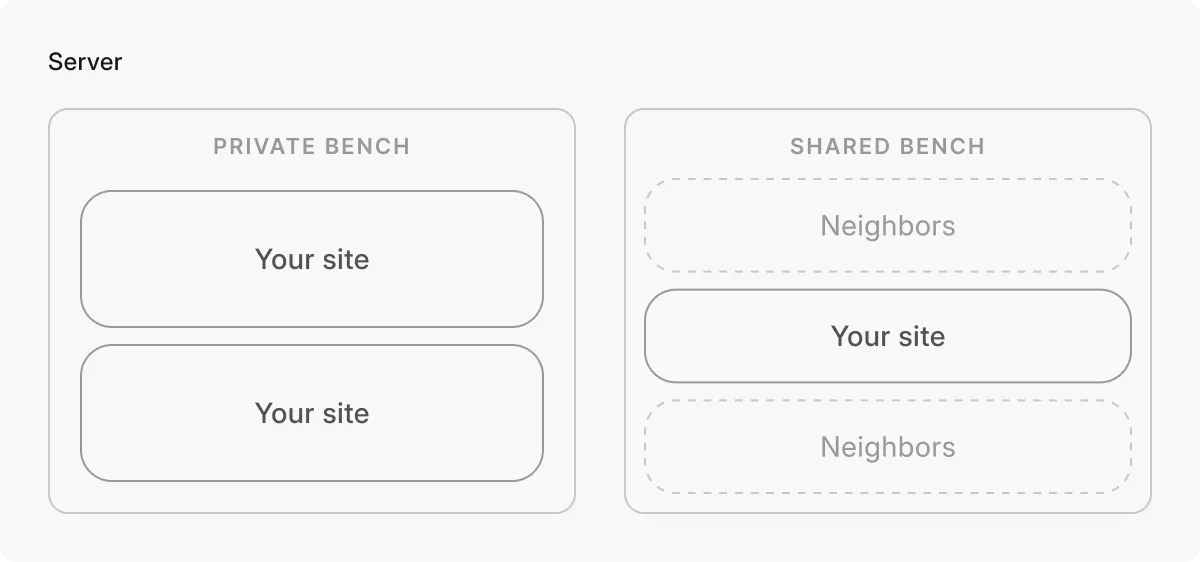
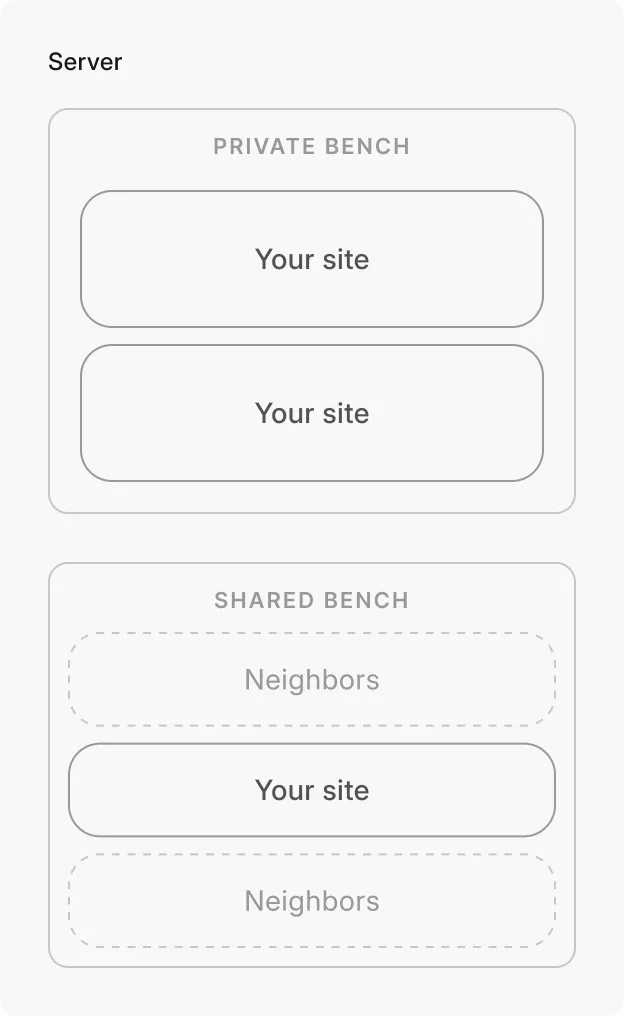
A new site is by default created under a shared bench group. Shared bench groups simplify hosting tasks, and are ideal for companies looking for out-of-the-box apps with minimal customisations.
Hosting your sites on private bench groups creates an isolated environment and unlocks deeper controls. It lets you manage your upgrades, install custom apps, get SSH access, and more. You also get access to 150+ ready-to-use Frappe apps available.
Ease of Install, Backup, Monitor
Multi-region hosting
Voluntary upgrades
Isolated deployments
Multi-environment (eg. Dev, Staging, Production)
Server Scripts for ERPNext, Framework and other Frappe apps
Auto upgrades
Access limited to Frappe's 1st party apps
$5/mo
₹410/mo
$25/mo
₹2050/mo


$5/mo
₹410/mo


Ease of Install, Backup, Monitor
Multi-region hosting
Voluntary upgrades
Isolated deployments
Multi-environment
Server Scripts for ERPNext, Framework and FrappeHR
Access to all 150+ marketplace applications
Auto upgrades
Access to 20+
Frappe apps
$5/mo
$25/mo


site pricing
No, we don’t charge for every minute your site is used
Site owners only pay for the CPU time allocated to their site. Whenever your site needs to take an action, like saving an invoice, loading data, or running a report, it briefly “borrows” some computing power to get that job done.
What you pay for
You only pay for those tiny moments when your site is actually using the CPU to work, not for every minute you use the site. Some examples include:
Fetching information
Running calculations or reports
What you don’t pay for
If you spend 5 minutes filling out a form, your site might only need a few milliseconds of CPU time when you hit “Save”. You’re charged only for those milliseconds, not the full 5 minutes.
How long users use your site
How many hours your site is running
Idle time when nothing is happening
Frequently asked questions
What exactly do I get with a Site plan?
Can I install multiple apps on one site?
What is Product Warranty?
Are Site plans suitable for production use?
Yes. Site plans are suitable for production workloads as long as the use case is not mission-critical, concurrency of usage is low and occasional variability in performance is tolerable. For more reliable hosting, we recommend Server plans.
Can I install multiple apps on one site?
Yes, for small or simple production setups. For heavier workloads or multiple sites, Server plans are usually a better fit.
Is there a per-user limit?
Where are the servers hosted, and where is the data stored?
We host most of our servers with Amazon Web Services (AWS EC2), while a few are hosted via OCI (KSA) and Hetzner. You can choose your data centre location across 5 continents and 10 countries.
Can I switch (downgrade or upgrade) my plan later?
Want to try out servers instead?